Statamic is a flat-file-first CMS built on Laravel, and one of the best things about it is how easy it is to extend. If you know Laravel, you already know most of what you need for Statamic addon development. The rest is a handful of Statamic conventions, a Vue 3 component or two, and, as of September 2026, a proper review before anything goes on the Marketplace.
Also Read: Claude Code & Cursor on Filament: AI Agent Rules That Work
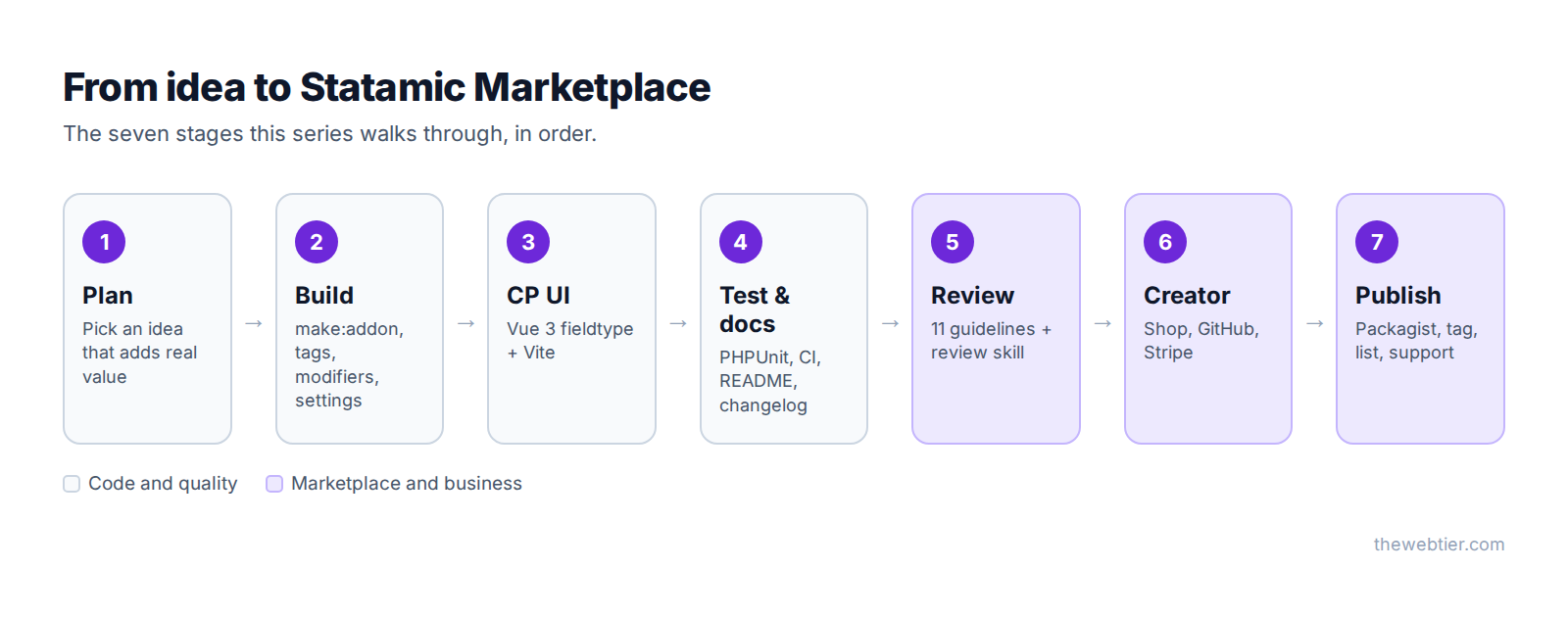
This is part 1 of a 7-part series that takes one real addon from a blank folder to a published Marketplace listing. This first post covers the big picture: what an addon is, what it can do, what changed in Statamic 6, and how to set up before you write any code.
Written for Statamic 6. Everything in this series was checked against Statamic 6.34 (released 22 September 2026), PHP 8.3+ and Laravel 12/13.
What is a Statamic addon?
A Statamic addon is a Composer package with two extra things:
- An
extra.statamicsection in itscomposer.json, which tells Statamic "this package is an addon". - A service provider that extends
Statamic\Providers\AddonServiceProviderinstead of Laravel's plainServiceProvider.
That's it. Everything else (tags, fieldtypes, Control Panel pages) is optional. Because an addon is just a package, customers install it the normal way:
composer require vendor/package
Once it's installed, it lives in vendor/, gets updates through Composer, and shows up in the Control Panel under Tools → Addons.
📸 SCREENSHOT TO ADD ·
01-cp-tools-addons.pngControl Panel → Tools → Addons, showing the list of installed addons.
Alt text: "The Addons screen in the Statamic 6 Control Panel listing installed addons"
What can a Statamic addon do?
Nearly anything a Laravel package can, plus Statamic-specific extension points. These are the ones you'll use most:
| Extension point | What it does | Example |
|---|---|---|
| Tags | Template logic you call from Antlers or Blade | {{ reading_time field="content" }} |
| Modifiers | Transform a value inside a template | {{ content | reading_time }} |
| Fieldtypes | New field UIs in the Control Panel's publish forms | A textarea with a live word count |
| Widgets | Dashboard cards | "Top 5 longest posts" |
| Actions | Bulk or single actions in listings | "Recalculate reading time" |
| Scopes and filters | Query scopes and listing filters | "Posts over 10 minutes" |
| Dictionaries | Option lists for select-style fields | Countries, currencies |
| CP pages and navigation | Full screens in the Control Panel (Vue with Inertia in v6) | A reports area |
| Routes | CP, action (/!/your-addon/...) and web routes | A webhook endpoint |
| Settings | A settings screen generated from a blueprint | Words per minute |
| Events, schedules, update scripts | Standard Laravel hooks, plus scripts that run on upgrade | Migrating old config |
| Editions | Free/Pro tiers inside one package | Pro-only features |
Since Statamic 5.28, tags, modifiers, fieldtypes, widgets and commands placed in the conventional folders (src/Tags, src/Modifiers and so on) are registered automatically. You don't need to list them in the service provider any more.
Also Read: Auto-Post to LinkedIn PHP from Laravel (2026 Guide)
Addons vs starter kits
People often mix these up, and the Marketplace sells both. Here's the difference:
| Addon | Starter kit | |
|---|---|---|
| Installed with | composer require | statamic new or php please starter-kit:install |
| Lives in | vendor/ | Copied into your site |
| Gets updates | Yes, via Composer | No. Once installed, the files are yours |
| Licence tied to | A specific site | Expires after a successful install |
| Best for | Features you want to keep maintaining | Themes and site starting points you'll customise |
This series is about addons. If you want to sell a theme or a full site setup, you want a starter kit.
What changed for addon developers in Statamic 6
Statamic 6 came out on 28 January 2026, and it's the biggest change for addon authors in years. If you last built an addon for v4 or v5, this is what's different:
- PHP 8.3 and Laravel 12 are the minimum. Statamic recommends Laravel 13 and PHP 8.5.
- The Control Panel moved from Vue 2 to Vue 3. Any addon with custom Vue components has to be migrated. Fieldtypes now use a
Fieldtypecomposable with<script setup>instead of the old mixin. - Inertia.js for CP pages. Custom Control Panel pages are best written as Vue pages rendered with Inertia rather than Blade views.
- A real UI component library. Buttons, inputs, modals, tables and more are exported from
@statamic/cms/ui. Browse them at ui.statamic.dev. - Vite is the standard build tool.
make:addonandmake:fieldtypenow scaffoldvite.config.jsandpackage.jsonfor you. - Addon settings. Drop a blueprint in
resources/blueprints/settings.yamland Statamic builds a settings page for you under Tools → Addons. - Icons and breadcrumbs changed. Custom icon sets are registered with
Icon::register(), and breadcrumbs are generated from the CP navigation.
The full list is in the official 5 to 6 upgrade guide and the Vue 2 to Vue 3 guide.
Also Read: Create a LinkedIn Developer App for Laravel (2026)
The Marketplace has new rules (September 2026)
On 14 September 2026, Statamic published Stewarding the Marketplace, which brought in three changes:
- Marketplace Submission Guidelines: 11 numbered rules every addon and starter kit must meet, free or paid, including existing listings.
- A Product Review skill: a
SKILL.mdfile you drop into your repo and run with your AI coding assistant to find gaps before you submit. - A review process: every new product is reviewed, with AI-assisted screening and a human making the decision.
The reasoning is simple. Anyone with a coding assistant can now produce a working addon in an afternoon. A working addon isn't the same as one that's ready to sell, so the Marketplace needs a quality bar. Part 5 covers every rule and how to use the review skill.
This changes how you should approach the whole project: plan for review from day one, not the night before you submit.
Before you write code: choose an idea that will pass review
Guideline 01 says your product must "contribute a distinct design, capability, or workflow." Reskins and near-copies of existing addons won't be accepted. Before you build anything, check:
- Is it already on the Marketplace? If it is, what would yours do meaningfully better?
- Does it use Statamic's own extension points? (Guideline 02.) Addons that patch core files or hard-code content get rejected.
- Can editors use it without writing code? (Guideline 03.) Settings belong in the Control Panel, not only in a config file.
- Does it touch Pro features? (Guideline 11.) You can't unlock Pro-only features, such as extra users or forms, for Statamic Core sites.
- Can you support it? Documentation and a working support channel are required (guideline 09), not optional extras.
Good addon ideas usually come from real client work: something you've built twice for two different sites is a strong candidate for a package.
Also Read: Laravel: Get a LinkedIn
Set up your development environment
You'll need:
- PHP 8.3 or newer and Composer
- Node.js (for the Vite build of any Control Panel UI)
- A local Statamic 6 site to develop the addon inside
- Git and a GitHub account (the Marketplace links products to GitHub repositories)
The quickest way to get a local site is the Statamic CLI:
composer global require statamic/cli
statamic new addon-playground
If you'd rather skip the CLI, composer create-project statamic/statamic addon-playground gives you the same site without the setup wizard. Laravel Herd is the easiest way to serve it locally on macOS and Windows.
📸 SCREENSHOT TO ADD ·
01-statamic-new-cli.pngTerminal running
statamic new addon-playground, showing the setup wizard prompts.Alt text: "The Statamic CLI setup wizard creating a new Statamic 6 site"
Optional: give your AI assistant Statamic's guidelines
If you use Claude Code, Cursor, Codex or similar, install Laravel Boost in your playground site:
composer require laravel/boost --dev
php artisan boost:install
Statamic ships its own Boost guidelines inside statamic/cms (at resources/boost/guidelines/core.blade.php). Boost finds them automatically and teaches your assistant Statamic's folder structure, the please CLI, Antlers and Blade conventions, and the difference between Core and Pro. That means fewer suggestions that are really plain-Laravel habits. In part 4 you'll see how to ship Boost guidelines with your own addon.
The addon we'll build in this series
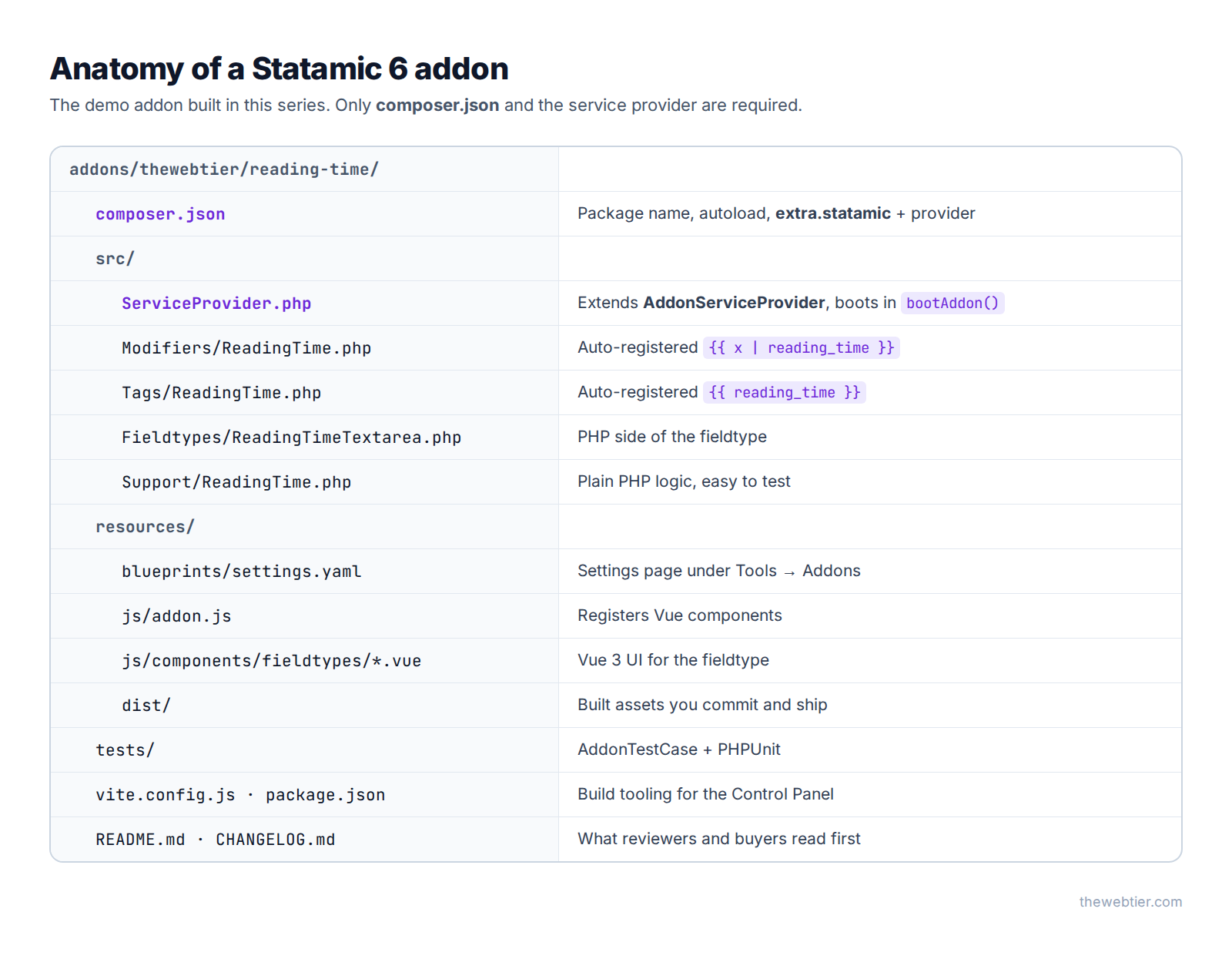
To keep things practical, every post builds on one addon: Reading Time. It's small enough to follow and still uses most of the extension points you'll need:
- a modifier:
{{ content | reading_time }}→ "4 min read" - a tag:
{{ reading_time field="content" }}, with a pair version that exposes minutes and words - Control Panel settings for words per minute and the label text
- a Vue 3 fieldtype: a textarea that shows editors a live word count and reading time
- tests, CI, docs, a changelog and a tagged release
Here's what the finished package looks like on disk:
Also Read: Renew LinkedIn Access Tokens PHP in Laravel (60-Day Fix)
The series
- Statamic Addon Development: The Complete Guide (you are here)
- How to Build a Statamic Addon, Step by Step:
make:addon, tags, modifiers and CP settings - Build a Custom Statamic 6 Fieldtype with Vue 3 and Vite
- Testing and Documenting a Statamic Addon: PHPUnit, GitHub Actions, README and changelog
- Statamic Marketplace Submission Guidelines Explained: all 11 rules plus the review skill
- How to Become a Statamic Creator: seller account, Stripe, pricing and editions
- How to Publish a Statamic Addon: Packagist, releases and your listing
FAQ
Do I need to know Vue to build a Statamic addon?
No. Tags, modifiers, widgets built with Blade, actions, routes, events and settings pages are all PHP. You only need Vue 3 for custom fieldtypes or custom Control Panel pages.
Can I sell a Statamic addon?
Yes. Creators keep 75% of every sale, paid to their Stripe account when the sale happens, as long as they're in a country Stripe supports. Part 6 covers the details.
Do free addons go through Marketplace review?
Yes. The submission guidelines apply to free and paid products, and to existing listings too.
Also Read: How to Create a WordPress Plugin from Scratch (2026 Guide)
Can I distribute an addon without the Marketplace?
Yes. The guidelines only apply to the official Marketplace. You can publish on Packagist or GitHub and people can composer require it. You'll miss out on Marketplace discovery, the Control Panel's addon browser, licensing and checkout.
Will my Statamic 5 addon work on Statamic 6?
Not automatically if it has Vue components. PHP-only addons often need only a bumped statamic/cms constraint and a test run. Anything with Vue 2 components needs migrating to Vue 3.
Further reading
- Building an Addon (Statamic 6 docs)
- Marketplace Submission Guidelines
- Stewarding the Marketplace (Statamic blog)
- Laravel Boost documentation
Next up: Part 2: How to Build a Statamic Addon, Step by Step →