
Our Reading Time addon is built, tested, documented and has been through the review checklist from part 5. Before we can publish it, we need somewhere to publish it from: a Statamic creator account.
Also Read: Prepare a WordPress Plugin for Release: readme & Plugin Check
This post covers who can become a creator, how to set up your shop, how the money and licensing work, and how to decide what to charge. The actual publishing steps are in part 7.
Terms and figures here come from Statamic's creator page and Marketplace announcement as of September 2026. Check those pages for changes before you rely on them.
What is a Statamic creator?
A creator is anyone who publishes addons or starter kits on the Statamic Marketplace. Creators get:
- A shop with its own page listing your products. You can use your own name or a company name.
- Products linked to GitHub. Tagging a release pushes the update to your customers.
- Built-in licensing and validation. You don't write any licence-checking code.
- Checkout, VAT and refunds handled by Statamic.
- A dashboard with sales stats, ways to contact customers, and team members who can help manage products.
- Discovery. Marketplace products are visible through Statamic's API and in the Control Panel's addon browser, plus tools that read it, such as Sherpa, Laravel Forge and Ploi.
Who can sell? Check this first
Payouts go through Stripe Connect, so to sell paid products you must be located in a country Stripe supports. Statamic's creator page specifically says creators in India, Russia, Ukraine and China (among others) can't sell on the Marketplace yet, because Stripe doesn't operate there.
Check Stripe's list of supported countries before you spend time on a paid product. If you're not eligible, you can still:
- publish free addons on the Marketplace, or
- distribute on Packagist and GitHub and sell licences some other way (you lose Marketplace checkout and licensing if you do).
Step 1: Open your shop
- Sign in to (or create) your account at statamic.com.
- Go to statamic.com/creator/begin and start the creator setup. (
make:addonalso points you to statamic.com/sell when it finishes.) - Name your shop. Your own name is fine. Pick the name you want on every listing, because customers will see it next to your products.
📸 SCREENSHOT TO ADD ·
06-creator-begin.pngThe "Become a Creator" page at statamic.com/creator/begin.
Alt text: "The Become a Creator page on the Statamic Marketplace"
Step 2: Connect GitHub
Marketplace products are linked to GitHub repositories. That's how Statamic knows about your releases and release notes. Connect the GitHub account (or organisation) that owns your addon's repo.
Also Read: WordPress Development and PHP
If the repository belongs to a GitHub organisation, check that you've granted access to that organisation when authorising. It's the usual reason a repo doesn't show up when you create a product.
📸 SCREENSHOT TO ADD ·
06-seller-connect-github.pngSeller dashboard showing the connected GitHub account.
Alt text: "Connecting a GitHub account to a Statamic Marketplace seller dashboard"
Step 3: Connect Stripe (for paid products)
Connect a Stripe account through Stripe Connect. Stripe will ask for identity and bank details as part of its own onboarding. Once that's done, your share of each sale is paid to your Stripe account at the time of purchase.
You can skip this if you're only publishing free addons.
📸 SCREENSHOT TO ADD ·
06-seller-connect-stripe.pngSeller dashboard showing Stripe connected (blur any account details).
Alt text: "Stripe Connect linked to a Statamic Marketplace creator account"
How the money works
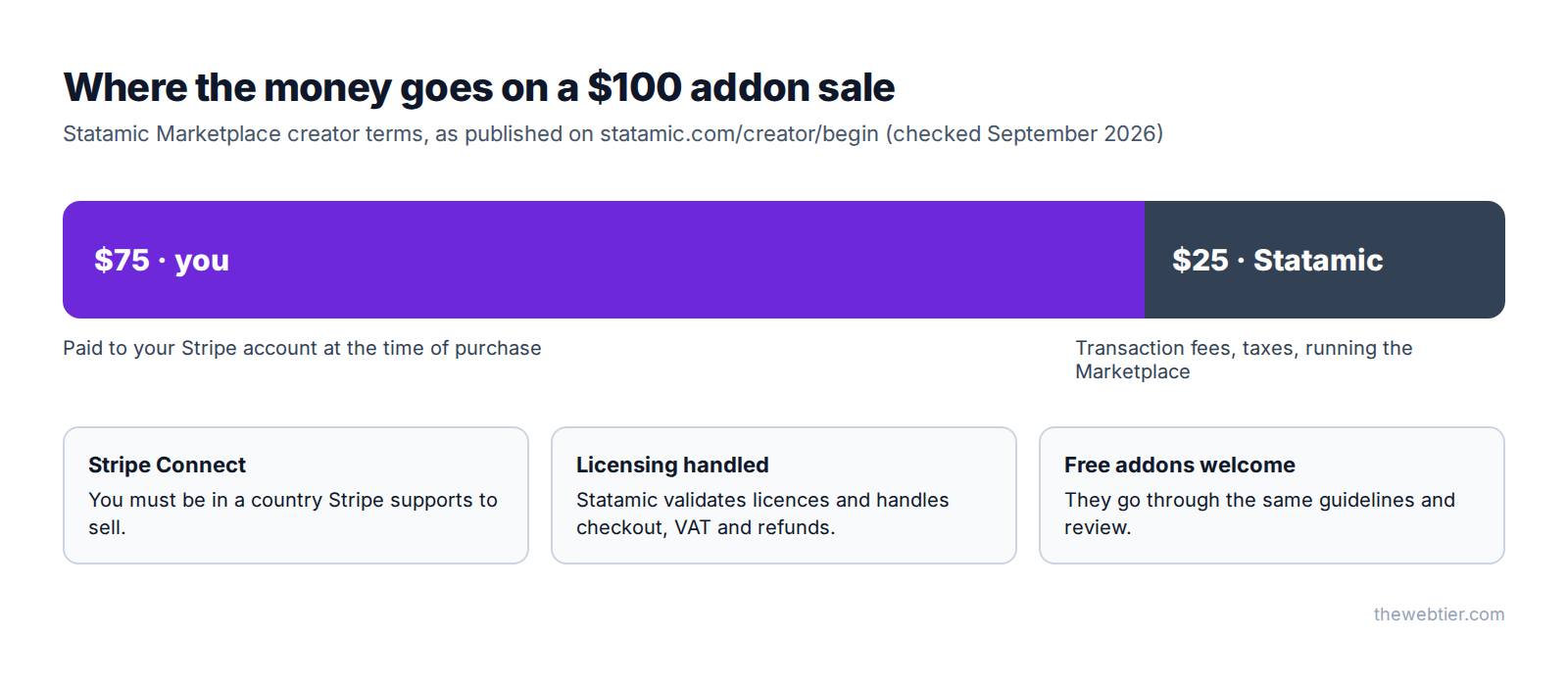
- You get 75% of every sale.
- The other 25% covers transaction fees and taxes, and funds Statamic and the Marketplace.
- Payouts go to your Stripe account at the time of purchase, not in a monthly batch.
- Statamic handles checkout, VAT and refunds, which saves you a lot of admin, especially selling into the EU and UK.
You're still responsible for declaring your own income where you live. Statamic handling VAT at checkout doesn't replace your own tax obligations, so talk to an accountant if you're not sure. (We're not accountants, and this isn't financial advice.)
Also Read: WordPress Development Guide
Statamic has also said addon renewal subscriptions are "launching soon", to fund ongoing maintenance. That's worth keeping in mind when you plan pricing: you may be able to earn from updates, not just the first sale.
How licensing works for your customers
Understanding the customer side helps you write a better listing and answer support questions.
- The customer installs your addon with Composer. It works free in local development ("trial mode"), so they can evaluate it properly.
- On statamic.com, they create a Site, buy your addon, and attach the licence to that site. Each site has one licence key covering Statamic Pro and every commercial addon.
They add the key to their
.env:STATAMIC_LICENSE_KEY=your-site-license-key- Statamic checks the licence with Statamic's validation service ("The Outpost") about once an hour while someone is logged into the Control Panel. If the domain doesn't match, a notice appears in the Control Panel.
Domains count as not public (so they stay in trial mode) if they're a single segment like localhost, an IP address, on a non-standard port, use a dev subdomain (dev., staging., test. and similar) or a dev TLD (.test, .local and similar). Customers can test on staging without paying twice. Mention that in your FAQ, because it's one of the most common pre-sales questions.
You write zero licensing code. Your addon doesn't need to check licences or phone home. Statamic does it. Adding your own "hidden" licence calls could fall foul of guideline 07 (no hidden tracking).
Pricing your addon
There's no single right price, but some principles hold up:
- Price for the time you save. If your addon replaces a day of custom work, a one-off price that's a fraction of a day's rate is an easy yes for an agency.
- Look at similar addons in the directory and position yours against them. Remember guideline 01: yours needs to be meaningfully different.
- Free is a strategy too. Free addons build reputation and trust, and a free edition can lead people to a paid one.
- Don't under-price support. Every sale comes with support expectations (guideline 09 requires a working channel).
Free and paid tiers with editions
Statamic has editions built in, so one package can offer free and paid tiers. Define them in composer.json, from cheapest to most expensive. The first one is the default:
{
    "extra": {
        "statamic": {
            "name": "Reading Time",
            "description": "Show how long your content takes to read.",
            "editions": ["free", "pro"]
        }
    }
}
Check the active edition in your code:
use Statamic\Facades\Addon;

if (Addon::get('thewebtier/reading-time')->edition() === 'pro') {
    // e.g. register the fieldtype, or per-collection reading speeds
}
Customers pick their edition in config/statamic/editions.php:
'addons' => [
    'thewebtier/reading-time' => 'pro',
],
Statamic handles licence validation for each edition. For Reading Time, a sensible split would be a free edition (modifier and tag) and a pro edition (the editor fieldtype, per-collection settings and a dashboard widget).
Also Read: Laravel: How to Test
Keep guideline 10 in mind: the listing must say clearly which features belong to which edition.
Before you move on
You should now have:
- Confirmed you're in a Stripe-supported country (for paid products)
- A statamic.com account with a creator shop
- GitHub connected, with access to the addon's repository
- Stripe connected (for paid products)
- A pricing decision, and editions defined if you're using them
FAQ
How much does Statamic take from addon sales?
Statamic keeps 25% of each sale to cover transaction fees, taxes and running the Marketplace. Creators receive 75%, paid to their Stripe account at the time of purchase.
Also Read: Statamic Custom Fieldtype Tutorial: Vue 3 & Vite (v6) - Laravel
Can I sell Statamic addons from India or Pakistan?
Only if Stripe supports your country. Statamic's creator page says India (among others) isn't currently supported. Check Stripe's supported countries for your location. You can still publish free addons.
Do I need to add licence checks to my addon?
No. Licensing and validation are built into Statamic and the Marketplace. Customers attach the licence to their site on statamic.com and set STATAMIC_LICENSE_KEY.
Also Read: How to Build a Statamic Addon (Step by Step, Statamic 6)
Can customers try a paid addon before buying?
Yes. Commercial addons run in trial mode on local and non-public domains. A licence is needed before going to production on a public domain.
Can I have a team manage my shop?
Yes. You can invite team members to help manage products from your creator dashboard.
Further reading
- Become a Creator (Statamic Marketplace)
- Licensing (Statamic docs)
- Stripe supported countries
- Stewarding the Marketplace
Previous: ← Part 5: Marketplace Guidelines and Review Skill · Next: Part 7: Publish Your Addon →
