Until recently, getting an addon onto the Statamic Marketplace was mostly paperwork: publish to Packagist, create a product, press publish. That changed on 14 September 2026.
Also Read: how you can run multiple AI Web agents in parallel with git worktrees
In a post called Stewarding the Marketplace, Jack McDade explained why. Anyone with an AI coding assistant can now build a working addon in about 20 minutes, so "making something exist and making something ready for the Marketplace can now feel like the same step." They aren't the same step, and the Marketplace needed, in his words, more friction.
Statamic introduced three things:
- Statamic Marketplace Submission Guidelines: 11 numbered rules with examples of what's acceptable and what isn't.
- A Product Review skill: a
SKILL.mdyou run with your own coding assistant to find problems before you submit. - A review process for every new product. AI skills handle the first screening, and a human makes the call.
This post goes through all of it from an addon developer's point of view, using the Reading Time addon we've built in this series as the example.
Who this applies to: every Marketplace product, free and paid, addons and starter kits. Existing listings must comply too. The guidelines don't apply if you only distribute on Packagist or GitHub.
The 11 guidelines, explained for addon developers
Several rules are written mainly with starter kits in mind (content modelling, front-end design). We've focused on what each one means for addons.
01 · Offer substantial original value
"Your product must contribute a distinct design, capability, or workflow."
- Acceptable: a service integration, a port of a tool from another platform built natively for Statamic, a genuinely different approach to a problem.
- Not acceptable: reskins or cosmetic variants of existing products.
What to do: search the addon directory before you build. If something similar exists, your listing should say clearly what yours does differently. Being cheaper isn't enough.
02 · Use Statamic's native capabilities appropriately
Addons "must use supported extension points". That means tags, modifiers, fieldtypes, widgets, actions, settings, events and the rest, not patching core files or copying core classes to change their behaviour.
Also Read: Tooling and Web
Red flags: editing anything in vendor/statamic/cms, monkey-patching core Vue components, hard-coded content, or asking customers to change core files by hand.
03 · Make content editable and components reusable
Editors must be able to handle routine tasks without writing code. For addons, that usually means settings belong in the Control Panel. Statamic 6's settings blueprints (resources/blueprints/settings.yaml) make this about ten lines of YAML, as we saw in part 2. A config file on its own, for things editors will want to change, is a weak spot.
04 · Deliver deliberate, consistent design
Every interface needs coherent typography, hierarchy, spacing and interaction. The guideline specifically calls out a "polished homepage paired with unfinished inner pages".
For addons: your Control Panel UI shouldn't look like a different app. Use Statamic's UI components (@statamic/cms/ui), test in dark mode, and make sure your settings, empty states and error states are as polished as the screen in your screenshots.
05 · Work beyond the demo's happy path
Interfaces must handle realistic content, small screens and keyboard navigation. Named failures include "hover-only controls" and "clipped headings". Keyboard access, labelled forms, visible focus and readable contrast are expected.
Also Read: News and NVidia
Check your addon with: empty values, very long values, Bard and Replicator content, multi-site, a read-only field, a user without permissions, and keyboard only.
06 · Ship an installable, compatible release
Reviewers test your actual tagged release using your instructions and compatibility claims. Unacceptable: "missing globals or assets; references to local paths; undeclared dependencies."
Most common addon failures here:
resources/distnot rebuilt before tagging- a
pathrepository or local path left incomposer.json - a PHP extension or package you use but didn't
require - claiming Laravel 12 support without testing it
A CI matrix and a clean-install test (see part 4) catch nearly all of these.
07 · Protect customer sites and data
Use proper authorisation, validation and credential handling. Unacceptable: "committed API keys; unauthorized access to control-panel actions; hidden tracking."
For addons:
- Check permissions on the server in every CP controller and action, not just by hiding buttons in Vue.
- Validate all input, especially on action routes (
/!/your-addon/...), which are publicly reachable. - Store API keys in
.envand reference them from settings, e.g.{{ config:services:example:api_key }}. Never commit keys. - Document every external request your addon makes. No quiet telemetry.
08 · Have permission to distribute everything included
Every font, icon, image, snippet and library you bundle needs documented redistribution rights, with any required attribution kept. If you vendored some JavaScript from a gist, find out its licence or replace it.
Also Read: News: IBM and NASA
09 · Document the product and provide support
Customers must be able to "install, configure, use, and maintain the product without guessing." That means installation steps, working examples, configuration guidance, a changelog and a working support channel. Generic boilerplate (like the README make:addon generates) and dead support links are named as failures.
10 · Represent the shipped product honestly
The listing, screenshots, demo, pricing and compatibility claims must match the release. Screenshots have to come from the actual product. Mockups presented as features, or demo features missing from the download, will get you rejected. If a feature is Pro-only, say so next to the screenshot.
11 · Respect Statamic's Core and Pro boundaries
Addons can't bypass Statamic's own edition limits. The example given is "unlocking additional users or forms in Core by disabling or working around edition checks". If a feature needs Statamic Pro, require Pro for it and say so in the listing.
The Product Review skill (marketplace-review)
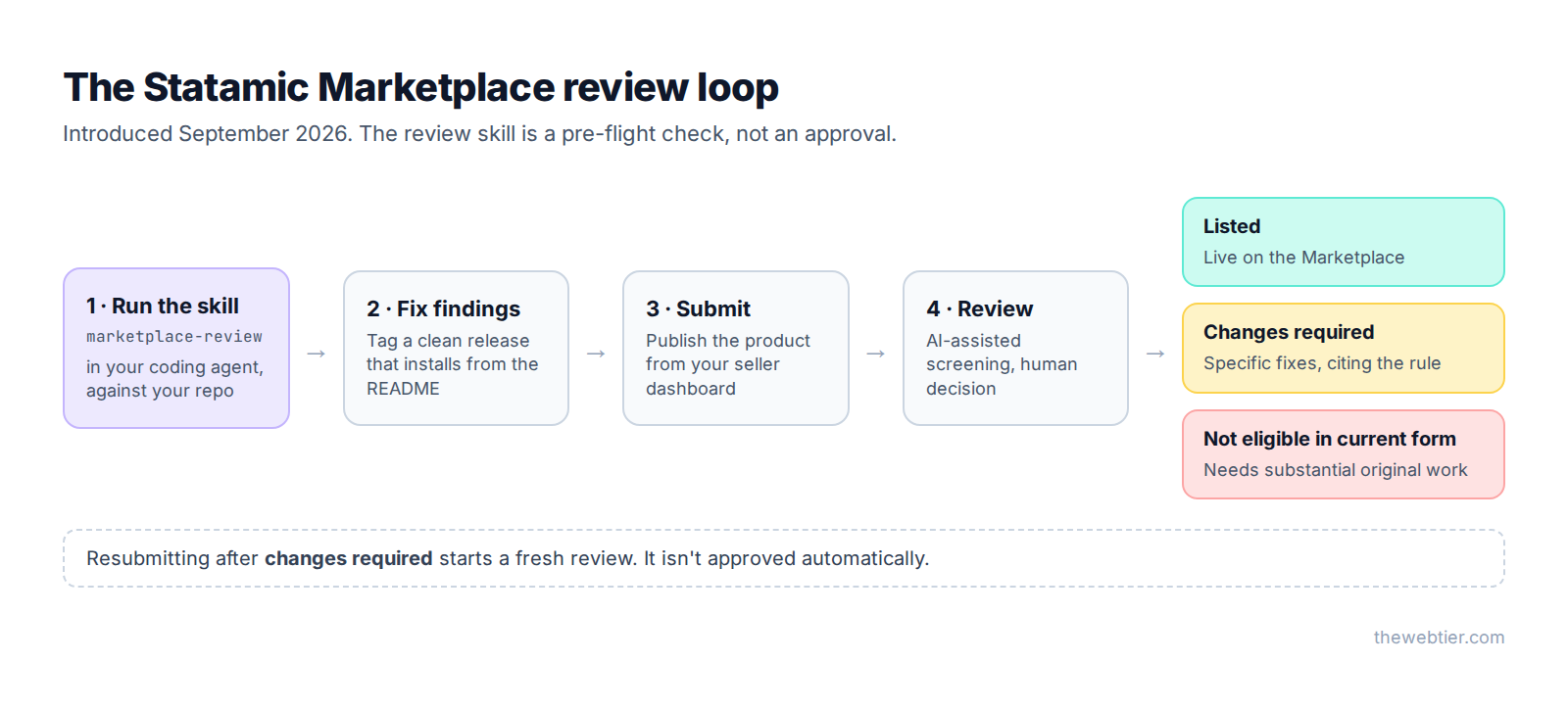
Statamic publishes a review skill (a single SKILL.md file) that you run with your own AI coding assistant against your repository. It checks your product against the 11 guidelines and reports gaps and rough edges before a human reviewer sees it.
Install it
Statamic's instructions are to save the file at .agents/skills/marketplace-review/SKILL.md in your project. From your addon's root:
curl --create-dirs -o .agents/skills/marketplace-review/SKILL.md \
  https://statamic.com/downloads/marketplace-review/SKILL.md
Or download it from the guidelines page and put it there yourself.
Also Read: Statamic Custom Fieldtype Tutorial: Vue 3 & Vite (v6) - Laravel
.agents/skills/ is a shared convention that several coding agents read. If yours looks somewhere else (Claude Code, for example, loads project skills from .claude/skills/), copy or symlink the folder there:
mkdir -p .claude/skills
ln -s ../../.agents/skills/marketplace-review .claude/skills/marketplace-review
📸 SCREENSHOT TO ADD ·
05-guidelines-page-skill-download.pngThe submission guidelines page, scrolled to the review skill download.
Alt text: "Download link for Statamic's marketplace-review skill on the submission guidelines page"
Run it
Open your assistant in the addon's folder and ask it to use the skill. For example:
Use the marketplace-review skill to review this addon against the
Statamic Marketplace submission guidelines. It's an addon, not a
starter kit. Our compatibility claims are PHP 8.3+, Laravel 12–13 and
Statamic 6. Report findings by guideline number and don't change any
code yet.
Asking for a report first, before any fixes, lets you read the findings and decide what to change yourself.
📸 SCREENSHOT TO ADD ·
05-review-skill-report.pngYour coding assistant's terminal showing a marketplace-review report for the Reading Time addon, with findings grouped by guideline.
Alt text: "Running Statamic's marketplace-review skill against an addon in an AI coding assistant"
What the skill doesn't do
Statamic is clear about its limits. The skill doesn't:
- approve your product
- submit anything for you
- verify human authorship
You're responsible for reading and acting on the findings. Treat it like a linter: a clean run makes a smooth review more likely, but a human reviewer still decides.
Tips for getting the most out of it
- Run it on the tagged release, not a dirty working copy. Guideline 06 is about what customers install.
- Run it again after fixing things. New code creates new findings.
- Keep the skill out of your distributed package. Add
/.agents export-ignore(and/.claude export-ignoreif you symlinked it) to.gitattributesso it doesn't end up in customers'vendorfolders. Part 7 has a full.gitattributes. - Don't expect it to catch everything. Keyboard navigation, dark mode and visual consistency still need you to open the Control Panel and use your own addon.
What happens when you submit
Once you publish a product from your seller dashboard (covered in part 7), it goes into review. The outcomes are:
| Outcome | What it means | What to do |
|---|---|---|
| Listed | It passed | Share it, and keep it compliant with each release |
| Changes required | Specific, fixable issues, each citing the relevant guideline | Fix them, tag a new release, resubmit |
| Not eligible in current form | Needs substantial original work or a fundamental rebuild | Rethink the product (usually guideline 01) |
Feedback separates required fixes from optional suggestions. Resubmitting starts a new review. It isn't approved automatically.
A pre-submission checklist
Copy this into your repo's pull request template or issue tracker:
- Searched the Marketplace: this adds something distinct (01)
- Only supported extension points, no core patches (02)
- Everything editors need is in the Control Panel (03)
- CP UI uses Statamic UI components and works in dark mode (04)
- Tested with empty, long and multi-site content, read-only fields, keyboard only (05)
- Clean install from the tagged release on a fresh site, following only the README (06)
- Server-side permission checks, validated input, no keys in Git, external requests documented (07)
- Licences for all bundled assets documented (08)
- README, changelog and a working support link (09)
- Screenshots taken from the real release; claims match
composer.json(10) - No workarounds for Core/Pro limits (11)
marketplace-reviewskill run on the release, findings addressed
FAQ
Do the new guidelines apply to free Statamic addons?
Yes. They apply to every product on the Marketplace, free or paid, including products that were already listed.
Where do I download the Statamic marketplace-review skill?
From the submission guidelines page. The file is at statamic.com/downloads/marketplace-review/SKILL.md, and Statamic recommends saving it as .agents/skills/marketplace-review/SKILL.md.
Also Read: Claude Code & Cursor on Filament: AI Agent Rules That Work
Does passing the review skill mean my addon will be approved?
No. The skill is a pre-flight check. Final decisions are made by Statamic's reviewers, and the skill doesn't approve or submit anything.
Can I still sell my addon outside the Marketplace?
Yes. The guidelines only cover the official Marketplace. You can distribute through Packagist, GitHub or your own site. You lose Marketplace discovery, the Control Panel's addon browser, and built-in checkout, VAT handling, refunds and licensing.
Is AI-generated code allowed?
The guidelines are about the quality of the product, not the tools used to build it. The point of the review is that "it works" isn't enough: it has to meet all 11 rules.
Further reading
- Marketplace Submission Guidelines
- Stewarding the Marketplace, Jack McDade
- Agent Skills format
- WCAG 2.2 quick reference, useful for guideline 05
Previous: ← Part 4: Testing and Documentation · Next: Part 6: How to Become a Statamic Creator →