This is the last part of the series. Over the previous six posts, our Reading Time addon has gone from a blank folder to a tested, documented package with a Vue 3 fieldtype, and we've set up a creator account. Now we ship it. This post shows how to publish a Statamic addon, from a local folder to a live Marketplace listing.
Also Read: Laravel: How to implement
Publishing has four stages:
- Prepare the repository so the release installs cleanly
- Tag a release on GitHub
- Publish the package on Packagist
- Create the Marketplace product, write the listing and submit it for review
Stage 1: Prepare the repository
Move the addon into its own repo
During development the addon lived inside your site's addons/ folder. It needs its own Git repository now. From the addon's folder:
cd addons/thewebtier/reading-time
git init
git add .
git commit -m "Initial release"
git branch -M main
git remote add origin [email protected]:thewebtier/statamic-reading-time.git
git push -u origin main
A note on paid addons: the repository is public. Packagist serves public repositories, and Statamic's Marketplace licensing protects your revenue at runtime, so you don't need to hide the code. That's how most commercial Statamic addons work. Customers appreciate being able to read what they're installing.
Keep development files out of the package
Composer downloads a zip of your tagged release. Use .gitattributes so tests, CI config and the review skill don't end up in every customer's vendor folder:
/.github            export-ignore
/.agents            export-ignore
/.claude            export-ignore
/tests              export-ignore
/phpunit.xml        export-ignore
/.gitattributes     export-ignore
/.gitignore         export-ignore
Don't export-ignore resources/dist. That's your compiled Control Panel code, and customers need it.
Pre-release checklist
Work through this for every release, not just the first:
npm run buildhas been run andresources/distis committed (part 3)- Tests pass in CI across your supported PHP and Laravel versions (part 4)
- The addon's
composer.jsonhas nopathrepositories or references to local folders requireconstraints match what the README and listing claim- README is complete and every link works
- CHANGELOG has an entry for this version
- Clean install on a fresh site, following only the README
- The
marketplace-reviewskill has been run and findings addressed (part 5) - Your site's
composer.jsonno longer has the path repository, if you're deploying it
Stage 2: Tag a release
Statamic addons use semantic versioning. Your first public release is v1.0.0:
git tag v1.0.0
git push origin v1.0.0
Then create a GitHub release for that tag, with your changelog entry as the notes. With the GitHub CLI:
# Save this version's changelog entry to release-notes.md first
gh release create v1.0.0 --title "v1.0.0" --notes-file release-notes.md
or just paste the changelog entry into the release form on GitHub. Write release notes for customers. They're shown on your addon's release notes page on the Marketplace. "Fixed bug" tells nobody anything. "Fixed reading time being 0 for entries that only use Bard sets" does.
📸 SCREENSHOT TO ADD ·
07-github-release.pngThe GitHub release page for v1.0.0, showing the changelog notes.
Alt text: "GitHub release v1.0.0 for a Statamic addon with changelog release notes"
Stage 3: Publish on Packagist
Packagist is where Composer finds public packages. Statamic's docs list publishing there as a prerequisite for the Marketplace.
- Sign in at packagist.org. Signing in with GitHub makes the next steps easier.
- Go to Submit and paste your repository URL:
https://github.com/thewebtier/statamic-reading-time. - Packagist reads
composer.jsonand createsthewebtier/reading-time. - Check the package page says it's auto-updated. If you signed in with GitHub this is usually set up for you. If not, follow Packagist's instructions to add the GitHub hook, so new tags appear within seconds.
📸 SCREENSHOT TO ADD ·
07-packagist-package.pngThe Packagist page for your package, showing v1.0.0 and the auto-update status.
Alt text: "A Statamic addon package page on Packagist"
Now anyone can install it:
composer require thewebtier/reading-time
Try that on a fresh site before you go any further.
Also Read: Laravel and PHP
Stage 4: Create the Marketplace product
In your creator dashboard on statamic.com:
- Create a new product for your addon.
- Link the package. Connect the GitHub repository and the Packagist package you just published.
- Set the price. Choose free or paid. If you defined editions (part 6), set a price for each.
- Write the listing (tips below).
- Preview the draft. Products start as drafts you can tweak as much as you like.
- Publish. Your product goes into review against the submission guidelines.
📸 SCREENSHOT TO ADD ·
07-seller-new-product.pngThe seller dashboard's new product form, with the Packagist package linked.
Alt text: "Creating a new addon product in the Statamic Marketplace seller dashboard"
📸 SCREENSHOT TO ADD ·
07-marketplace-draft-preview.pngThe draft preview of your listing before publishing.
Alt text: "Previewing a draft addon listing on the Statamic Marketplace"
If review comes back with changes required, each point cites the guideline it relates to. Fix them, tag a new release, and resubmit. Resubmission starts a fresh review.
Writing a listing that sells (and passes review)
Your listing is a sales page. It's also covered by guideline 10 ("represent the shipped product honestly"), so it has to be accurate.
Title and short description. Say what it does in plain words: "Reading Time: word counts and reading-time estimates for Statamic". People search the Marketplace and the Control Panel's addon browser, so use the words they'd type.
Lead with the problem. "Editors can't tell how long a post is while they're writing it" lands better than a feature list.
Also Read: Laravel: Can you run
Screenshots. Use real screenshots from the release you're shipping, showing:
- the fieldtype in an entry (light and dark mode)
- the settings page
- the output on a front-end page
No mockups and no features that are only on your roadmap. If a screenshot shows a Pro-only feature, label it.
Compatibility. State the Statamic, Laravel and PHP versions you actually test in CI.
Editions. If you have free and pro, use a simple table showing which features are in which edition.
Documentation and support. Link to your README (or docs site) and a support channel you'll actually answer, such as GitHub Issues. Guideline 09 treats dead support links as a failure.
Also Read: Create a Filament v5 Laravel Plugin with the Plugin Skeleton
Promote it. Once it's live, write a launch post (like this series), share it in the Statamic community, and link to it from your README. Marketplace listings are indexed by search engines too, so a clear title and description help.
After launch: shipping updates
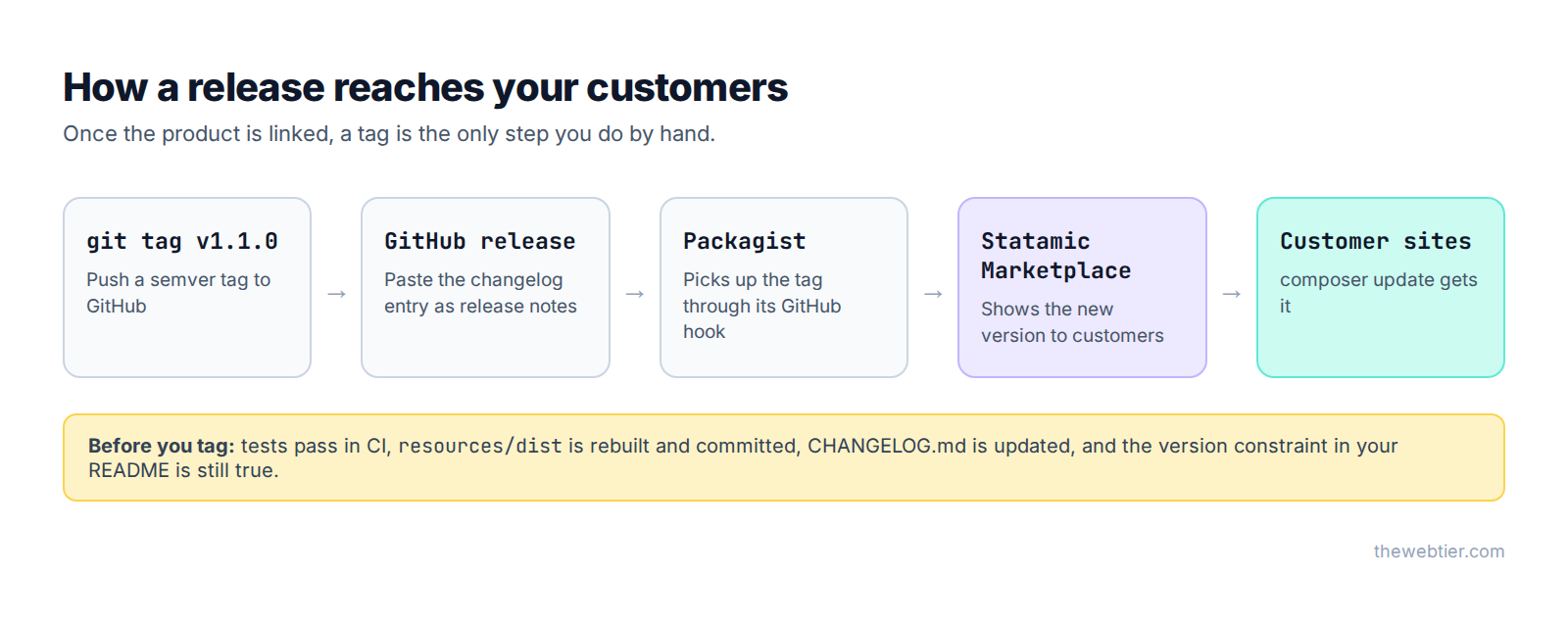
Once the product is linked, a tag is the only manual step. Tagging a new release pushes the update to your customers: it appears on the Marketplace, and customers get it with composer update.
Version numbers matter
- Patch (
1.0.1): bug fixes only - Minor (
1.1.0): new features, nothing breaks - Major (
2.0.0): breaking changes
Customers usually require your addon with a caret (^1.0), so they'll get every 1.x automatically. Put anything breaking in a major version and document the upgrade in the changelog.
Plan for Statamic's release cycle
Statamic releases a major version every year, around Q1, with minor and patch releases as often as every few days. Bug fixes are supported for 1 year and security fixes for 18 months. Watch the betas (Statamic 6 had alphas from late 2025 and betas in January 2026 before its 28 January release) and have a compatible release ready on launch day. Customers notice, and it stops support requests piling up.
Also Read: Publish a Filament Plugin & Become a Filament Author - Programming
Migrate customer data with update scripts
When a release needs to change existing data or config (renaming a setting, adding a permission), use an update script. Statamic runs these automatically when a customer updates.
Say version 1.1.0 renames the label setting to label_format. This script copies existing values across so nobody loses their customisation:
<?php

namespace TheWebTier\ReadingTime\Updates;

use Statamic\Facades\Addon;
use Statamic\UpdateScripts\UpdateScript;

class RenameLabelSetting extends UpdateScript
{
    public function shouldUpdate($newVersion, $oldVersion)
    {
        return $this->isUpdatingTo('1.1.0');
    }

    public function update()
    {
        $settings = Addon::get('thewebtier/reading-time')->settings();

        if ($old = $settings->get('label')) {
            $settings->set('label_format', $old)->save();
        }

        $this->console()->info('Reading Time: label setting migrated.');
    }
}
Register it in your service provider:
protected $updateScripts = [
    \TheWebTier\ReadingTime\Updates\RenameLabelSetting::class,
];
Test it with the RunsUpdateScripts trait (Statamic 6.3+) as shown in part 4.
Look after your customers
- Answer issues promptly, even if it's "thanks, looking into it"
- Keep the README and screenshots up to date as the UI changes
- Re-run the
marketplace-reviewskill before each significant release, because the guidelines apply to existing listings too
The whole series
- Statamic Addon Development: The Complete Guide
- How to Build a Statamic Addon, Step by Step
- Build a Custom Statamic 6 Fieldtype with Vue 3 and Vite
- Testing and Documenting a Statamic Addon
- Statamic Marketplace Submission Guidelines Explained
- How to Become a Statamic Creator
- How to Publish a Statamic Addon (you are here)
FAQ
Does a Statamic addon need to be on Packagist?
To sell on the Marketplace, yes. Statamic's docs list publishing the Composer package on Packagist as a prerequisite. Private addons can be installed from a path or VCS repository instead, but they won't be on the Marketplace.
How do I push an update to customers?
Tag a new version on GitHub. Packagist picks it up, the Marketplace shows it, and customers get it with composer update, within the version constraint they've required.
Also Read: How to Sell Premium Filament Plugins (Anystack vs Privato)
Is my paid addon's code public?
Yes. The repository on GitHub and Packagist is public. Your revenue is protected by Statamic's licensing, which requires a valid licence on public production domains.
How long does Marketplace review take?
Statamic hasn't published a timeframe. Submitting a release that already passes the marketplace-review skill and the checklist above is the best way to avoid extra rounds.
What happens when Statamic 7 comes out?
Your statamic/cms: ^6.0 constraint will stop your addon installing on Statamic 7 until you test it and release a version that allows ^7.0. Watch the betas and plan the update ahead of the stable release.
Further reading
- Publishing to the Marketplace (Statamic 6 docs)
- Release schedule and support policy
- Packagist: About
- Semantic Versioning
Previous: ← Part 6: Become a Statamic Creator · Back to the start: Part 1: The Complete Guide