Introduction
You could build a Filament plugin from an empty folder. You'd write a composer.json, a service provider, a Pest setup, a Testbench base class, GitHub Actions workflows, a PHPStan config and a .gitattributes file before writing a single line of feature code. Or you could let Filament's official skeleton do it for you in about a minute.
Also Read: Claude Code & Cursor on Filament: AI Agent Rules That Work
In Part 1 we covered how plugins work and planned Filament Announcements, a plugin that shows scheduled, dismissible banners across a panel. In this part we'll:
- Generate the plugin from filamentphp/plugin-skeleton
- Walk through every file it creates, and what you can delete
- Fix a few naming mismatches in the skeleton that will otherwise bite you later
- Wire the plugin into a local Filament app with a Composer path repository, so every change shows up instantly
Step 1: Create Your Repository from the Template
The skeleton is a GitHub template repository. Its default branch is 5.x, and there are 4.x and 3.x branches if you need to target older versions.
- Open github.com/filamentphp/plugin-skeleton.
- Click Use this template → Create a new repository.
- Name it after your package, for example
filament-announcements. The configure script uses the folder name as the default package name, so matching them saves a keystroke. - Choose public for a free plugin or private for a paid one. You can change this later.
Then clone it locally:
git clone [email protected]:thewebtier/filament-announcements.git
cd filament-announcements
Step 2: Run the Configure Script
The skeleton is full of placeholders like :vendor_slug, VendorName\Skeleton and SkeletonServiceProvider. The configure.php script asks you a few questions and replaces all of them:
php ./configure.php
Here's a real run for our plugin:
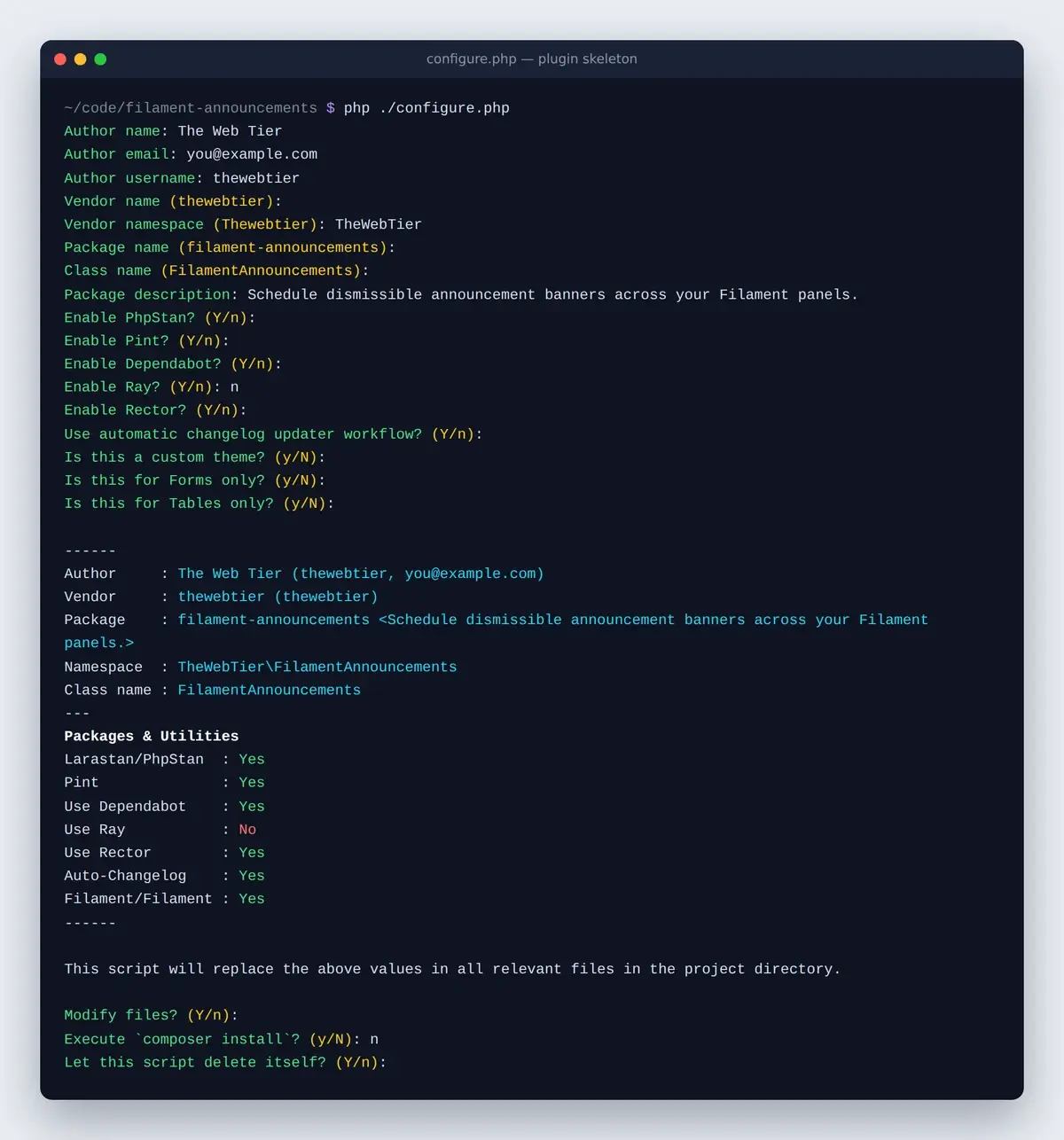
A few answers are worth thinking about:
- Vendor namespace. The default is built with
ucwords(), sothewebtierbecomesThewebtier. If your brand uses a different capitalization, type it yourself. We usedTheWebTier. - Class name. This prefixes the service provider and plugin class, giving us
FilamentAnnouncementsServiceProviderandFilamentAnnouncementsPlugin. - Enable Ray? Ray is a paid debugging app. If you don't use it, say
nsospatie/laravel-raydoesn't end up in your dev dependencies. - Is this a custom theme? Only say yes if you're building a panel theme. It generates a theme class and a different CSS setup.
- Forms only / Tables only? If you're building a standalone component that only needs
filament/formsorfilament/tables, these trim yourrequiresection so users don't pull in the whole panel builder. For a panel plugin like ours, answer no to both. The script then requiresfilament/filament.
When it finishes, the script offers to run composer install and delete itself. Let it delete itself, because configure.php has no place in a published package.
Step 3: Understand What You Just Generated
Here's the structure the skeleton gives you, trimmed to what matters:
filament-announcements/
├── .github/
│   ├── workflows/          # tests, phpstan, code style, changelog, zizmor
│   ├── dependabot.yml
│   └── SECURITY.md
├── bin/build.js            # esbuild script for your JavaScript
├── config/announcements.php
├── database/
│   ├── factories/ModelFactory.php
│   └── migrations/create_announcements_table.php.stub
├── resources/
│   ├── css/index.css
│   ├── dist/               # compiled assets that ship with the package
│   ├── js/index.js
│   ├── lang/en/announcements.php
│   └── views/
├── src/
│   ├── Commands/FilamentAnnouncementsCommand.php
│   ├── Facades/FilamentAnnouncements.php
│   ├── Testing/TestsFilamentAnnouncements.php
│   ├── FilamentAnnouncements.php
│   ├── FilamentAnnouncementsPlugin.php
│   └── FilamentAnnouncementsServiceProvider.php
├── tests/
│   ├── DebugTest.php
│   ├── ExampleTest.php
│   ├── Pest.php
│   └── TestCase.php
├── .gitattributes
├── composer.json
├── phpstan.neon.dist
├── phpunit.xml.dist
├── pint.json
└── rector.php
composer.json
The generated require section is short:
"require": {
    "php": "^8.2",
    "filament/filament": "^5.0",
    "spatie/laravel-package-tools": "^1.15.0"
},
The dev dependencies give you a full toolchain: Larastan for static analysis, Pint for code style, Rector for automated refactors, Pest (with the Arch, Laravel and Livewire plugins) for tests, and Orchestra Testbench (^9.0|^10.0|^11.0) so tests can run on Laravel 11, 12 and 13.
Also Read: Auto-Post to LinkedIn PHP from Laravel (2026 Guide)
The extra.laravel.providers entry is what makes Laravel's package discovery register your service provider automatically when someone installs the plugin.
The service provider
FilamentAnnouncementsServiceProvider extends Spatie's PackageServiceProvider. Instead of hand-writing loadViewsFrom(), publishes() and friends, you describe the package fluently in configurePackage(), and Spatie's package tools handle the Laravel plumbing. See the laravel-package-tools README for the full list of options.
The generated provider also shows where Filament-specific registration goes. It registers assets through FilamentAsset::register(), icons through FilamentIcon::register(), and a Livewire testing mixin, all in packageBooted().
The plugin class
FilamentAnnouncementsPlugin implements Filament\Contracts\Plugin and already includes the two helper methods you'll use constantly:
public static function make(): static
{
    return app(static::class);
}

public static function get(): static
{
    /** @var static $plugin */
    $plugin = filament(app(static::class)->getId());

    return $plugin;
}
make() resolves the plugin through the container, so users (and tests) can swap in their own implementation. get() returns the instance registered on the current panel, which is how the rest of your code reads per-panel settings. We'll lean on both in Part 3.
Also Read: Create a LinkedIn Developer App for Laravel (2026)
GitHub workflows and repository hygiene
The .github folder is easy to ignore, but it's doing a lot:
- tests.yml runs Pest on Ubuntu and Windows, across PHP 8.2 to 8.4, Laravel 11 to 13, with both lowest and stable dependencies.
- phpstan.yml runs Larastan across the same PHP and Laravel versions.
- fix-code-style.yml runs Pint and commits the fixes.
- update-changelog.yml updates
CHANGELOG.mdfrom your GitHub release notes. - zizmor.yml audits the workflows themselves for security problems.
- dependabot.yml keeps your GitHub Actions up to date, with a seven-day cooldown.
Every third-party action is pinned to a commit SHA rather than a tag. That matters more than it looks: the Filament plugin directory shows a health score for each plugin, and "GitHub Actions pinned to SHA", "Dependabot or Renovate configured", "Dependency update cooldown configured" and "Provides a security policy" are all checks in it. The skeleton passes those out of the box, as long as you keep these files. We'll go through the full list in Part 6.
Finally, .gitattributes marks tests, .github, art, config files and more as export-ignore, so the zip Composer downloads only contains what your users need. "Dist archive is lean" is another health check.
Step 4: Clean Up What You Don't Need
The skeleton is designed for the kitchen-sink case. Filament's own tutorials recommend deleting what your plugin doesn't use. For Filament Announcements, we removed:
| Removed | Why |
|---|---|
src/Commands, src/Facades, src/FilamentAnnouncements.php | No artisan command, facade or main service class needed |
src/Testing | No custom Livewire testing macros |
config/ | The plugin is configured per panel through the Plugin class, not a config file |
stubs/ | No publishable stubs |
bin/, resources/js, package.json | No JavaScript to compile (the banner uses a few lines of inline Alpine) |
database/factories/ModelFactory.php | Replaced with a real AnnouncementFactory |
tests/ExampleTest.php | Replaced with real tests |
Then trim the service provider down to what's left:
class FilamentAnnouncementsServiceProvider extends PackageServiceProvider
{
    public static string $name = 'filament-announcements';

    public static string $viewNamespace = 'filament-announcements';

    public function configurePackage(Package $package): void
    {
        $package
            ->name(static::$name)
            ->hasViews(static::$viewNamespace)
            ->hasTranslations()
            ->hasMigrations(['create_announcements_table'])
            ->hasInstallCommand(function (InstallCommand $command): void {
                $command
                    ->publishMigrations()
                    ->askToRunMigrations()
                    ->askToStarRepoOnGitHub('thewebtier/filament-announcements');
            });
    }
}
Also remove the facade alias from extra.laravel.aliases in composer.json. If you delete config/, remove it from the paths list in phpstan.neon.dist too, or PHPStan stops with a "Path … does not exist" error.
Also Read: Laravel: Get a LinkedIn
Step 5: Fix the Skeleton's Naming Gotchas
While building this plugin we hit a few mismatches between the file names the configure script generates and the names the code expects. None of them show up as errors until you try to publish something, which is exactly when you don't want surprises.
1. The config file never loads. The script names the config file after the package slug without the filament- prefix (config/announcements.php). But the provider only registers a config file named after $package->shortName(), which is filament-announcements. The names don't match, so hasConfigFile() is never called. Either rename the file to config/filament-announcements.php, or delete it like we did.
2. The migration can't be published. The migration stub is create_announcements_table.php.stub, but the generated provider asks for create_filament-announcements_table. Spatie's package tools build the publish path from that name, so vendor:publish --tag=filament-announcements-migrations points at a file that doesn't exist. Make the names match, as we did above. Alternatively, call ->discoversMigrations() to publish everything in database/migrations.
3. The stub creates the wrong table. The generated migration creates filament_announcements_table. Rename it to the table your model actually uses. For us, that's announcements.
Also Read: Renew LinkedIn Access Tokens PHP in Laravel (60-Day Fix)
4. The README badges point at missing workflows. They link to run-tests.yml and fix-php-code-style-issues.yml, but the files are called tests.yml and fix-code-style.yml. Update the badge URLs, or they show as broken on GitHub, Packagist and the Filament directory.
5. The README links to the 4.x docs. Point any filamentphp.com/docs/4.x/... links at 5.x.
6. The translation file name sets your translation keys. The generated file is resources/lang/en/announcements.php, so every key becomes filament-announcements::announcements.something. That's fine, just be consistent.
Step 6: Develop Locally with a Composer Path Repository
You need somewhere to see your plugin. The best playground is a normal Laravel app with Filament v5 installed, sitting next to the plugin:
~/code/
├── filament-announcements/   # the plugin
└── playground/               # a Laravel + Filament v5 app
In the playground's composer.json, add a path repository pointing at the plugin:
"repositories": [
    {
        "type": "path",
        "url": "../filament-announcements"
    }
]
Then require it at the @dev version:
composer require thewebtier/filament-announcements:@dev
Composer symlinks the package into vendor/thewebtier/filament-announcements, so edits in the plugin folder show up in the playground immediately, with no reinstalling. @dev lets Composer install your unreleased branch without lowering the app's minimum-stability.
Also Read: How to Create a WordPress Plugin from Scratch (2026 Guide)
Check that package discovery picked up your provider:
php artisan package:discover
You should see thewebtier/filament-announcements ... DONE in the list. Now publish the migration, run it, publish the plugin's assets and register the plugin on a panel:
php artisan vendor:publish --tag="filament-announcements-migrations"
php artisan migrate
php artisan filament:assets
// app/Providers/Filament/AdminPanelProvider.php
use TheWebTier\FilamentAnnouncements\FilamentAnnouncementsPlugin;

public function panel(Panel $panel): Panel
{
    return $panel
        // ...
        ->plugin(FilamentAnnouncementsPlugin::make());
}
Two habits will save you debugging time:
- Re-run
php artisan filament:assetswhenever you change a registered CSS or JS file. Filament serves assets frompublic/, not from your package folder. - Clear cached components after moving classes around with
php artisan filament:clear-cached-componentsif you've cached them.
Step 7: Make Your First Commit
Commit the configured skeleton before your cleanup, then commit the cleanup separately. If something in the skeleton turns out to matter later, the first commit makes it easy to find what you deleted.
git add -A
git commit -m "Scaffold from filamentphp/plugin-skeleton"
Key Takeaways
- Start from filamentphp/plugin-skeleton. Its
5.xbranch targets Filament v5 and ships CI, static analysis and Testbench already wired up. php ./configure.phpreplaces all placeholders. Choose your vendor namespace and "forms/tables only" answers carefully.- Keep the
.githubfolder. SHA-pinned actions, Dependabot with a cooldown, and a security policy all feed into your plugin's health score in the directory. - Delete what you don't need, then fix the config and migration name mismatches before they break publishing.
- Develop against a real Filament app using a Composer path repository and
composer require vendor/package:@dev.
In Part 3, we'll write the actual plugin: the Plugin class, a model and migration, a Filament v5 resource, a stats widget and the banner render hook.
FAQ
Which branch of the plugin skeleton should I use for Filament v5?
Use 5.x, which is the default branch. The 4.x and 3.x branches are there if you need to support older Filament versions from a separate release line.
Why does vendor:publish not find my plugin's migration?
The generated service provider asks for create_{package-slug}_table, while the generated stub file drops the filament- prefix. Rename one so they match, or use ->discoversMigrations().
Do I need Node.js to build a Filament plugin?
Only if your plugin compiles JavaScript or CSS. The skeleton's bin/build.js uses esbuild for JavaScript. A plugin that only uses Filament's Blade components and a small precompiled stylesheet, like ours, doesn't need a build step at all.
How do I test my plugin in a real Laravel app while developing?
Add a Composer path repository pointing at your plugin folder, then run composer require vendor/package:@dev. Composer symlinks the package, so every change is live without reinstalling.