Series: Laravel + LinkedIn Auto-Posting Overview · Part 1: Developer app · Part 2: OAuth token · Part 3: Token renewal · Part 4: post:share command
Your integration works for about two months. Then one morning the queue log fills up with 401 Unauthorized and your latest article never reached LinkedIn. That's the 60-day access token expiry, and it's the most common reason LinkedIn automations quietly stop working.
Also Read: Livewire 4 Islands in Filament: Where They Actually Help
This part makes renewal routine. You'll build:
- a token manager that refreshes programmatically when LinkedIn allows it,
- token introspection to catch revoked tokens early,
- a scheduled
linkedin:token checkthat emails you a week before expiry, - a one-click reconnect that usually skips the consent screen, and
linkedin:token status|refresh|importfor regenerating tokens from the terminal as often as you need.
How LinkedIn token lifetimes work
| Token | Lifetime | Who gets it |
|---|---|---|
| Access token | 60 days | Everyone |
| Refresh token | 365 days, and it does not reset | Only apps approved for programmatic refresh tokens (mostly Marketing Developer Platform partners) |
| Authorization code | 30 minutes | Everyone, used once |
Two consequences:
- Most self-serve apps (including a typical blog) get no refresh token. The only way to get a new access token is to go through the authorization flow again.
- Even with a refresh token, you re-authorise once a year. Each refresh gives a new 60-day access token, but the refresh token keeps its original expiry date. On day 360 you have 5 days left, whatever you do.
The good news, from LinkedIn's OAuth docs: if you re-run the flow while you're still logged in to linkedin.com and your current token hasn't expired, LinkedIn skips the consent screen and redirects straight back. So renewing before expiry takes one click, and renewing after expiry means going through consent again.
Also Read: Filament on Laravel 13: The Complete Compatibility Checklist
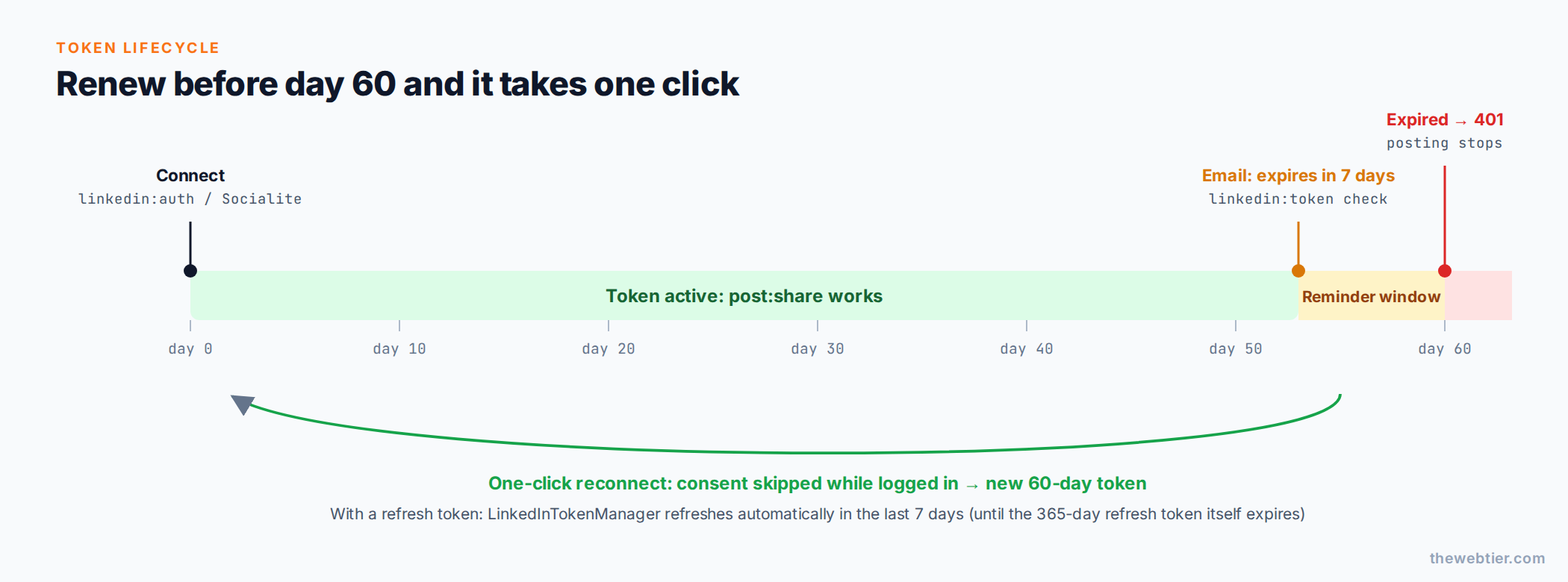 Renew in the reminder window and it takes one click. Wait past day 60 and posting stops until you go through consent again.
Also Read: Laravel and PHP
Step 1: Add refresh and introspection to the OAuth service
Add these methods to the LinkedInOAuth class from Part 2. refresh() is already there. Token introspection tells you whether LinkedIn still considers a token active, expired or revoked:
// app/Services/LinkedIn/LinkedInOAuth.php (add)
private const INTROSPECT_URL = 'https://www.linkedin.com/oauth/v2/introspectToken';

/** @return array{active: bool, status: string, expires_at?: int, scope?: string} */
public function introspect(string $accessToken): array
{
    return Http::asForm()
        ->acceptJson()
        ->timeout(15)
        ->post(self::INTROSPECT_URL, [
            'client_id'     => config('services.linkedin-openid.client_id'),
            'client_secret' => config('services.linkedin-openid.client_secret'),
            'token'         => $accessToken,
        ])
        ->throw()
        ->json();
}
Introspection matters because a token can be revoked before its expiry date, for example when you change your LinkedIn password, remove the app under Settings → Data privacy → Permitted services, or LinkedIn revokes it for policy reasons. Your database would still say "valid for 40 days".
Also Read: Best Filament Themes and PHP Starter Kits for 2026 (v5-Ready)
Step 2: A "re-auth required" exception
// app/Services/LinkedIn/LinkedInReauthRequired.php
namespace App\Services\LinkedIn;

use App\Models\LinkedInToken;
use RuntimeException;

final class LinkedInReauthRequired extends RuntimeException
{
    public static function noToken(): self
    {
        return new self('No LinkedIn token stored. Run `php artisan linkedin:auth` or connect from the admin panel.');
    }

    public static function expired(LinkedInToken $token): self
    {
        return new self("LinkedIn token for {$token->owner_urn} expired on {$token->expires_at->toDateString()}. Re-authorise to continue posting.");
    }

    public static function revoked(LinkedInToken $token): self
    {
        return new self("LinkedIn token for {$token->owner_urn} was revoked. Re-authorise to continue posting.");
    }
}
Throwing a specific exception lets the share job in Part 4 fail fast and notify you instead of retrying a request that can't succeed.
Also Read: Claude Code & Cursor on Filament: AI Agent Rules That Work - Laravel
Step 3: The complete token manager
Extend LinkedInTokenManager from Part 2 (keep the existing store() method):
// app/Services/LinkedIn/LinkedInTokenManager.php
namespace App\Services\LinkedIn;

use App\Models\LinkedInToken;
use Carbon\CarbonImmutable;
use Illuminate\Http\Client\RequestException;
use Illuminate\Support\Facades\Cache;
use Illuminate\Support\Facades\Log;

class LinkedInTokenManager
{
    /** Refresh this many days before expiry when a refresh token exists. */
    public const REFRESH_WINDOW_DAYS = 7;

    public function __construct(private readonly LinkedInOAuth $oauth) {}

    /**
     * The token to post with. Refreshes it when possible and throws when a human must re-authorise.
     */
    public function current(): LinkedInToken
    {
        $token = LinkedInToken::query()->latest('expires_at')->first()
            ?? throw LinkedInReauthRequired::noToken();

        if ($token->expiresWithin(self::REFRESH_WINDOW_DAYS) && $token->canRefresh()) {
            $token = $this->refresh($token);
        }

        if ($token->isExpired()) {
            throw LinkedInReauthRequired::expired($token);
        }

        return $token;
    }

    /**
     * Swap the refresh token for a new access token. Safe to call from several workers at once.
     */
    public function refresh(LinkedInToken $token, bool $force = false): LinkedInToken
    {
        return Cache::lock('linkedin:token-refresh:'.$token->id, 30)->block(15, function () use ($token, $force) {
            $token = $token->fresh();

            // Another worker may have refreshed while we waited for the lock.
            if (! $force && ! $token->expiresWithin(self::REFRESH_WINDOW_DAYS)) {
                return $token;
            }

            try {
                $payload = $this->oauth->refresh($token->refresh_token);
            } catch (RequestException $e) {
                Log::warning('LinkedIn refresh failed', ['status' => $e->response->status(), 'body' => $e->response->json()]);

                // 400 invalid_request = refresh token expired or revoked
                $token->forceFill(['refresh_token' => null, 'refresh_expires_at' => null])->save();

                return $token;
            }

            $now = CarbonImmutable::now();

            $token->forceFill([
                'access_token'       => $payload['access_token'],
                'expires_at'         => $now->addSeconds((int) $payload['expires_in']),
                'refresh_token'      => $payload['refresh_token'] ?? $token->refresh_token,
                'refresh_expires_at' => isset($payload['refresh_token_expires_in'])
                    ? $now->addSeconds((int) $payload['refresh_token_expires_in'])
                    : $token->refresh_expires_at,
                'last_notified_at'   => null,
            ])->save();

            Log::info('LinkedIn token refreshed', ['owner' => $token->owner_urn, 'expires_at' => $token->expires_at]);

            return $token;
        });
    }

    /**
     * Ask LinkedIn whether the token is still usable, and sync our expiry date with LinkedIn's.
     */
    public function verify(LinkedInToken $token): string
    {
        $info = $this->oauth->introspect($token->access_token);

        if (isset($info['expires_at'])) {
            $token->forceFill(['expires_at' => CarbonImmutable::createFromTimestamp($info['expires_at'])])->save();
        }

        return $info['status'] ?? ($info['active'] ? 'active' : 'expired');
    }

    // store() from Part 2 stays here unchanged
}
Why the cache lock? If you run several queue workers, two jobs could refresh at the same moment. With single-use refresh flows, the loser would overwrite a good token with a failed one. Atomic locks need a lock-capable cache store such as Redis, database or Memcached.
Also Read: How to Create a WordPress Plugin from Scratch (2026 Guide)
Step 4: The "token expiring" notification
php artisan make:notification LinkedInTokenExpiring
// app/Notifications/LinkedInTokenExpiring.php
namespace App\Notifications;

use App\Models\LinkedInToken;
use Illuminate\Bus\Queueable;
use Illuminate\Notifications\Messages\MailMessage;
use Illuminate\Notifications\Notification;

class LinkedInTokenExpiring extends Notification
{
    use Queueable;

    public function __construct(public LinkedInToken $token, public string $reason = 'expiring') {}

    public function via(object $notifiable): array
    {
        return ['mail'];
    }

    public function toMail(object $notifiable): MailMessage
    {
        $subject = match ($this->reason) {
            'expired' => 'LinkedIn posting has stopped: token expired',
            'revoked' => 'LinkedIn posting has stopped: token revoked',
            default   => "LinkedIn token expires in {$this->token->daysLeft()} days",
        };

        return (new MailMessage)
            ->subject($subject)
            ->line("Account: {$this->token->name} ({$this->token->owner_urn})")
            ->line('Expiry: '.$this->token->expires_at->toDayDateTimeString())
            ->line('Renew now while you are logged in to LinkedIn and it takes one click, with no consent screen.')
            ->action('Reconnect LinkedIn', route('linkedin.connect'))
            ->line('No browser handy? Run `php artisan linkedin:auth` on the server.');
    }
}
Step 5: php artisan linkedin:token, one command for every token task
php artisan make:command LinkedInTokenCommand
// app/Console/Commands/LinkedInTokenCommand.php
namespace App\Console\Commands;

use App\Models\LinkedInToken;
use App\Notifications\LinkedInTokenExpiring;
use App\Services\LinkedIn\LinkedInOAuth;
use App\Services\LinkedIn\LinkedInTokenManager;
use Illuminate\Console\Command;
use Illuminate\Http\Client\RequestException;
use Illuminate\Support\Facades\Notification;

class LinkedInTokenCommand extends Command
{
    protected $signature = 'linkedin:token
        {action=status : status | refresh | check | import}
        {--remote : With status, also ask LinkedIn (token introspection)}
        {--days=7 : With check, warn when the token expires within this many days}';

    protected $description = 'Inspect, refresh, import or monitor the stored LinkedIn access token';

    public function handle(LinkedInTokenManager $tokens, LinkedInOAuth $oauth): int
    {
        return match ($this->argument('action')) {
            'status'  => $this->status($tokens),
            'refresh' => $this->refreshToken($tokens),
            'check'   => $this->check($tokens),
            'import'  => $this->import($tokens, $oauth),
            default   => $this->invalidAction(),
        };
    }

    private function status(LinkedInTokenManager $tokens): int
    {
        $token = LinkedInToken::query()->latest('expires_at')->first();

        if (! $token) {
            $this->components->warn('No token stored. Run `php artisan linkedin:auth`.');

            return self::FAILURE;
        }

        $this->components->twoColumnDetail('Account', "{$token->name} <fg=gray>{$token->owner_urn}</>");
        $this->components->twoColumnDetail('Scopes', $token->scopes ?? '-');
        $this->components->twoColumnDetail('Expires', $token->expires_at->toDayDateTimeString());
        $this->components->twoColumnDetail('Days left', $this->colourDays($token->daysLeft()));
        $this->components->twoColumnDetail('Refresh token', $token->canRefresh()
            ? 'yes, until '.$token->refresh_expires_at?->toDateString()
            : 'no (renew by re-authorising)');

        if ($this->option('remote')) {
            $this->components->twoColumnDetail('LinkedIn says', $tokens->verify($token));
        }

        return self::SUCCESS;
    }

    private function refreshToken(LinkedInTokenManager $tokens): int
    {
        $token = LinkedInToken::query()->latest('expires_at')->firstOrFail();

        if (! $token->canRefresh()) {
            $this->components->warn('This app has no refresh token. Generate a new token with `php artisan linkedin:auth`.');

            return self::FAILURE;
        }

        $token = $tokens->refresh($token, force: true);

        $this->components->info("Refreshed. New expiry: {$token->expires_at->toDayDateTimeString()}");

        return self::SUCCESS;
    }

    private function check(LinkedInTokenManager $tokens): int
    {
        $token = LinkedInToken::query()->latest('expires_at')->first();
        $to = Notification::route('mail', config('services.linkedin-openid.notify_email'));

        if (! $token) {
            return self::FAILURE;
        }

        // Auto-refresh when possible. This is a no-op without a refresh token.
        if ($token->canRefresh() && $token->expiresWithin((int) $this->option('days'))) {
            $token = $tokens->refresh($token);
        }

        try {
            $status = $tokens->verify($token);
        } catch (RequestException) {
            $status = $token->isExpired() ? 'expired' : 'active'; // LinkedIn unreachable, so trust our DB
        }

        $reason = match (true) {
            $status === 'revoked'                                  => 'revoked',
            $status === 'expired' || $token->isExpired()           => 'expired',
            $token->expiresWithin((int) $this->option('days'))     => 'expiring',
            default                                                => null,
        };

        if ($reason === null) {
            $this->components->info("Token healthy: {$token->daysLeft()} days left.");

            return self::SUCCESS;
        }

        // At most one email a day
        if ($token->last_notified_at === null || $token->last_notified_at->lt(now()->subDay())) {
            $to->notify(new LinkedInTokenExpiring($token, $reason));
            $token->forceFill(['last_notified_at' => now()])->save();
        }

        $this->components->warn("Token {$reason}: reminder sent.");

        return self::SUCCESS;
    }

    /**
     * Import a token generated in the LinkedIn Developer Portal's Token Generator.
     */
    private function import(LinkedInTokenManager $tokens, LinkedInOAuth $oauth): int
    {
        $accessToken = trim((string) $this->secret('Paste the access token'));

        try {
            $info = $oauth->introspect($accessToken);
            $profile = $oauth->userInfo($accessToken);
        } catch (RequestException $e) {
            $this->components->error('LinkedIn rejected the token: '.$e->response->body());

            return self::FAILURE;
        }

        if (! ($info['active'] ?? false)) {
            $this->components->error("Token is {$info['status']}.");

            return self::FAILURE;
        }

        $token = $tokens->store([
            'access_token' => $accessToken,
            'expires_in'   => max(0, (int) $info['expires_at'] - time()),
            'scope'        => str_replace(',', ' ', $info['scope'] ?? ''),
        ], $profile['sub'], $profile['name'] ?? null);

        $this->components->info("Imported. {$token->daysLeft()} days left.");

        return self::SUCCESS;
    }

    private function colourDays(int $days): string
    {
        return match (true) {
            $days <= 3  => "<fg=red;options=bold>{$days}</>",
            $days <= 10 => "<fg=yellow>{$days}</>",
            default     => "<fg=green>{$days}</>",
        };
    }

    private function invalidAction(): int
    {
        $this->components->error('Action must be one of: status, refresh, check, import');

        return self::INVALID;
    }
}
Check it:
php artisan linkedin:token status --remote
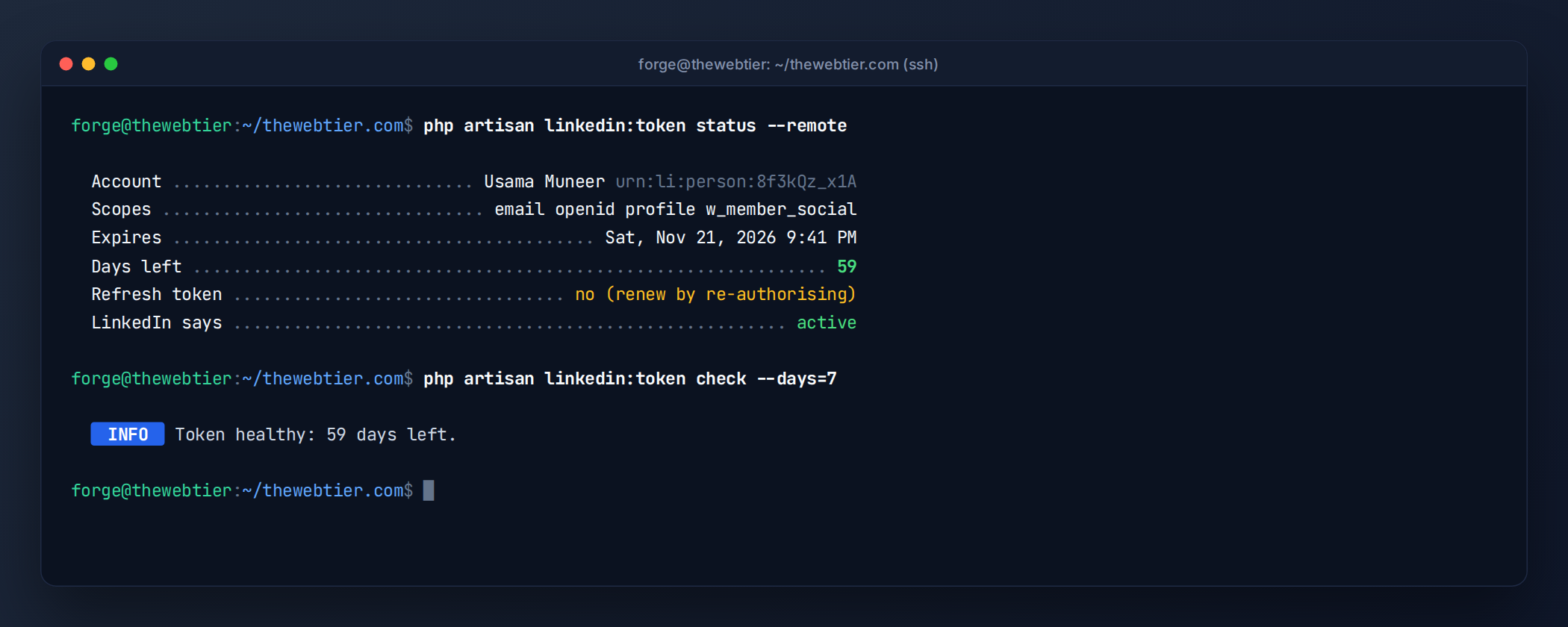
linkedin:token status --remote compares your database with LinkedIn's own view of the token.
Step 6: Schedule the check
In Laravel 11 and later, schedules live in routes/console.php:
// routes/console.php
use Illuminate\Support\Facades\Schedule;

Schedule::command('linkedin:token check --days=7')
    ->dailyAt('09:00')
    ->timezone('Europe/London')
    ->onOneServer()
    ->withoutOverlapping();
Make sure the scheduler runs every minute via cron (see Laravel task scheduling):
* * * * * cd /var/www/yoursite && php artisan schedule:run >> /dev/null 2>&1
From now on you'll get an email when 7 days remain. Click Reconnect LinkedIn while logged in to LinkedIn, and the redirect goes straight back with a new 60-day token. The callback from Part 2 stores it, and the reminder resets.
Every way to generate a new token
| Method | When to use | Command / action |
|---|---|---|
| One-click reconnect | Normal renewal, from the reminder email | route('linkedin.connect') |
| Artisan OAuth flow | SSH-only servers, no admin UI | php artisan linkedin:auth |
| Programmatic refresh | Only if LinkedIn granted refresh tokens | Automatic, or php artisan linkedin:token refresh |
| Developer Portal Token Generator | Quick fixes, local testing | Token Generator → php artisan linkedin:token import |
All four write to the same linkedin_tokens row, so the share command in Part 4 doesn't care which one you used.
Common renewal errors
| Error | Meaning | Fix |
|---|---|---|
401 with EMPTY_ACCESS_TOKEN / INVALID_ACCESS_TOKEN | Expired or revoked | Reconnect / linkedin:auth |
400 invalid_request "refresh token is invalid, expired or revoked" | Refresh token over 365 days old or revoked | Full re-authorisation |
| Token "valid" in DB but posts fail with 401 | Revoked early (password change, app removed) | linkedin:token status --remote, then reconnect |
| All old tokens died after reconnecting | You requested a different scope set | Keep one constant scope list |
DecryptException when reading token | APP_KEY rotated | Re-auth, or set APP_PREVIOUS_KEYS |
Key takeaways
- LinkedIn access tokens live 60 days. Refresh tokens are partner-only and never extend past 365 days.
- Renew before expiry and it usually takes one click with no consent screen.
- Let the scheduler watch expiry and revocation for you, and treat "re-auth required" as its own failure type.
Next up
Part 4: Share Laravel Blog Posts to LinkedIn with an Artisan Command →: thumbnail uploads, article posts and the post:share command.
Further reading: LinkedIn programmatic refresh tokens, Token introspection, Laravel notifications.