
When you publish a post on your Laravel blog, it should reach your LinkedIn audience without you copying links, pasting excerpts or cropping thumbnails by hand. That is how we share every article here on The Web Tier: one artisan command, php artisan post:share, which runs automatically on a schedule.
Also Read: Livewire 4 Islands in Filament: Where They Actually Help
Getting there takes more than one API call. You need a LinkedIn developer app, an OAuth 2.0 access token, a way to renew that token every 60 days without a support ticket to yourself, and a share command that uploads the thumbnail, builds the post and never shares the same article twice.
This guide is the hub for a four-part series that covers each piece in depth. Start here to see the whole picture, then work through the parts in order.
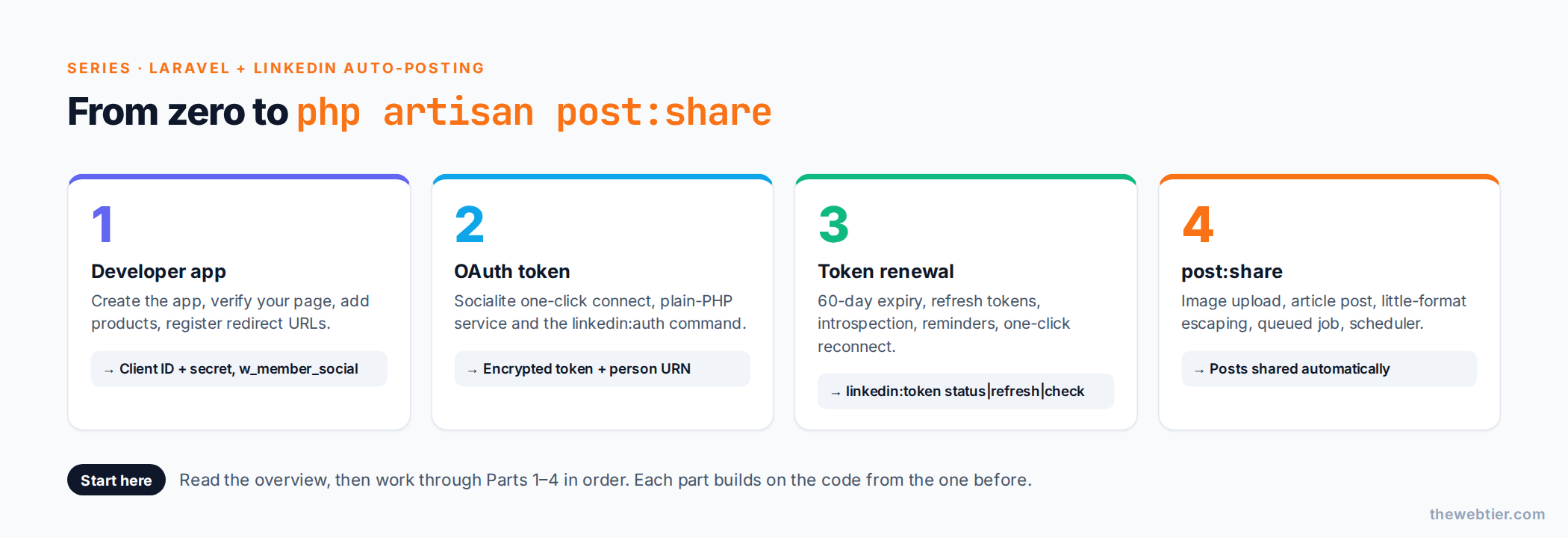 The four parts of the series and what each one produces.
Also Read: Filament on Laravel 13: The Complete Compatibility Checklist
What you'll build
By the end of the series your Laravel app will:
- Hold LinkedIn credentials in
config/services.phpand your.env, never in code. - Connect your LinkedIn account with one click (or one artisan command) and store the token encrypted in the database.
- Know when the token expires, warn you a week before, and let you renew in a single click, without the consent screen if you are still logged in.
- Upload the post's featured image to LinkedIn, build an article post using the current versioned Posts API, and save the returned post URN so nothing is shared twice.
- Run all of this from
php artisan post:share, queued and scheduled.
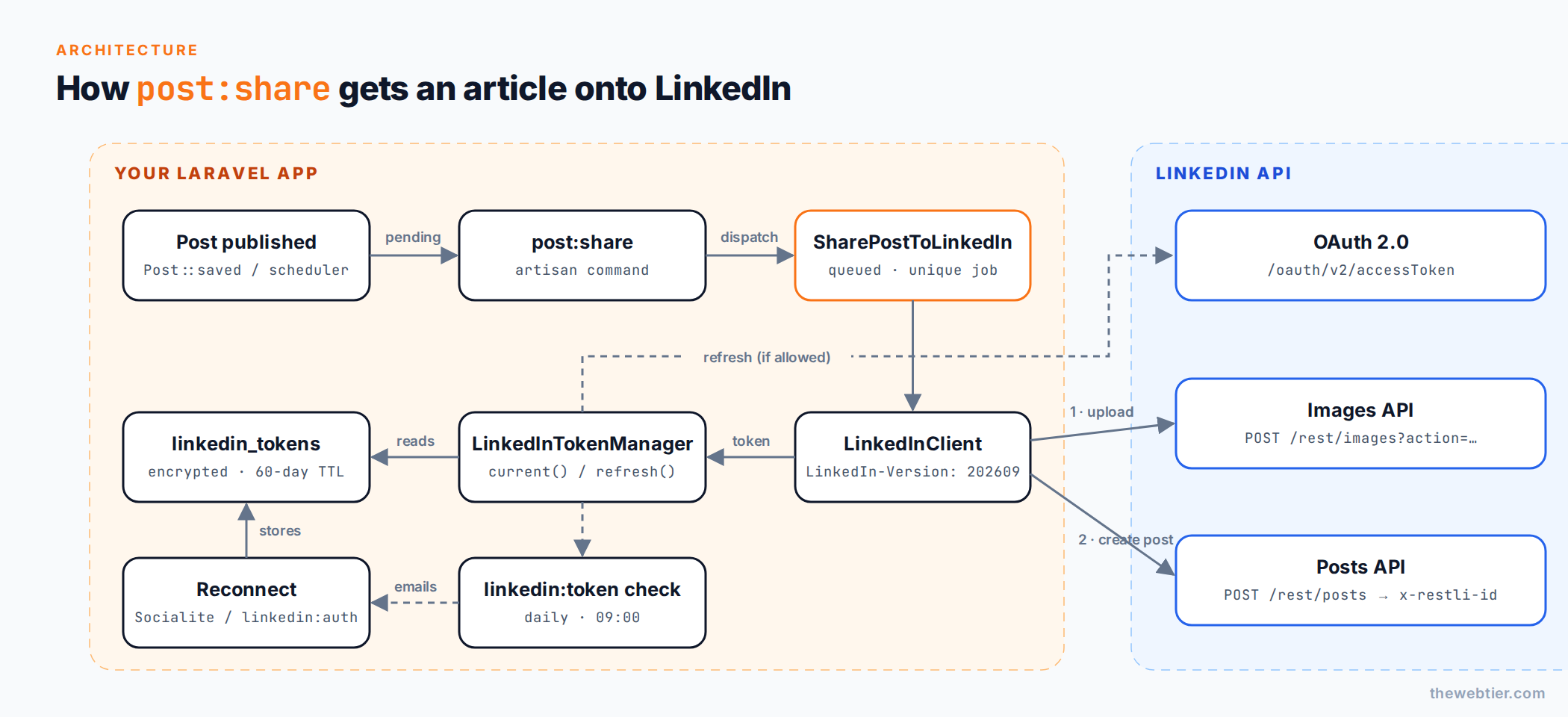 How the pieces fit together. Every arrow is covered in one of the parts below.
The series
Part 1: Create and configure a LinkedIn developer app
How to Create a LinkedIn Developer App for Laravel walks through the LinkedIn Developer Portal: creating the app, verifying its company page, adding the Share on LinkedIn and Sign In with LinkedIn using OpenID Connect products, and registering redirect URLs. It also explains why company-page posting is a separate, reviewed product.
You'll leave with: a Client ID, a Client Secret and the w_member_social scope.
Also Read: Laravel and PHP
Part 2: Get a LinkedIn OAuth access token in Laravel
LinkedIn OAuth 2.0 Access Token in Laravel implements the authorization code flow twice: once with Laravel Socialite for the web, and once in plain PHP with Laravel's HTTP client, using a php artisan linkedin:auth command that works over SSH.
You'll leave with: an encrypted token row in the database and your person URN (urn:li:person:…).
Part 3: Renew your LinkedIn token again and again
Renew LinkedIn Access Tokens Automatically in Laravel handles the part most tutorials skip. LinkedIn access tokens live for 60 days, and programmatic refresh tokens are only issued to approved partners. You'll build a token manager that refreshes when it can, a scheduled check that emails you before expiry, and a one-click reconnect that usually skips the consent screen.
Also Read: Best Filament Themes and PHP Starter Kits for 2026 (v5-Ready)
You'll leave with: php artisan linkedin:token status|refresh|check and a token that never lapses without warning.
Part 4: The post:share artisan command
Share Laravel Blog Posts to LinkedIn with an Artisan Command puts it together: an image upload through the Images API, an article post with title, description and thumbnail, correct escaping for LinkedIn's "little" text format, a queued job with retries, and a scheduler entry that shares new posts automatically.
You'll leave with: php artisan post:share --latest, --pending, --dry-run and --force.
Also Read: Claude Code & Cursor on Filament: AI Agent Rules That Work - Laravel
Requirements
- Laravel 11, 12 or 13. Code examples use Laravel 13 conventions (
routes/console.phpfor scheduling, theQueueabletrait), and the same code runs on Laravel 11 and 12. - PHP 8.3+, which Laravel 13 requires.
- A queue worker (database, Redis or Horizon) and the scheduler running via cron.
- A LinkedIn company page you administer. LinkedIn requires one to create a developer app, even if you only post as yourself.
- An HTTPS domain for the OAuth redirect URL.
Key LinkedIn facts to know up front
| Thing | Value (September 2026) | Why it matters |
|---|---|---|
| Access token lifetime | 60 days | You must renew. See Part 3. |
| Refresh tokens | Approved partners only (365-day TTL) | Most blogs get none and renew by re-authorising |
| Auth code lifetime | 30 minutes | Exchange it immediately |
| Scope to post as yourself | w_member_social | From the Share on LinkedIn product |
| Scope to post as a page | w_organization_social | Needs the reviewed Community Management API |
| Posts endpoint | POST https://api.linkedin.com/rest/posts | Replaces the legacy ugcPosts API |
| Required headers | LinkedIn-Version: YYYYMM, X-Restli-Protocol-Version: 2.0.0 | Versions are sunset after about a year |
| Member rate limit | 150 requests/day | Plenty for a blog, too few for bulk back-fills |
Sources: LinkedIn 3-legged OAuth, Refresh tokens, Share on LinkedIn, API versioning.
Why not just use a share button?
A share button (linkedin.com/sharing/share-offsite?url=…) is great for readers, and we have them on every post. It still needs a human to click it, though, and LinkedIn decides which title and image to scrape. The API route gives you:
- Automation. Posts go out on publish, with no manual step.
- Control. You choose the commentary, hashtags, title, description and thumbnail.
- Traceability. You store the post URN, so you can link to it, avoid duplicates and delete it later.
Frequently asked questions
Can I post to a LinkedIn company page instead of my profile? Yes, with the w_organization_social scope, which comes from the Community Management API. It needs LinkedIn's review. The code in Part 4 already takes an author URN, so switching from urn:li:person:… to urn:li:organization:… is a one-line change once you're approved.
Does this work without Socialite? Yes. Part 2 includes a dependency-free version that uses only Laravel's HTTP client, and the same classes power the CLI flow.
Also Read: How to Create a WordPress Plugin from Scratch (2026 Guide)
How often do I have to log in to LinkedIn again? Without refresh tokens, once every 60 days at most. The scheduled check in Part 3 emails you in advance, and if you're still signed in to LinkedIn, reconnecting is a single redirect.
Will LinkedIn show my article's image automatically? No. The Posts API does not scrape URLs for article posts. You must upload the thumbnail and send the title and description yourself. Part 4 does this for you.
Start the series
Go to Part 1: How to Create a LinkedIn Developer App for Laravel →
More Laravel guides: Implementing Roles and Permissions in Laravel (useful for protecting the LinkedIn connect routes) and Carbon Immutable vs Mutable in Laravel (we use immutable dates for token expiry).
