
Series: Laravel + LinkedIn Auto-Posting Overview · Part 1: Developer app · Part 2: OAuth token · Part 3: Token renewal · Part 4: post:share command
This is the payoff. You have a LinkedIn app (Part 1), a stored token (Part 2) and renewal that looks after itself (Part 3). Now we build the command we use on The Web Tier to publish every article to LinkedIn:
php artisan post:share --latest
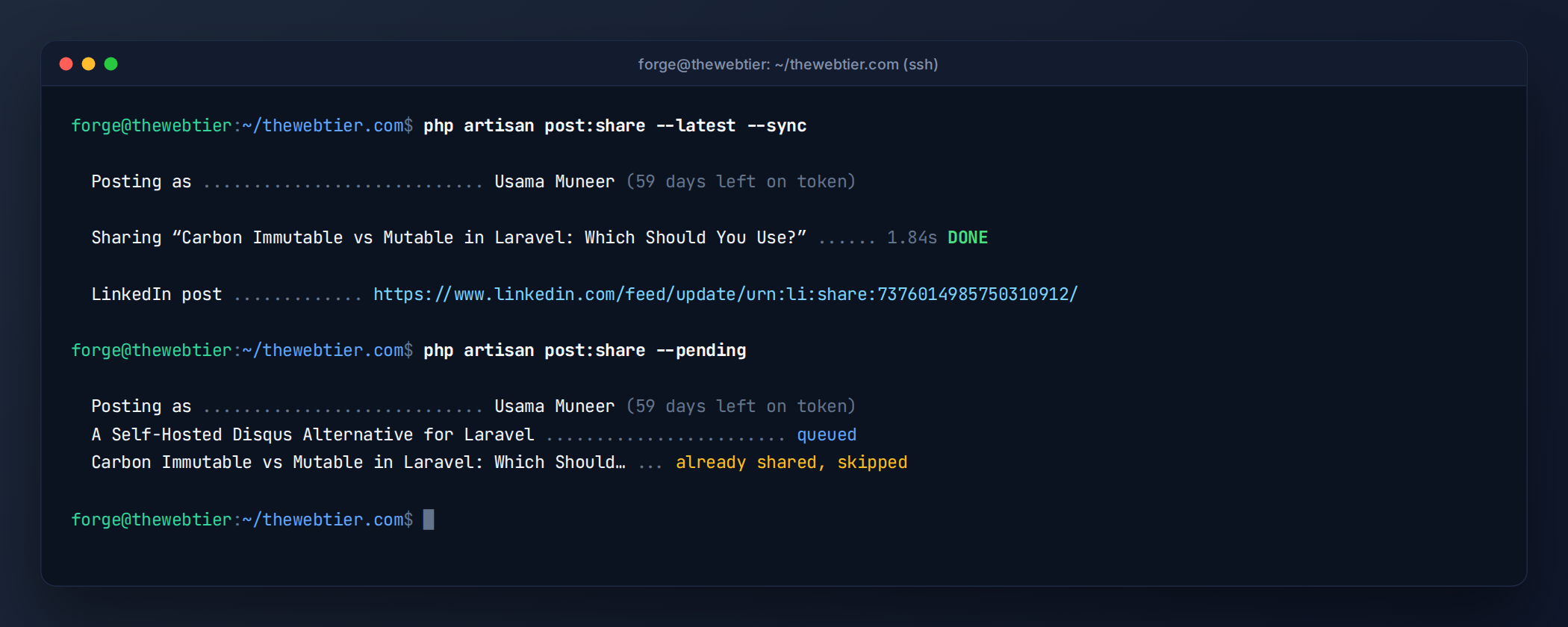 One command: upload the thumbnail, create the article post, save the post URN.
Also Read: WordPress Development Guide
You'll build four pieces:
LinkedInClient: a thin wrapper around the versioned REST API (images and posts).LinkedInPostBuilder: turns aPostmodel into a valid Posts API payload, with escaping.SharePostToLinkedIn: a queued, unique, retry-aware job.post:share: the artisan command, with--latest,--pending,--dry-run,--force,--messageand--sync.
Adapting to your own blog: the examples assume a
Postmodel withtitle,slug,excerpt,published_at, afeatured_image_urland aurlaccessor, plus atagsrelation. If your column names differ, change them inLinkedInPostBuilderonly. Nothing else touches the model's shape.
How LinkedIn article posts work (and why most tutorials get it wrong)
Many older tutorials still use POST /v2/ugcPosts with shareMediaCategory: ARTICLE. That API is legacy. The current endpoint is the versioned Posts API:
POST https://api.linkedin.com/rest/posts
Authorization: Bearer {token}
LinkedIn-Version: 202609
X-Restli-Protocol-Version: 2.0.0
Content-Type: application/json
The key detail from LinkedIn's docs: the Posts API does not scrape your URL. If you send only a link, you get a bare post with no card image. For a proper article card you must send:
content.article.source: the article URLcontent.article.titleandcontent.article.descriptioncontent.article.thumbnail: an image URN you uploaded first through the Images API
So sharing one article takes three HTTP calls: initialise upload → PUT the image bytes → create the post. A successful post returns 201 Created, with the new post's ID in the x-restli-id response header (for example urn:li:share:7234…).
Also Read: WordPress Development and PHP
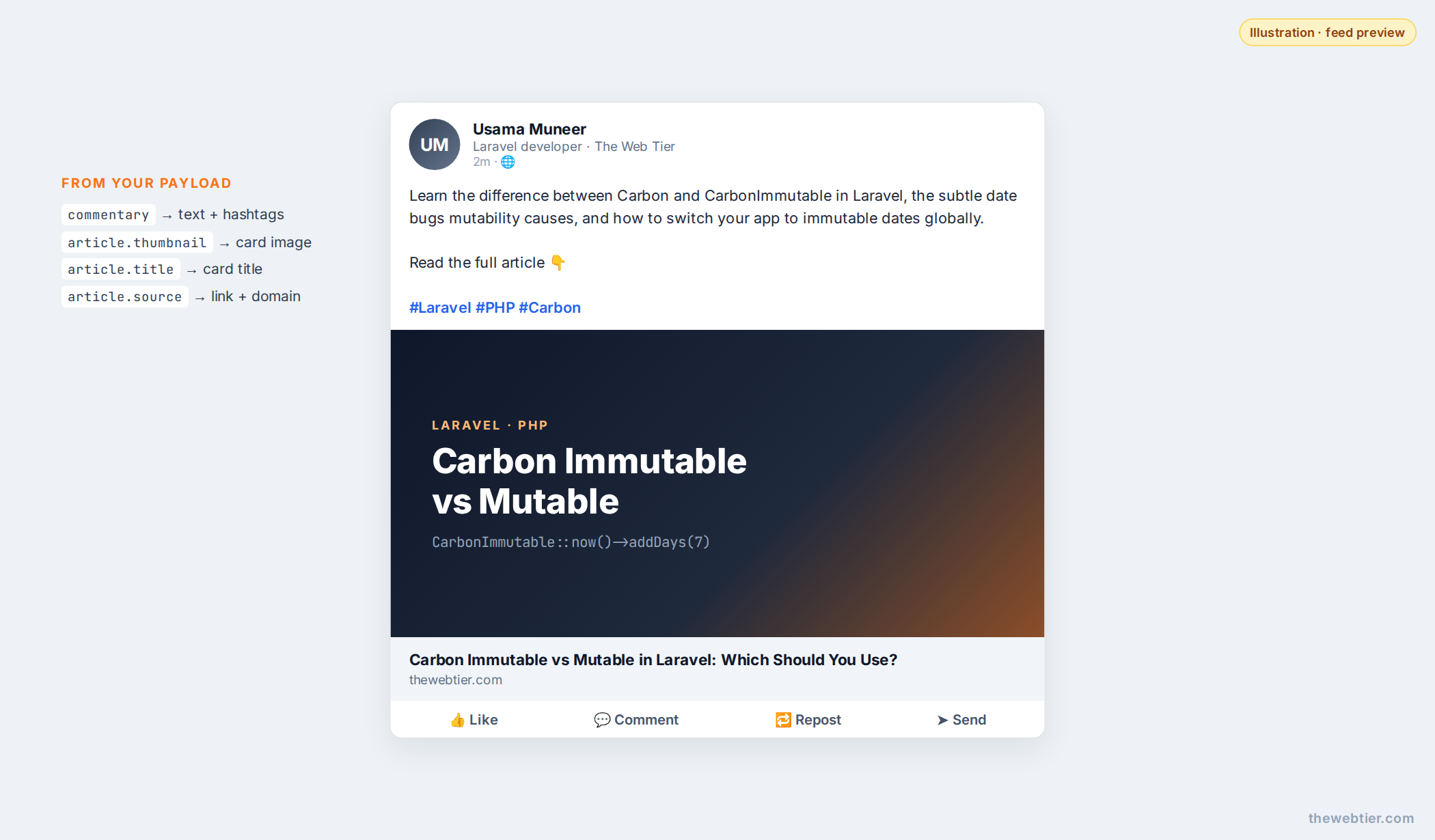 Illustration: the finished article post, with commentary and hashtags above a card built from the uploaded thumbnail, title and domain.
Also Read: WordPress Development Guide
Step 1: Track what's been shared
php artisan make:migration add_linkedin_columns_to_posts_table
public function up(): void
{
    Schema::table('posts', function (Blueprint $table) {
        $table->string('linkedin_post_urn')->nullable()->after('published_at');
        $table->timestamp('linkedin_shared_at')->nullable()->after('linkedin_post_urn');
        $table->index('linkedin_post_urn');
    });
}
Storing the URN is what makes the whole thing idempotent: a post with a URN is never shared again unless you pass --force. You can also link to the LinkedIn post from your admin panel, or delete it through the API later.
Also Read: WordPress Development: Prepare a WordPress
Step 2: The LinkedIn API client
// app/Services/LinkedIn/LinkedInClient.php
namespace App\Services\LinkedIn;

use App\Models\LinkedInToken;
use Illuminate\Http\Client\ConnectionException;
use Illuminate\Http\Client\PendingRequest;
use Illuminate\Http\Client\RequestException;
use Illuminate\Support\Facades\Http;
use Illuminate\Support\Facades\Log;
use RuntimeException;
use Throwable;

final class LinkedInClient
{
    private const BASE_URL = 'https://api.linkedin.com/rest';

    /** The Images API accepts JPG, PNG and GIF only. */
    private const IMAGE_TYPES = ['image/jpeg', 'image/png', 'image/gif'];

    private function api(LinkedInToken $token): PendingRequest
    {
        return Http::baseUrl(self::BASE_URL)
            ->withToken($token->access_token)
            ->withHeaders([
                'LinkedIn-Version'          => config('services.linkedin-openid.api_version'),
                'X-Restli-Protocol-Version' => '2.0.0',
            ])
            ->acceptJson()
            ->asJson()
            ->timeout(30)
            // Retry network blips only. HTTP errors are handled by the caller.
            ->retry(2, 1000, fn (Throwable $e) => $e instanceof ConnectionException);
    }

    /**
     * Upload an image from a public URL and return its urn:li:image:… (or null on failure).
     */
    public function uploadImageFromUrl(LinkedInToken $token, ?string $url): ?string
    {
        if (blank($url)) {
            return null;
        }

        try {
            $image = Http::timeout(20)->get($url)->throw();
            $mime = strtolower(trim(explode(';', (string) $image->header('Content-Type'))[0]));

            if (! in_array($mime, self::IMAGE_TYPES, true)) {
                Log::warning('LinkedIn thumbnail skipped: unsupported type', compact('url', 'mime'));

                return null;
            }

            // 1) Register the upload
            $upload = $this->api($token)
                ->post('images?action=initializeUpload', [
                    'initializeUploadRequest' => ['owner' => $token->owner_urn],
                ])
                ->throw()
                ->json('value');

            // 2) PUT the bytes to the pre-signed upload URL
            Http::withToken($token->access_token)
                ->withBody($image->body(), $mime)
                ->timeout(60)
                ->put($upload['uploadUrl'])
                ->throw();

            return $upload['image']; // urn:li:image:C4E10AQ…
        } catch (RequestException|ConnectionException $e) {
            Log::warning('LinkedIn thumbnail upload failed, posting without image', [
                'url'   => $url,
                'error' => $e->getMessage(),
            ]);

            return null;
        }
    }

    /**
     * Create a post and return its URN (urn:li:share:… or urn:li:ugcPost:…).
     */
    public function createPost(LinkedInToken $token, array $payload): string
    {
        $response = $this->api($token)->post('posts', $payload)->throw();

        return $response->header('x-restli-id')
            ?: throw new RuntimeException('LinkedIn returned no post ID: '.$response->body());
    }

    public function deletePost(LinkedInToken $token, string $postUrn): void
    {
        $this->api($token)->delete('posts/'.rawurlencode($postUrn))->throw();
    }

    public static function postUrl(string $postUrn): string
    {
        return "https://www.linkedin.com/feed/update/{$postUrn}/";
    }
}
Notes:
- A thumbnail failure never blocks the post. You'd rather have a plain article post than none at all.
- WebP featured images are skipped because the Images API doesn't accept them. If your blog serves WebP, keep a JPG/PNG copy for social sharing (you probably already have one for
og:image). - The API version comes from config, so when LinkedIn sunsets a version you only need to update
.env(Part 1).
Step 3: Build the payload (and escape LinkedIn's "little" text format)
commentary isn't plain text. It uses LinkedIn's little text format, where these characters are reserved:
| { } @ [ ] ( ) < > # \ * _ ~
If you don't escape them, LinkedIn may silently truncate your post at the first ( or treat @ as a broken mention. It's the most common "my post got cut off" bug. The builder escapes the excerpt and then adds real hashtags unescaped:
// app/Services/LinkedIn/LinkedInPostBuilder.php
namespace App\Services\LinkedIn;

use App\Models\Post;
use Illuminate\Support\Str;

final class LinkedInPostBuilder
{
    private const MAX_COMMENTARY = 3000;
    private const MAX_HASHTAGS = 5;

    public function build(Post $post, string $authorUrn, ?string $thumbnailUrn = null, ?string $message = null): array
    {
        return [
            'author'     => $authorUrn,
            'commentary' => $this->commentary($post, $message),
            'visibility' => 'PUBLIC',
            'distribution' => [
                'feedDistribution'               => 'MAIN_FEED',
                'targetEntities'                 => [],
                'thirdPartyDistributionChannels' => [],
            ],
            'content' => [
                'article' => array_filter([
                    'source'      => $post->url,
                    'title'       => Str::limit($post->title, 200, ''),
                    'description' => Str::limit($this->plain($post->excerpt), 250),
                    'thumbnail'   => $thumbnailUrn,
                ]),
            ],
            'lifecycleState'            => 'PUBLISHED',
            'isReshareDisabledByAuthor' => false,
        ];
    }

    public function commentary(Post $post, ?string $message = null): string
    {
        $text = self::escape($this->plain($message ?: ($post->excerpt ?: $post->title)));

        $hashtags = $post->tags
            ->take(self::MAX_HASHTAGS)
            ->map(fn ($tag) => Str::studly(preg_replace('/[^\pL\pN]+/u', ' ', $tag->name)))
            ->filter()
            ->map(fn (string $tag) => '#'.$tag)
            ->implode(' ');

        $body = $text."\n\nRead the full article 👇";

        if ($hashtags !== '') {
            $body .= "\n\n".$hashtags;
        }

        return Str::limit($body, self::MAX_COMMENTARY, '');
    }

    /** Escape LinkedIn "little" format reserved characters. */
    public static function escape(string $text): string
    {
        return preg_replace('/([\\\\|{}@\[\]()<>#*_~])/u', '\\\\$1', $text);
    }

    private function plain(?string $html): string
    {
        return trim(html_entity_decode(strip_tags((string) $html), ENT_QUOTES | ENT_HTML5, 'UTF-8'));
    }
}
For a tag named Laravel 13 you get #Laravel13, and OAuth 2.0 becomes #OAuth20. Hashtags can't contain spaces or punctuation.
Also Read: How to Submit a Plugin PHP to WordPress.org (and Pass Review)
Step 4: The queued job
Posting belongs on the queue: it makes several network calls, and you don't want a slow LinkedIn response holding up a web request or blocking other scheduled commands.
php artisan make:job SharePostToLinkedIn
// app/Jobs/SharePostToLinkedIn.php
namespace App\Jobs;

use App\Models\LinkedInToken;
use App\Models\Post;
use App\Notifications\LinkedInTokenExpiring;
use App\Services\LinkedIn\LinkedInClient;
use App\Services\LinkedIn\LinkedInPostBuilder;
use App\Services\LinkedIn\LinkedInReauthRequired;
use App\Services\LinkedIn\LinkedInTokenManager;
use Illuminate\Contracts\Queue\ShouldBeUnique;
use Illuminate\Contracts\Queue\ShouldQueue;
use Illuminate\Foundation\Queue\Queueable;
use Illuminate\Http\Client\RequestException;
use Illuminate\Support\Facades\Log;
use Illuminate\Support\Facades\Notification;

class SharePostToLinkedIn implements ShouldQueue, ShouldBeUnique
{
    use Queueable;

    public int $tries = 3;
    public int $uniqueFor = 600; // no duplicate jobs for the same post within 10 minutes

    public function __construct(
        public Post $post,
        public ?string $message = null,
        public bool $force = false,
    ) {}

    public function uniqueId(): string
    {
        return 'linkedin-share-'.$this->post->getKey();
    }

    public function backoff(): array
    {
        return [60, 300];
    }

    public function handle(LinkedInClient $linkedin, LinkedInPostBuilder $builder, LinkedInTokenManager $tokens): void
    {
        $post = $this->post->fresh(['tags']);

        if ($post->linkedin_post_urn && ! $this->force) {
            return; // already shared
        }

        try {
            $token = $tokens->current(); // refreshes when possible (Part 3)
            $thumbnail = $linkedin->uploadImageFromUrl($token, $post->featured_image_url);
            $urn = $linkedin->createPost($token, $builder->build($post, $token->owner_urn, $thumbnail, $this->message));
        } catch (LinkedInReauthRequired $e) {
            $this->alert('expired');
            $this->fail($e);

            return;
        } catch (RequestException $e) {
            $status = $e->response->status();

            Log::error('LinkedIn share failed', ['post' => $post->getKey(), 'status' => $status, 'body' => $e->response->json()]);

            match (true) {
                $status === 401 => $this->alert('revoked'),     // token dead before expiry
                $status === 429 => $this->release(3600),        // daily limit hit, try again in an hour
                $status >= 500  => throw $e,                    // LinkedIn hiccup, retry with backoff
                default         => null,                        // 400/403/422: retrying won't help
            };

            if ($status !== 429) {
                $this->fail($e);
            }

            return;
        }

        $post->forceFill([
            'linkedin_post_urn'  => $urn,
            'linkedin_shared_at' => now(),
        ])->save();

        Log::info('Shared to LinkedIn', ['post' => $post->getKey(), 'urn' => $urn]);
    }

    private function alert(string $reason): void
    {
        if ($token = LinkedInToken::query()->latest('expires_at')->first()) {
            Notification::route('mail', config('services.linkedin-openid.notify_email'))
                ->notify(new LinkedInTokenExpiring($token, $reason));
        }
    }
}
Why these choices:
ShouldBeUnique: if the scheduler and a manualpost:sharerun at the same moment, only one job runs. This is part of the unique jobs feature and needs a lock-capable cache.- 4xx errors fail immediately. A bad payload won't fix itself, so retrying just burns your 150-requests-per-day member limit.
- 5xx errors are thrown, so Laravel retries after 60s and then 300s.
- Auth failures email you with the reconnect link from Part 3.
Step 5: The post:share artisan command
php artisan make:command SharePostCommand
// app/Console/Commands/SharePostCommand.php
namespace App\Console\Commands;

use App\Jobs\SharePostToLinkedIn;
use App\Models\Post;
use App\Services\LinkedIn\LinkedInClient;
use App\Services\LinkedIn\LinkedInPostBuilder;
use App\Services\LinkedIn\LinkedInReauthRequired;
use App\Services\LinkedIn\LinkedInTokenManager;
use Illuminate\Console\Command;
use Illuminate\Database\Eloquent\Collection;
use Throwable;

class SharePostCommand extends Command
{
    protected $signature = 'post:share
        {post? : Post ID or slug}
        {--latest : Share the most recently published post}
        {--pending : Share published posts from the last 7 days that are not on LinkedIn yet}
        {--message= : Custom commentary instead of the excerpt}
        {--dry-run : Print the LinkedIn payload without posting}
        {--force : Share again even if already shared}
        {--sync : Post now instead of queueing}';

    protected $description = 'Share blog posts to LinkedIn';

    public function handle(LinkedInPostBuilder $builder, LinkedInTokenManager $tokens): int
    {
        $posts = $this->resolvePosts();

        if ($posts === null) {
            $this->components->error('Pass a post ID/slug, --latest or --pending.');

            return self::INVALID;
        }

        if ($posts->isEmpty()) {
            $this->components->info('Nothing to share.');

            return self::SUCCESS;
        }

        if ($this->option('dry-run')) {
            $posts->each(fn (Post $post) => $this->line(json_encode(
                $builder->build($post, 'urn:li:person:DRY_RUN', 'urn:li:image:DRY_RUN', $this->option('message')),
                JSON_PRETTY_PRINT | JSON_UNESCAPED_SLASHES | JSON_UNESCAPED_UNICODE,
            )));

            return self::SUCCESS;
        }

        try {
            $token = $tokens->current(); // fail fast before queueing anything
        } catch (LinkedInReauthRequired $e) {
            $this->components->error($e->getMessage());

            return self::FAILURE;
        }

        $this->components->twoColumnDetail('Posting as', "{$token->name} <fg=gray>({$token->daysLeft()} days left on token)</>");

        foreach ($posts as $post) {
            if ($post->linkedin_post_urn && ! $this->option('force')) {
                $this->components->twoColumnDetail($post->title, '<fg=yellow>already shared, skipped</>');

                continue;
            }

            $job = new SharePostToLinkedIn($post, $this->option('message'), (bool) $this->option('force'));

            if (! $this->option('sync')) {
                dispatch($job);
                $this->components->twoColumnDetail($post->title, '<fg=blue>queued</>');

                continue;
            }

            try {
                $this->components->task("Sharing “{$post->title}”", fn () => dispatch_sync($job));
            } catch (Throwable $e) {
                $this->components->error($e->getMessage());

                return self::FAILURE;
            }

            if ($urn = $post->fresh()->linkedin_post_urn) {
                $this->components->twoColumnDetail('LinkedIn post', LinkedInClient::postUrl($urn));
            } else {
                $this->components->warn('Not shared. Check storage/logs for the LinkedIn response.');
            }
        }

        return self::SUCCESS;
    }

    private function resolvePosts(): ?Collection
    {
        $published = Post::query()
            ->with('tags')
            ->whereNotNull('published_at')
            ->where('published_at', '<=', now());

        $id = $this->argument('post');

        return match (true) {
            filled($id) => $published
                ->where(is_numeric($id) ? 'id' : 'slug', $id)
                ->get(),

            (bool) $this->option('latest') => $published
                ->latest('published_at')
                ->limit(1)
                ->get(),

            (bool) $this->option('pending') => $published
                ->whereNull('linkedin_post_urn')
                ->where('published_at', '>=', now()->subDays(7)) // don't back-fill the archive
                ->oldest('published_at')
                ->limit(10)
                ->get(),

            default => null,
        };
    }
}
Using it
# Preview the exact JSON that will be sent. Makes no API calls.
php artisan post:share --latest --dry-run

# Share the newest post right now and print the LinkedIn URL
php artisan post:share --latest --sync

# Share a specific post by slug, with custom commentary
php artisan post:share carbon-immutable-vs-mutable-in-laravel-which-should-you-use \
  --message="Stop mutating your dates by accident. Here's how we switched to CarbonImmutable app-wide."

# Queue everything published this week that isn't on LinkedIn yet
php artisan post:share --pending

# Re-share an older post (for example after a major update)
php artisan post:share 412 --force
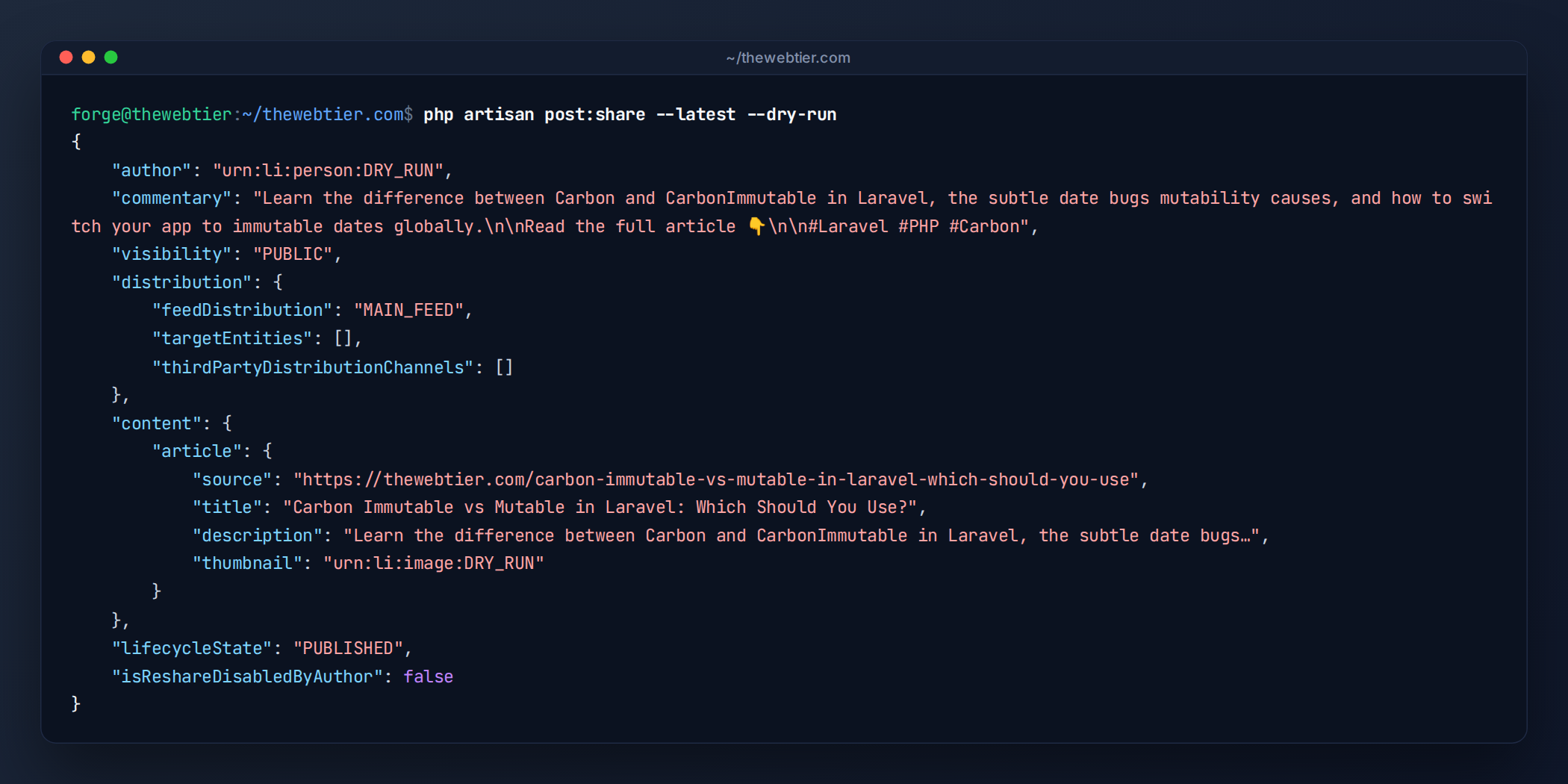
--dry-run shows the payload without calling LinkedIn. Use it to check escaping and hashtags.
Also Read: Publish a WordPress Plugin with SVN & GitHub Actions
Step 6: Share new posts automatically
Scheduling --pending handles instant publishes and future-dated posts, because a post is picked up as soon as its published_at passes:
// routes/console.php
use Illuminate\Support\Facades\Schedule;

Schedule::command('post:share --pending')
    ->everyFifteenMinutes()
    ->onOneServer()
    ->withoutOverlapping();

Schedule::command('linkedin:token check --days=7')->dailyAt('09:00'); // from Part 3
Prefer an instant share when you click Publish? Dispatch from a model observer as well. The unique job and the stored URN stop it from posting twice:
// app/Observers/PostObserver.php
public function saved(Post $post): void
{
    if ($post->wasChanged('published_at') && $post->published_at?->isPast() && ! $post->linkedin_post_urn) {
        SharePostToLinkedIn::dispatch($post)->delay(now()->addMinutes(2)); // time for caches/CDN to warm
    }
}
Keep a queue worker running (Supervisor or Horizon):
php artisan queue:work --tries=3
Posting as a company page instead
Once LinkedIn approves the Community Management API for your app (Part 1), reconnect with the w_organization_social scope and pass your page URN as the author:
$builder->build($post, 'urn:li:organization:12345678', $thumbnail);
Upload the thumbnail with the organization as owner as well, because image owner and post author must match. You need to be an ADMINISTRATOR, CONTENT_ADMIN or DIRECT_SPONSORED_CONTENT_POSTER on the page.
Troubleshooting
| Response | Likely cause | Fix |
|---|---|---|
401 EMPTY_ACCESS_TOKEN / INVALID_ACCESS_TOKEN | Token expired/revoked | php artisan linkedin:auth (Part 3) |
403 ACCESS_DENIED | Missing w_member_social, or posting as a page without w_organization_social | Add the product, then reconnect |
426 / "version is not active" | Your LinkedIn-Version has been sunset | Bump LINKEDIN_API_VERSION (versions) |
400 INVALID_URN_TYPE on thumbnail | Sent an image URL instead of urn:li:image:… | Upload through the Images API first |
422 on create | Duplicate content or invalid field combination | Change the commentary; check --dry-run output |
Post cut off after ( or @ | Unescaped little-format characters | Use LinkedInPostBuilder::escape() |
| Article card has no image | Thumbnail skipped (WebP, 404, upload failed) | Check logs for "thumbnail skipped" |
429 TOO_MANY_REQUESTS | Member daily limit (150) | Job releases for an hour; don't back-fill in bulk |
Final checklist
- App has Share on LinkedIn + OpenID Connect (Part 1)
- Token stored and encrypted (Part 2)
linkedin:token checkscheduled (Part 3)posts.linkedin_post_urncolumn migratedpost:share --latest --dry-runoutput looks right- Queue worker and scheduler running in production
Key takeaways
- Use the versioned Posts API (
/rest/posts) with theLinkedIn-VersionandX-Restli-Protocol-Versionheaders, not the legacyugcPosts. - LinkedIn doesn't scrape article URLs. Upload the thumbnail, then send the title and description yourself.
- Escape the little format, store the post URN, and let a unique queued job do the work.
That completes the series. Go back to the series overview for the full architecture, or browse more guides in our Laravel category.
Further reading: LinkedIn Posts API, Images API, Laravel Artisan console, Laravel queues.
