Series: Laravel + LinkedIn Auto-Posting Overview · Part 1: Developer app · Part 2: OAuth token · Part 3: Token renewal · Part 4: post:share command
You have a LinkedIn app with a Client ID, a Client Secret and the w_member_social scope (Part 1). Next, Laravel needs an access token it can use to post on your behalf, stored so that the queue worker, the scheduler and artisan can all use it.
Also Read: Livewire 4 Islands in Filament: Where They Actually Help
This part builds:
- A
linkedin_tokenstable with encrypted token columns. - A small, dependency-free
LinkedInOAuthservice (plain PHP, Laravel HTTP client). - A one-click web flow using Laravel Socialite.
- A
php artisan linkedin:authcommand for servers where you only have SSH.
How LinkedIn's authorization code flow works
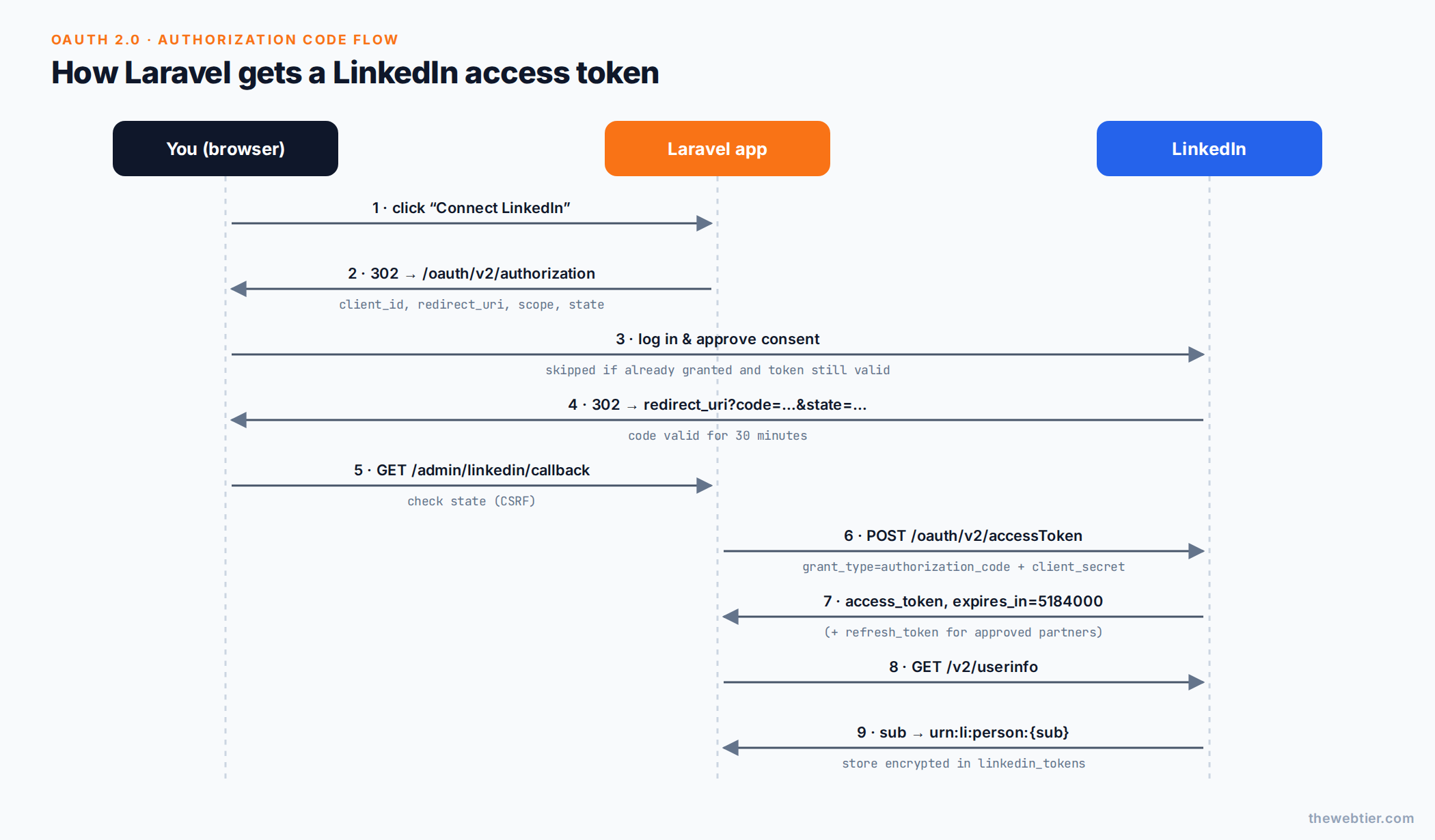 The 3-legged OAuth flow: redirect, consent, code, exchange, token.
- Laravel sends you to
https://www.linkedin.com/oauth/v2/authorizationwith yourclient_id,redirect_uri, thescopelist and a randomstate. - You approve the consent screen.
- LinkedIn redirects back to your
redirect_uriwith?code=…&state=…. - Laravel checks
state, then POSTs the code tohttps://www.linkedin.com/oauth/v2/accessToken. The code expires after 30 minutes. - LinkedIn returns
access_tokenandexpires_in(60 days). Approved partners also getrefresh_token.
Full reference: LinkedIn 3-legged OAuth.
Also Read: Filament on Laravel 13: The Complete Compatibility Checklist
Step 1: The token table and model
php artisan make:model LinkedInToken -m
// database/migrations/xxxx_xx_xx_create_linkedin_tokens_table.php
use Illuminate\Database\Migrations\Migration;
use Illuminate\Database\Schema\Blueprint;
use Illuminate\Support\Facades\Schema;

return new class extends Migration
{
    public function up(): void
    {
        Schema::create('linkedin_tokens', function (Blueprint $table) {
            $table->id();
            $table->string('owner_urn')->unique();     // urn:li:person:xxxx
            $table->string('name')->nullable();
            $table->text('access_token');              // encrypted, so use text
            $table->text('refresh_token')->nullable(); // only for approved partners
            $table->timestamp('expires_at');
            $table->timestamp('refresh_expires_at')->nullable();
            $table->string('scopes')->nullable();
            $table->timestamp('last_notified_at')->nullable();
            $table->timestamps();
        });
    }

    public function down(): void
    {
        Schema::dropIfExists('linkedin_tokens');
    }
};
LinkedIn says tokens are about 500 characters and asks you to allow at least 1,000. After Laravel's encryption they're longer still, so use text, not string.
// app/Models/LinkedInToken.php
namespace App\Models;

use Carbon\CarbonImmutable;
use Illuminate\Database\Eloquent\Model;

class LinkedInToken extends Model
{
    protected $table = 'linkedin_tokens';

    protected $fillable = [
        'owner_urn', 'name', 'access_token', 'refresh_token',
        'expires_at', 'refresh_expires_at', 'scopes', 'last_notified_at',
    ];

    protected $hidden = ['access_token', 'refresh_token'];

    protected function casts(): array
    {
        return [
            'access_token'       => 'encrypted',
            'refresh_token'      => 'encrypted',
            'expires_at'         => 'immutable_datetime',
            'refresh_expires_at' => 'immutable_datetime',
            'last_notified_at'   => 'immutable_datetime',
        ];
    }

    public function isExpired(): bool
    {
        return $this->expires_at->isPast();
    }

    public function expiresWithin(int $days): bool
    {
        return $this->expires_at->lte(CarbonImmutable::now()->addDays($days));
    }

    public function canRefresh(): bool
    {
        return filled($this->refresh_token)
            && ($this->refresh_expires_at === null || $this->refresh_expires_at->isFuture());
    }

    public function daysLeft(): int
    {
        return max(0, (int) floor(CarbonImmutable::now()->diffInDays($this->expires_at, false)));
    }
}
We use immutable_datetime on purpose: calling addDays() on a mutable expiry date changes the stored value by accident. We wrote about this in Carbon Immutable vs Mutable in Laravel.
php artisan migrate
Step 2: A plain-PHP OAuth service
This class has no Socialite dependency. It builds the authorization URL, exchanges codes, refreshes tokens and reads the member profile. The CLI command in Step 5 and the renewal logic in Part 3 both use it.
// app/Services/LinkedIn/LinkedInOAuth.php
namespace App\Services\LinkedIn;

use Illuminate\Support\Facades\Http;

final class LinkedInOAuth
{
    private const AUTHORIZE_URL = 'https://www.linkedin.com/oauth/v2/authorization';
    private const TOKEN_URL     = 'https://www.linkedin.com/oauth/v2/accessToken';
    private const USERINFO_URL  = 'https://api.linkedin.com/v2/userinfo';

    public const SCOPES = ['openid', 'profile', 'email', 'w_member_social'];

    public function authorizationUrl(string $state, string $redirectUri, array $scopes = self::SCOPES): string
    {
        return self::AUTHORIZE_URL.'?'.http_build_query([
            'response_type' => 'code',
            'client_id'     => config('services.linkedin-openid.client_id'),
            'redirect_uri'  => $redirectUri,
            'state'         => $state,
            'scope'         => implode(' ', $scopes),
        ], '', '&', PHP_QUERY_RFC3986);
    }

    /** @return array{access_token: string, expires_in: int, refresh_token?: string, refresh_token_expires_in?: int, scope?: string} */
    public function exchangeCode(string $code, string $redirectUri): array
    {
        return $this->tokenRequest([
            'grant_type'   => 'authorization_code',
            'code'         => $code,
            'redirect_uri' => $redirectUri,
        ]);
    }

    public function refresh(string $refreshToken): array
    {
        return $this->tokenRequest([
            'grant_type'    => 'refresh_token',
            'refresh_token' => $refreshToken,
        ]);
    }

    /** @return array{sub: string, name?: string, email?: string} */
    public function userInfo(string $accessToken): array
    {
        return Http::withToken($accessToken)
            ->acceptJson()
            ->timeout(15)
            ->get(self::USERINFO_URL)
            ->throw()
            ->json();
    }

    private function tokenRequest(array $params): array
    {
        return Http::asForm()
            ->acceptJson()
            ->timeout(15)
            ->post(self::TOKEN_URL, $params + [
                'client_id'     => config('services.linkedin-openid.client_id'),
                'client_secret' => config('services.linkedin-openid.client_secret'),
            ])
            ->throw()
            ->json();
    }
}
A few details that matter:
PHP_QUERY_RFC3986encodes the space between scopes as%20, which is what LinkedIn documents.- The token endpoint expects
application/x-www-form-urlencoded, which is whatasForm()sends. JSON bodies are rejected. - The client secret goes in the POST body, never in the URL.
Step 3: Store the token in one place
Both flows (web and CLI) end the same way, so put the storing logic in one class. Part 3 adds renewal to it.
// app/Services/LinkedIn/LinkedInTokenManager.php
namespace App\Services\LinkedIn;

use App\Models\LinkedInToken;
use Carbon\CarbonImmutable;

class LinkedInTokenManager
{
    public function __construct(private readonly LinkedInOAuth $oauth) {}

    /**
     * Persist a token response from LinkedIn's /accessToken endpoint.
     */
    public function store(array $payload, string $memberId, ?string $name = null): LinkedInToken
    {
        $now = CarbonImmutable::now();

        return LinkedInToken::updateOrCreate(
            ['owner_urn' => 'urn:li:person:'.$memberId],
            [
                'name'               => $name,
                'access_token'       => $payload['access_token'],
                'expires_at'         => $now->addSeconds((int) $payload['expires_in']),
                'refresh_token'      => $payload['refresh_token'] ?? null,
                'refresh_expires_at' => isset($payload['refresh_token_expires_in'])
                    ? $now->addSeconds((int) $payload['refresh_token_expires_in'])
                    : null,
                'scopes'             => $payload['scope'] ?? null,
                'last_notified_at'   => null,
            ],
        );
    }
}
The member ID is the OpenID Connect sub claim, and the post author is urn:li:person:{sub}. Storing it now means you never have to call the profile API when posting.
Also Read: Laravel and PHP
Step 4: One-click web flow with Laravel Socialite
Laravel Socialite ships a linkedin-openid driver that handles state and the code exchange for you.
composer require laravel/socialite
It reads config/services.php → linkedin-openid, which you set up in Part 1.
Also Read: Best Filament Themes and PHP Starter Kits for 2026 (v5-Ready)
Routes
Only you (or other admins) should connect the account. Protect the routes with auth and a gate. See Implementing Roles and Permissions in Laravel if you don't have one yet.
// routes/web.php
use App\Http\Controllers\Admin\LinkedInAuthController;

Route::middleware(['auth', 'can:manage-social'])
    ->prefix('admin/linkedin')
    ->name('linkedin.')
    ->group(function () {
        Route::get('connect',  [LinkedInAuthController::class, 'redirect'])->name('connect');
        Route::get('callback', [LinkedInAuthController::class, 'callback'])->name('callback');
    });

// The CLI flow's landing page (Step 5). It only displays the URL, it never exchanges the code.
Route::get('linkedin/cli-callback', fn () => response(
    'Copy the full URL from your address bar and paste it into your terminal.'
))->middleware('throttle:10,1')->name('linkedin.cli-callback');
Controller
// app/Http/Controllers/Admin/LinkedInAuthController.php
namespace App\Http\Controllers\Admin;

use App\Http\Controllers\Controller;
use App\Services\LinkedIn\LinkedInOAuth;
use App\Services\LinkedIn\LinkedInTokenManager;
use Illuminate\Http\RedirectResponse;
use Illuminate\Http\Request;
use Laravel\Socialite\Facades\Socialite;
use Symfony\Component\HttpFoundation\RedirectResponse as SymfonyRedirect;

class LinkedInAuthController extends Controller
{
    public function redirect(): SymfonyRedirect
    {
        // linkedin-openid already requests openid, profile, email.
        return Socialite::driver('linkedin-openid')
            ->scopes(['w_member_social'])
            ->redirect();
    }

    public function callback(Request $request, LinkedInTokenManager $tokens): RedirectResponse
    {
        if ($request->filled('error')) {
            return to_route('dashboard')->with('error', 'LinkedIn: '.$request->string('error_description'));
        }

        $user = Socialite::driver('linkedin-openid')->user(); // validates state

        $token = $tokens->store([
            'access_token'  => $user->token,
            'expires_in'    => $user->expiresIn,
            'refresh_token' => $user->refreshToken,
            'scope'         => implode(' ', $user->approvedScopes ?? LinkedInOAuth::SCOPES),
        ], memberId: $user->getId(), name: $user->getName());

        return to_route('dashboard')->with(
            'status',
            "LinkedIn connected as {$token->name}. Token valid until {$token->expires_at->toFormattedDayDateString()}."
        );
    }
}
Add a button anywhere in your admin panel:
<a href="{{ route('linkedin.connect') }}" >Connect LinkedIn</a>
Click it, approve, and you're back in the dashboard with a stored token.
Scope warning: LinkedIn invalidates all previous access tokens when you request a different scope set than the one previously granted. Pick your scopes once and keep them in one constant (
LinkedInOAuth::SCOPES).
Step 5: php artisan linkedin:auth for SSH-only servers
Sometimes you don't have an admin UI: a headless API, a fresh server, or a cron-only worker. This command runs the same OAuth flow from your terminal.
Also Read: Claude Code & Cursor on Filament: AI Agent Rules That Work - Laravel
The trick is the separate CLI redirect URL you registered in Part 1. It points at a route that only displays the URL. If it pointed at the web callback, the browser would use up the single-use code before you could paste it.
php artisan make:command LinkedInAuthCommand
// app/Console/Commands/LinkedInAuthCommand.php
namespace App\Console\Commands;

use App\Services\LinkedIn\LinkedInOAuth;
use App\Services\LinkedIn\LinkedInTokenManager;
use Illuminate\Console\Command;
use Illuminate\Http\Client\RequestException;
use Illuminate\Support\Str;

class LinkedInAuthCommand extends Command
{
    protected $signature = 'linkedin:auth';

    protected $description = 'Authorise the app with LinkedIn and store a fresh access token';

    public function handle(LinkedInOAuth $oauth, LinkedInTokenManager $tokens): int
    {
        $redirectUri = config('services.linkedin-openid.cli_redirect');
        $state = Str::random(40);

        $this->components->info('1) Open this URL in a browser where you are logged in to LinkedIn:');
        $this->newLine();
        $this->line('  '.$oauth->authorizationUrl($state, $redirectUri));
        $this->newLine();

        $pasted = $this->ask('2) Paste the full URL you were redirected to');
        parse_str((string) parse_url((string) $pasted, PHP_URL_QUERY), $query);

        if (isset($query['error'])) {
            $this->components->error("LinkedIn returned: {$query['error']} ({$query['error_description']})");

            return self::FAILURE;
        }

        if (! hash_equals($state, (string) ($query['state'] ?? ''))) {
            $this->components->error('State mismatch. Start again and paste the URL from this run.');

            return self::FAILURE;
        }

        try {
            $payload = $oauth->exchangeCode((string) $query['code'], $redirectUri);
            $profile = $oauth->userInfo($payload['access_token']);
        } catch (RequestException $e) {
            $this->components->error('LinkedIn rejected the request: '.$e->response->body());

            return self::FAILURE;
        }

        $token = $tokens->store($payload, $profile['sub'], $profile['name'] ?? null);

        $this->components->twoColumnDetail('Connected as', $token->name ?? '-');
        $this->components->twoColumnDetail('Author URN', $token->owner_urn);
        $this->components->twoColumnDetail('Expires', $token->expires_at->toDayDateTimeString()." ({$token->daysLeft()} days)");
        $this->components->twoColumnDetail('Refresh token', $token->refresh_token ? 'yes' : 'no (re-authorise before expiry)');

        return self::SUCCESS;
    }
}
Run it:
php artisan linkedin:auth
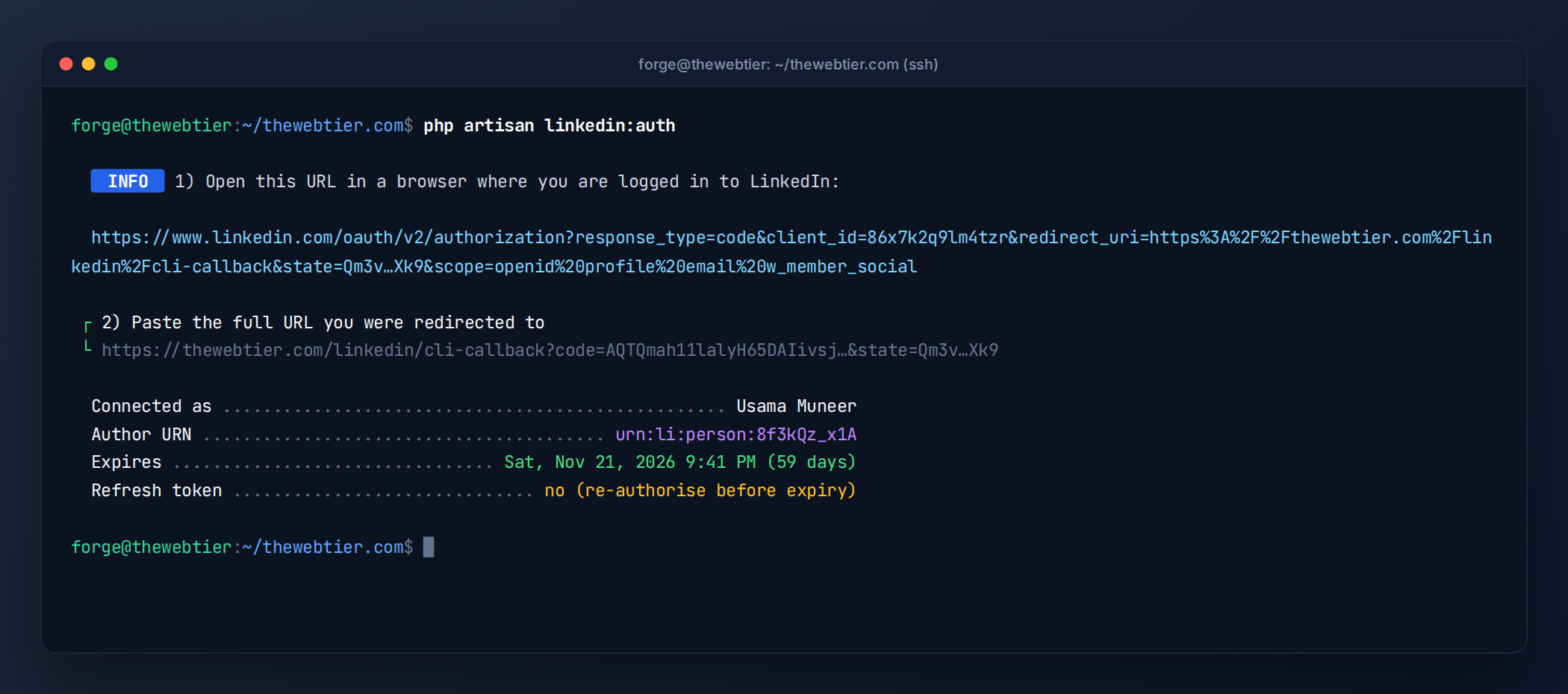 The CLI flow: open the URL, approve, paste the redirected URL, done.
Also Read: How to Create a WordPress Plugin from Scratch (2026 Guide)
You can run this command as often as you like. It updates the same row (keyed by your person URN), so running it again is how you generate a new token whenever you need one. Part 3 automates the reminder.
Step 6: Verify the token works
A quick tinker check:
php artisan tinker
>>> $t = App\Models\LinkedInToken::first();
>>> Http::withToken($t->access_token)->get('https://api.linkedin.com/v2/userinfo')->json('name');
=> "Your Name"
Security checklist
- ✅ Tokens encrypted at rest (
encryptedcast, which uses yourAPP_KEY). RotatingAPP_KEYmakes existing tokens unreadable. Re-runlinkedin:authafterwards, or useAPP_PREVIOUS_KEYS. - ✅
statechecked by Socialite (web) and withhash_equals()(CLI). - ✅ Connect routes behind
authand a gate. - ✅ Tokens in
$hidden, so they never appear in JSON or logs. - ✅ Minimal scopes: posting only needs
w_member_social.
Key takeaways
- The authorization code flow gives you a 60-day token. Save the
subasurn:li:person:{sub}, because that's your post author. - Use Socialite's
linkedin-openiddriver for the one-click web flow, and a plain-PHP service for everything else. php artisan linkedin:authgives you a fresh token from any terminal, as often as you need.
Next up
Part 3: Renew LinkedIn Access Tokens Automatically in Laravel →: refresh tokens, expiry reminders and one-click reconnects.
Further reading: Sign In with LinkedIn using OpenID Connect, Laravel HTTP client, OAuth 2.0 RFC 6749.