You've built the plugin, written the readme and got a clean Plugin Check report. Now you submit a plugin to WordPress.org: a volunteer team reviews it by hand, and once approved it's available to install from every WordPress dashboard.
Also Read: Filament Blueprint Review (2026): Is PHP It Worth It for AI Agents?
This is Part 6 of our series. It covers the submission form, the review process, how to answer the review email, the mistakes that cause most delays, and what happens when you're approved. If you haven't finished the checklist in Part 5, do that first. Most review delays start there.
Also Read: Laravel and PHP
Before you upload: a 2-minute sanity check
- You're logged in to the WordPress.org account that should own the plugin. Ownership is tied to the account that submits.
- Two-factor authentication is on. It's mandatory for plugin owners and committers.
- You have no other plugin waiting in the queue. Authors can generally have one plugin in review at a time, and only authors with over a million active installs can have more.
- The zip is under 10 MB, installs on a clean site, and has no Plugin Check errors.
- The Plugin Name is the one you want forever. Your slug (the URL
wordpress.org/plugins/your-slug/) is generated from it and can't be changed after approval.
Step 1: Choose your name and slug carefully
The directory builds your slug from the Plugin Name header, so "Web Tier Reading Time" becomes web-tier-reading-time. The rules:
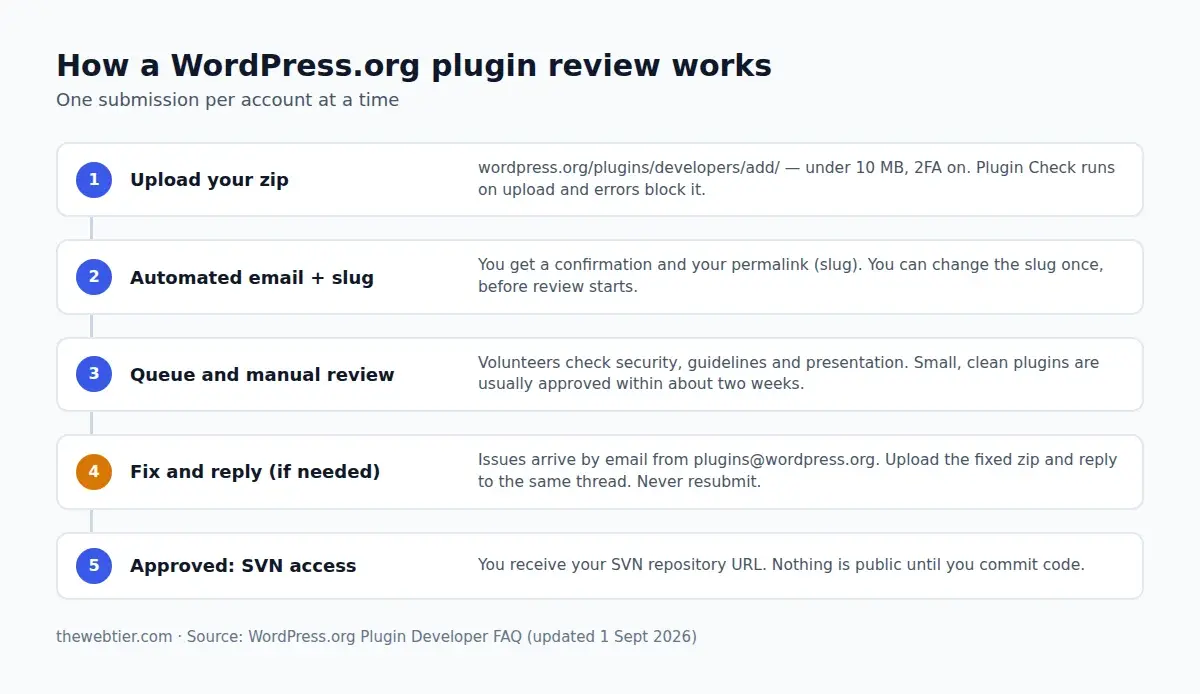
- You can change the slug once, after submitting and before the review starts.
- After approval the slug is permanent. You can change the display name later, but not the URL.
- No trademarks at the start of the name or slug unless you own them (Guideline 17). "Reading Time for WooCommerce" is fine. "WooCommerce Reading Time" isn't.
- Avoid "WordPress", "WP" used as a brand, and "Plugin" in the slug.
- Make it distinctive. Names too similar to an existing plugin get pushed back. The Plugin Check Namer tool from Part 5 can check this for you.
Your text domain must match the final slug, and this is where our own plugin needs care. "Web Tier Reading Time" generates web-tier-reading-time, but our folder and text domain are webtier-reading-time. We have two options:
- use the one-time slug change after uploading to request
webtier-reading-time(the simplest fix, and what we'd do here), or - keep the generated slug, and rename the folder, the
Text Domainheader and every'webtier-reading-time'string in__()calls andblock.jsonto match.
Either way, sort it out before the reviewer gets to it. A mismatched text domain is a common review note.
Step 2: Upload the zip
- Go to wordpress.org/plugins/developers/add and log in.
- Read the guidelines and FAQ links on the page, and confirm the agreements. You're confirming the plugin is yours, GPL-compatible and follows the guidelines.
- Choose your zip and click Upload.
- Plugin Check runs automatically. If it finds errors, the upload is rejected with the list of problems. Fix them and try again. This is why we ran it locally.
- When the upload succeeds, the page shows your plugin as pending, with its proposed slug.
You'll get an automated confirmation email straight away. The page you uploaded from now shows your pending plugin, and you can upload updated files there at any time while it's in review.
Also Read: What Is Jev? TypeSafe AI's 'System One' Model Explained (Pricing, API & Use Cases)
Step 3: Wait in the queue (and what "wait" means right now)
Every plugin is reviewed by a person. The official numbers vary by page. The submission page says 1 to 10 days, and the Developer FAQ says the team aims to reply within ten business days and that small, error-free plugins should be approved within fourteen days of the initial review.
For context, the Plugins team's 14 September 2026 update reported about 500 plugins waiting on a reviewer, and nearly 4,000 waiting on their authors to reply. Submissions are running far above last year's levels. The quickest way through is to need only one round of review.
Also Read: WordPress Development Guide
While you wait:
- Don't resubmit the same plugin, and don't create a second account. Secondary accounts get suspended.
- Don't email to ask for status. The review email will come.
- Keep improving the plugin. You can upload a new version to the pending submission.
Step 4: Read the review email and reply properly
The review arrives from the Plugins team with a subject like:
[WordPress Plugin Directory] Review in Progress: Web Tier Reading Time
If the reviewer finds problems, the email lists each one with an explanation, links to documentation and often the file and line. How to handle it:
- Fix everything in the email, not just the examples. When a reviewer shows one unescaped
echo, they expect you to check everyecho. - Upload the fixed version from the submission page.
- Reply to the same email thread. Say briefly what you changed. Starting a new thread or a new submission puts you at the back of the queue.
- Be concise and polite. Reviewers are handling thousands of plugins. A reply like "Fixed escaping in render.php and settings.php, added nonce to the reset action, updated to v1.0.1" is ideal.
If a review goes unanswered for 3 months, the submission is rejected. You can resubmit later and reply to the old email so the team has context.
The most common reasons plugins are sent back
From the Plugins team's FAQ and review notes, these come up again and again:
Also Read: How to Build a PHP Custom Gutenberg Block (WordPress 7.1)
| Issue | What to do instead |
|---|---|
| Unescaped output | Escape late with esc_html(), esc_attr(), esc_url(), wp_kses_post(). See Part 3. |
| Unsanitized input | wp_unslash() and then sanitize every $_GET, $_POST and $_REQUEST value. |
| Missing nonces or capability checks | Every state-changing action needs both. |
| Generic or missing prefixes | 4+ character unique prefix on everything global. |
| Calling external services without consent | No tracking, CDN fonts or scripts, or "phone home" by default (Guideline 7). Bundle assets locally. |
| Bundling libraries WordPress already ships | Use core's jQuery, React (wp.element) and so on (Guideline 13). |
| Trademark in the name or slug | Rename, or put the brand at the end: "…for Brand". |
| Incomplete readme | Accurate headers, a real description, the current Tested up to. |
Not tested with WP_DEBUG | Notices on activation are an instant flag. |
| Locked features or trialware | Everything in the plugin must work. Upsell to separate add-ons (Guideline 5). |
| Not enough functionality | "Hello world" plugins and near-copies of existing plugins are declined. |
Step 5: Approval, and what it does (and doesn't) mean
When everything checks out you'll receive an approval email with your Subversion (SVN) repository URL:
https://plugins.svn.wordpress.org/webtier-reading-time
Two things surprise people:
- Approval doesn't publish anything. Your repository is empty. The plugin page only goes live when you commit your code to SVN, which we do in Part 7.
- The WordPress.org team doesn't host your Git repo. WordPress.org distributes from SVN. Git (GitHub, GitLab) stays your development home, and many authors deploy from Git to SVN automatically. We set that up in Part 7 too.
If your plugin is rejected
A rejection isn't a ban. Common reasons are a plugin that duplicates an existing one too closely, a service not allowed under the guidelines, or an unanswered review. Read the reasoning, fix what can be fixed, and submit again when it's ready, replying to the original thread so the team has context. If you disagree with a decision, reply politely with your reasoning. The team does reconsider.
FAQ
Can I submit a plugin to WordPress.org without 2FA?
No. Two-factor authentication has been required for plugin owners and committers since October 2024.
Also Read: How to Become a WordPress Plugin Developer (2026 Roadmap)
Can I change my plugin's slug after it's approved?
No. You can change it once before the review starts. After approval, only the display name can change. To get a different URL you'd have to submit a new plugin and close the old one.
Can I submit two plugins at once?
Generally not. Most authors can only have one plugin in the queue. Wait for the first to be approved, then submit the next.
Do I need a GitHub repository to submit?
No. You upload a zip. A public repository is still useful: you can link it in your readme as the source for minified code, and use it to accept contributions.
What if my plugin needs an external API key?
That's allowed if the service does real work (Guideline 6). Document it clearly in the readme, including what data is sent, and link to the service's terms and privacy policy.
Next up
You're approved. In the final part, Part 7: How to Publish and Update Your WordPress Plugin with SVN, we commit the code, add banners, icons and screenshots, set up a Live Preview, automate releases with GitHub Actions, and cover what it takes to maintain a plugin people rely on.