
Introduction
In Part 2 we scaffolded Filament Announcements from the official skeleton, cleaned it up and linked it into a local Filament v5 app. Now we write the plugin itself.
Also Read: Claude Code & Cursor on Filament: AI Agent Rules That Work
By the end of this post the plugin will:
- Store announcements with a migration, model, factory and enum
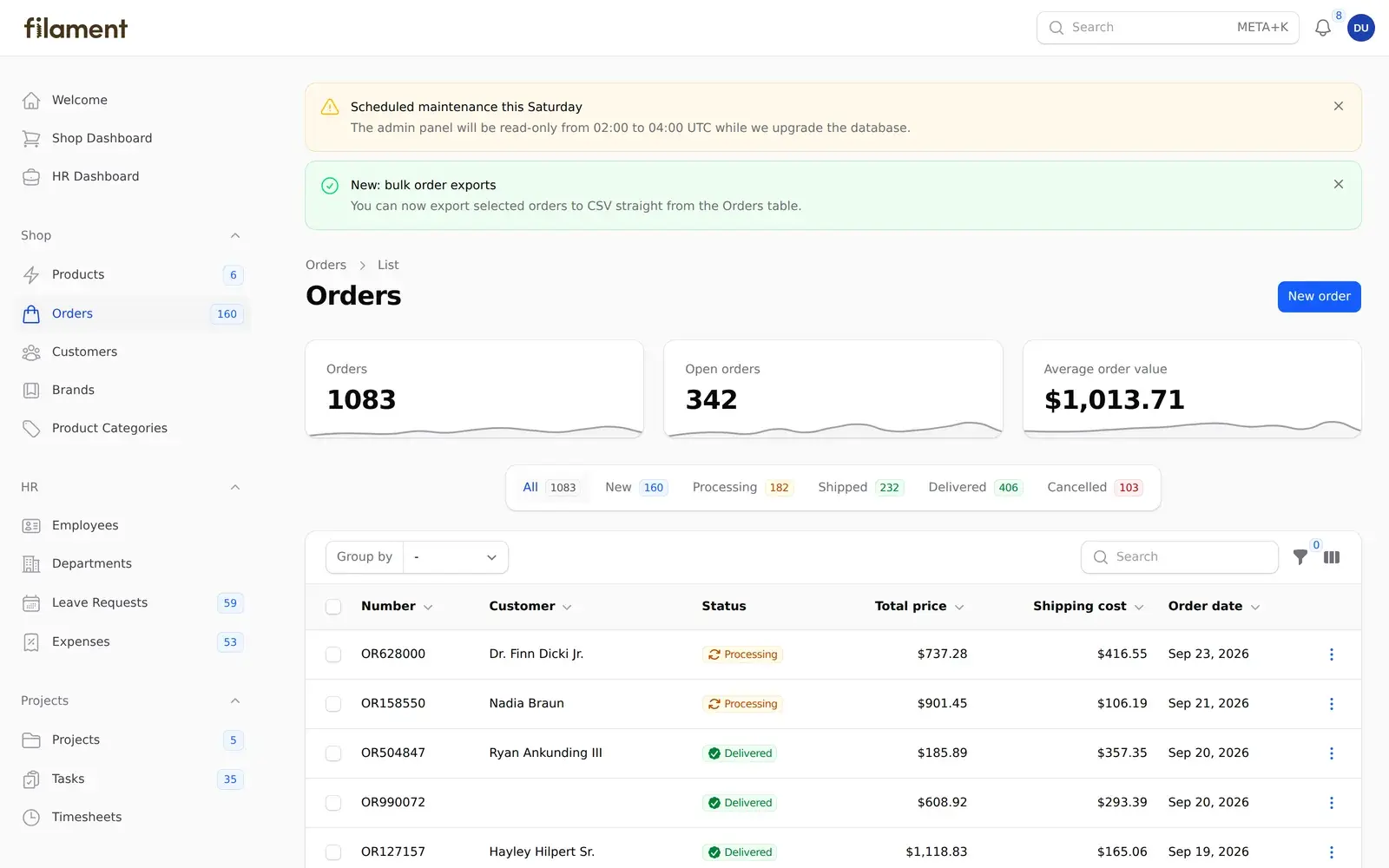
- Give admins a full Announcements resource built with Filament v5's schema and table classes
- Show a stats widget on the resource page (and optionally on the dashboard)
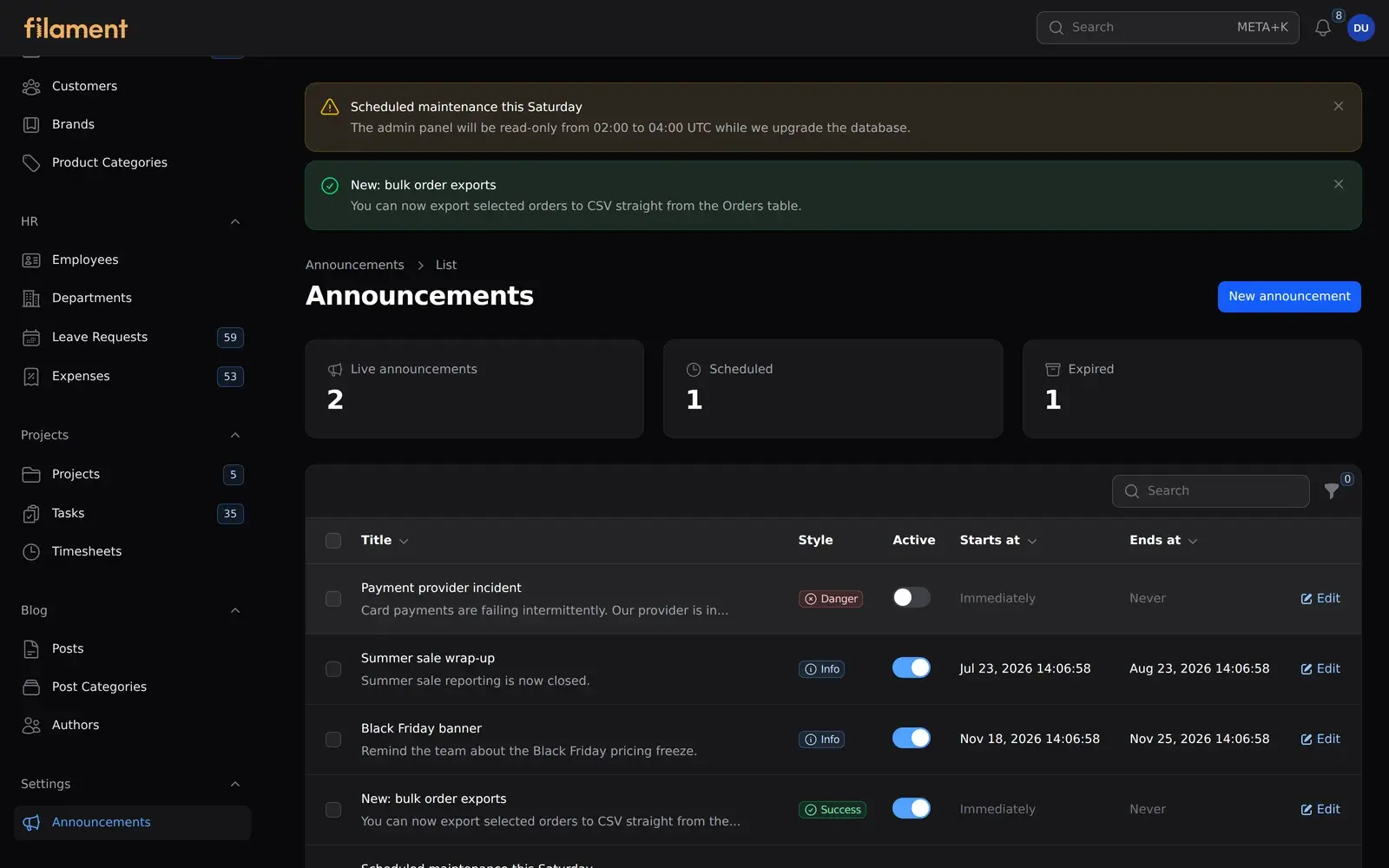
- Inject live announcements at the top of every page in the panel through a render hook
- Expose fluent, per-panel options like
->navigationGroup('Settings')and->resource(false)
Every snippet here comes from the finished plugin, which passes its test suite and PHPStan.
The Plugin Class: Your Plugin's Front Door
Filament's panel plugin docs describe the Plugin class as a simple PHP class implementing Filament\Contracts\Plugin, with three required methods:
getId()returns a unique ID. Make it specific enough not to clash with other plugins.filament-announcementsis safer thanannouncements.register(Panel $panel)runs while Filament builds the panel. Use it for anything you'd normally put in a panel provider: resources, pages, widgets, render hooks and assets.boot(Panel $panel)runs only when that panel is actually in use (it's called from middleware). Use it for work that should only happen when the panel is active.
Here's the skeleton of ours, before we add options:
namespace TheWebTier\FilamentAnnouncements;

use Filament\Contracts\Plugin;
use Filament\Panel;

class FilamentAnnouncementsPlugin implements Plugin
{
    public static function make(): static
    {
        return app(static::class);
    }

    public static function get(): static
    {
        /** @var static $plugin */
        $plugin = filament(app(static::class)->getId());

        return $plugin;
    }

    public function getId(): string
    {
        return 'filament-announcements';
    }

    public function register(Panel $panel): void
    {
        //
    }

    public function boot(Panel $panel): void
    {
        //
    }
}
Step 1: The Data Layer
Migration
Keep the migration as a .php.stub. Users publish it into their own app, where it gets a timestamp, and they stay in control of when it runs.
// database/migrations/create_announcements_table.php.stub
Schema::create('announcements', function (Blueprint $table) {
    $table->id();
    $table->string('title');
    $table->text('body')->nullable();
    $table->string('color')->default('info');
    $table->boolean('is_active')->default(true);
    $table->boolean('is_dismissible')->default(true);
    $table->timestamp('starts_at')->nullable();
    $table->timestamp('ends_at')->nullable();
    $table->timestamps();
});
An enum that Filament understands
Filament can read labels, colors and icons straight from a PHP enum if it implements the right contracts. Do this once and the same enum powers form options, table badges and filters automatically:
namespace TheWebTier\FilamentAnnouncements\Enums;

use Filament\Support\Contracts\HasColor;
use Filament\Support\Contracts\HasIcon;
use Filament\Support\Contracts\HasLabel;
use Filament\Support\Icons\Heroicon;

enum AnnouncementColor: string implements HasColor, HasIcon, HasLabel
{
    case Info = 'info';
    case Success = 'success';
    case Warning = 'warning';
    case Danger = 'danger';

    public function getLabel(): string
    {
        return __("filament-announcements::announcements.colors.{$this->value}");
    }

    public function getColor(): string
    {
        return $this->value;
    }

    public function getIcon(): Heroicon
    {
        return match ($this) {
            self::Info => Heroicon::OutlinedInformationCircle,
            self::Success => Heroicon::OutlinedCheckCircle,
            self::Warning => Heroicon::OutlinedExclamationTriangle,
            self::Danger => Heroicon::OutlinedXCircle,
        };
    }
}
Note the labels go through the translator. We'll come back to that in Part 4.
Also Read: Auto-Post to LinkedIn PHP from Laravel (2026 Guide)
The model
The model casts color to the enum and adds one query scope: announcements that are switched on and inside their schedule window.
class Announcement extends Model
{
    /** @use HasFactory<AnnouncementFactory> */
    use HasFactory;

    protected $guarded = [];

    protected function casts(): array
    {
        return [
            'color' => AnnouncementColor::class,
            'is_active' => 'boolean',
            'is_dismissible' => 'boolean',
            'starts_at' => 'datetime',
            'ends_at' => 'datetime',
        ];
    }

    public function scopeVisible(Builder $query): void
    {
        $query
            ->where('is_active', true)
            ->where(fn (Builder $query) => $query->whereNull('starts_at')->orWhere('starts_at', '<=', now()))
            ->where(fn (Builder $query) => $query->whereNull('ends_at')->orWhere('ends_at', '>=', now()));
    }

    protected static function newFactory(): AnnouncementFactory
    {
        return AnnouncementFactory::new();
    }
}
Two package-specific details:
newFactory()is required. Laravel guesses factory names from theApp\namespace, which doesn't exist in your package.- We used the classic
scopeVisible()method rather than Laravel 12's#[Scope]attribute, because Filament v5 still supports Laravel 11.28+. When you write a package, code against the oldest version you claim to support.
Step 2: A Filament v5 Resource Inside a Package
Filament v4 introduced a cleaner resource layout, and v5 keeps it: the resource class delegates its form and table to separate Schemas/ and Tables/ classes. In a package it looks like this:
src/Resources/Announcements/
├── AnnouncementResource.php
├── Pages/
│   ├── CreateAnnouncement.php
│   ├── EditAnnouncement.php
│   └── ListAnnouncements.php
├── Schemas/AnnouncementForm.php
└── Tables/AnnouncementsTable.php
You can generate these in your playground app with php artisan make:filament-resource and move them into the package, then fix the namespaces.
The resource class
This is where the plugin's per-panel settings first pay off. Instead of hardcoding a navigation group, the resource asks the plugin registered on the current panel:
class AnnouncementResource extends Resource
{
    protected static ?string $model = Announcement::class;

    protected static ?string $recordTitleAttribute = 'title';

    protected static string | BackedEnum | null $navigationIcon = Heroicon::OutlinedMegaphone;

    public static function getModelLabel(): string
    {
        return __('filament-announcements::announcements.model_label');
    }

    public static function getPluralModelLabel(): string
    {
        return __('filament-announcements::announcements.plural_model_label');
    }

    public static function getNavigationGroup(): string | UnitEnum | null
    {
        return FilamentAnnouncementsPlugin::get()->getNavigationGroup();
    }

    public static function getNavigationSort(): ?int
    {
        return FilamentAnnouncementsPlugin::get()->getNavigationSort();
    }

    public static function form(Schema $schema): Schema
    {
        return AnnouncementForm::configure($schema);
    }

    public static function table(Table $table): Table
    {
        return AnnouncementsTable::configure($table);
    }

    public static function getPages(): array
    {
        return [
            'index' => ListAnnouncements::route('/'),
            'create' => CreateAnnouncement::route('/create'),
            'edit' => EditAnnouncement::route('/{record}/edit'),
        ];
    }
}
The form
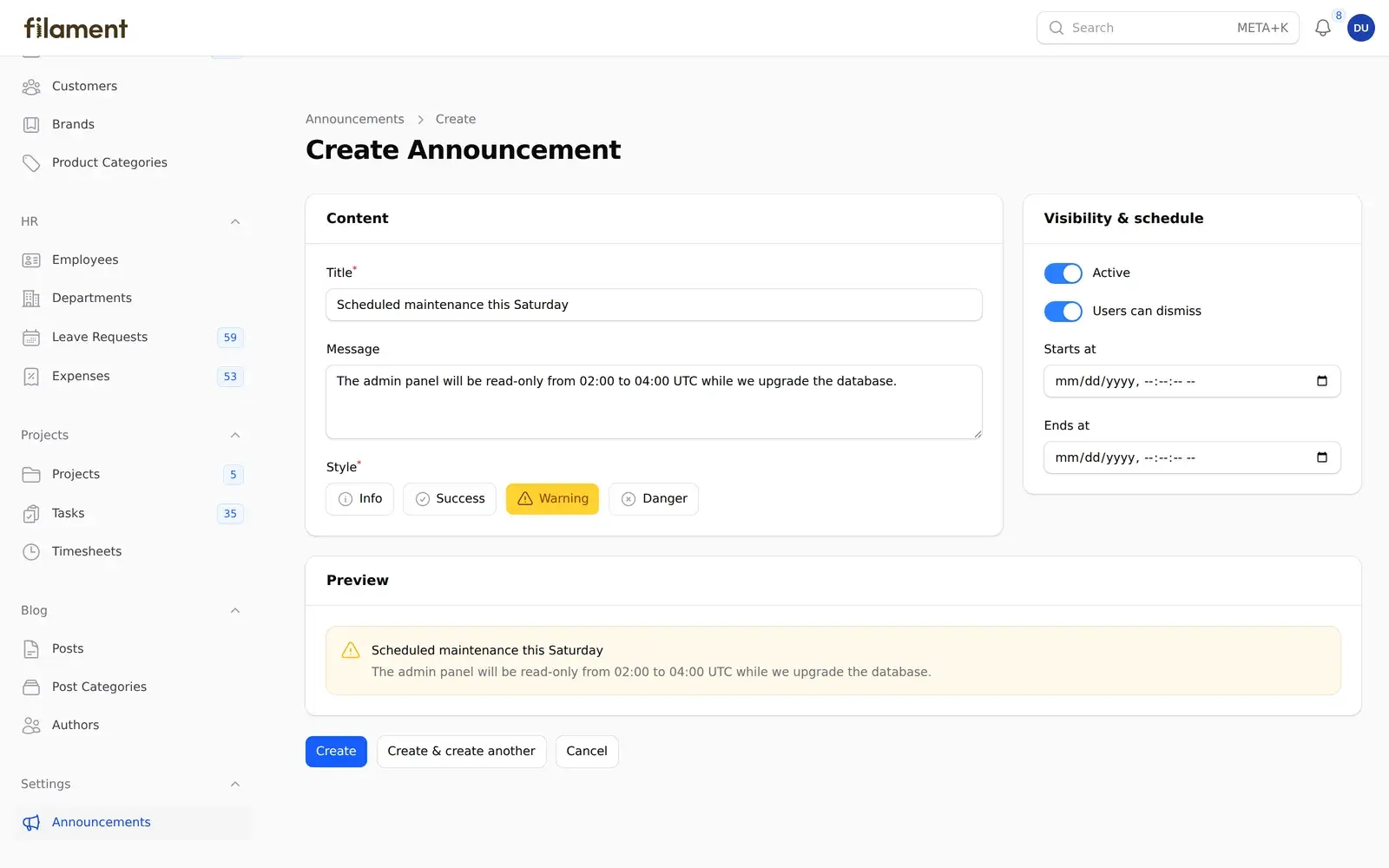
The form uses two sections side by side, plus a full-width live preview (a custom schema component we build in Part 4). ToggleButtons reads the enum directly, including icons and colors:
class AnnouncementForm
{
    public static function configure(Schema $schema): Schema
    {
        return $schema
            ->components([
                Section::make(__('filament-announcements::announcements.sections.content'))
                    ->schema([
                        TextInput::make('title')
                            ->label(__('filament-announcements::announcements.fields.title'))
                            ->required()
                            ->maxLength(255)
                            ->live(debounce: 500),
                        Textarea::make('body')
                            ->label(__('filament-announcements::announcements.fields.body'))
                            ->rows(3)
                            ->live(debounce: 500),
                        ToggleButtons::make('color')
                            ->label(__('filament-announcements::announcements.fields.color'))
                            ->options(AnnouncementColor::class)
                            ->default(AnnouncementColor::Info)
                            ->inline()
                            ->required()
                            ->live(),
                    ])
                    ->columnSpan(['lg' => 2]),
                Section::make(__('filament-announcements::announcements.sections.visibility'))
                    ->schema([
                        Toggle::make('is_active')
                            ->label(__('filament-announcements::announcements.fields.is_active'))
                            ->default(true),
                        Toggle::make('is_dismissible')
                            ->label(__('filament-announcements::announcements.fields.is_dismissible'))
                            ->default(true),
                        DateTimePicker::make('starts_at')
                            ->label(__('filament-announcements::announcements.fields.starts_at')),
                        DateTimePicker::make('ends_at')
                            ->label(__('filament-announcements::announcements.fields.ends_at'))
                            ->after('starts_at'),
                    ])
                    ->columnSpan(['lg' => 1]),
                Section::make(__('filament-announcements::announcements.preview.label'))
                    ->schema([
                        AnnouncementPreview::make(),
                    ])
                    ->columnSpanFull(),
            ])
            ->columns(3);
    }
}
The table
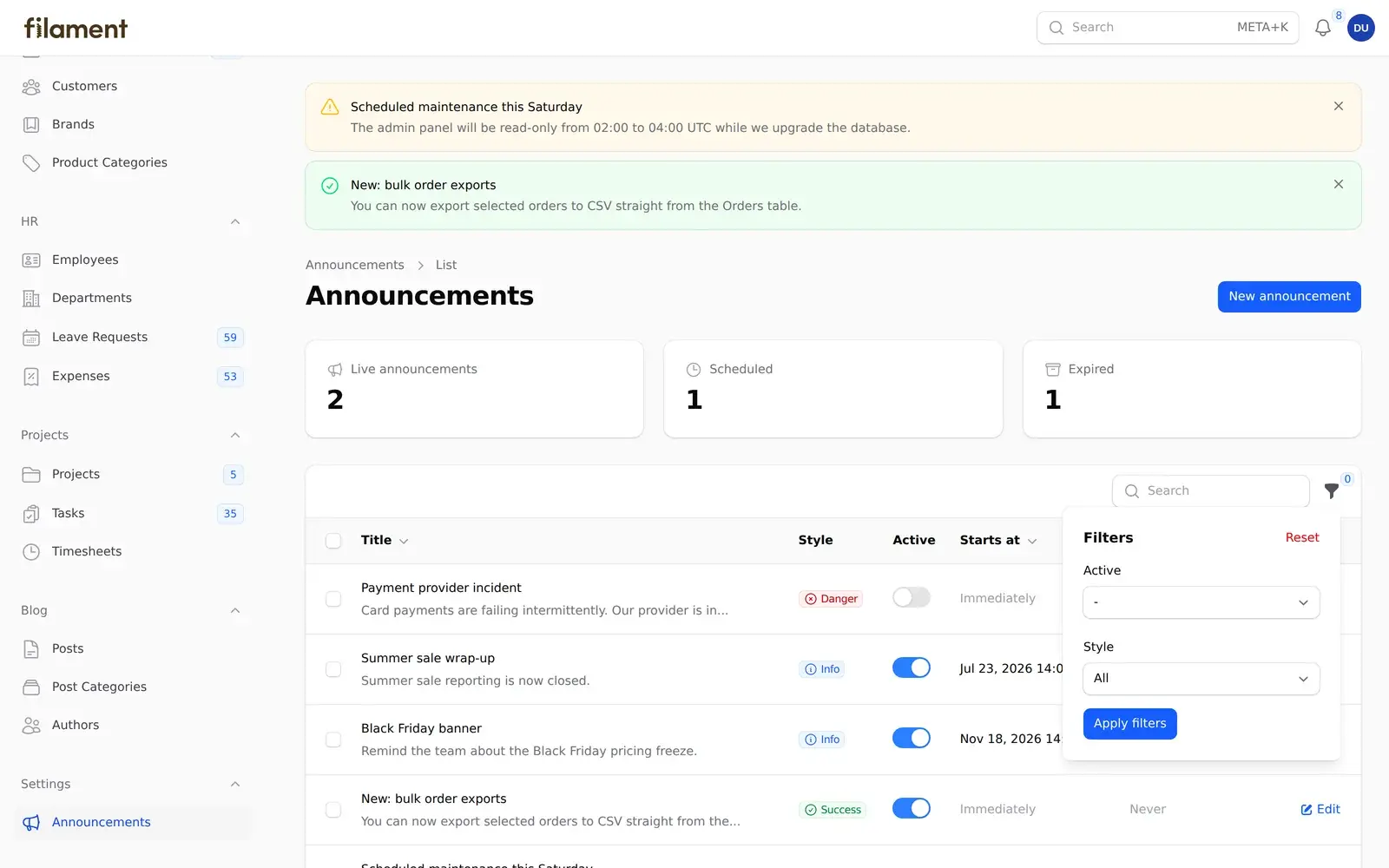
The table gets a searchable title with the message as a description, an enum badge, an inline ToggleColumn for switching announcements on and off, and filters:
return $table
    ->columns([
        TextColumn::make('title')
            ->searchable()
            ->sortable()
            ->description(fn ($record): ?string => str($record->body)->limit(60)->toString() ?: null),
        TextColumn::make('color')->badge(),
        ToggleColumn::make('is_active'),
        TextColumn::make('starts_at')->dateTime()->placeholder('Immediately')->sortable(),
        TextColumn::make('ends_at')->dateTime()->placeholder('Never')->sortable(),
    ])
    ->filters([
        TernaryFilter::make('is_active'),
        SelectFilter::make('color')->options(AnnouncementColor::class),
    ])
    ->recordActions([
        EditAction::make(),
    ])
    ->toolbarActions([
        BulkActionGroup::make([
            DeleteBulkAction::make(),
        ]),
    ])
    ->defaultSort('created_at', 'desc');
(Labels are trimmed here for readability. The real plugin passes each one through __().)
Also Read: Create a LinkedIn Developer App for Laravel (2026)
Notice the v5 action classes all live in Filament\Actions, and row actions use recordActions() while bulk actions use toolbarActions(). If you're porting a v3 plugin, that's one of the biggest changes.
Step 3: A Stats Widget
A StatsOverviewWidget gives admins a quick read on what's live:
class AnnouncementStatsWidget extends StatsOverviewWidget
{
    protected function getStats(): array
    {
        return [
            Stat::make(
                __('filament-announcements::announcements.stats.live'),
                Announcement::query()->visible()->count(),
            )
                ->icon(Heroicon::OutlinedMegaphone)
                ->color('success'),
            Stat::make(
                __('filament-announcements::announcements.stats.scheduled'),
                Announcement::query()->where('is_active', true)->where('starts_at', '>', now())->count(),
            )
                ->icon(Heroicon::OutlinedClock),
            Stat::make(
                __('filament-announcements::announcements.stats.expired'),
                Announcement::query()->where('ends_at', '<', now())->count(),
            )
                ->icon(Heroicon::OutlinedArchiveBox),
        ];
    }
}
We show it in two places:
- Always, as a header widget on the list page, via
getHeaderWidgets()inListAnnouncements. - Optionally, on the panel dashboard, if the user calls
->dashboardWidget()on the plugin.
Why optional? Because many apps build custom dashboards with their own getWidgets() list, and a plugin that forces itself onto every dashboard gets uninstalled.
Also Read: Laravel: Get a LinkedIn
Step 4: Injecting Banners with a Render Hook
Render hooks let you inject Blade into specific places in Filament's layout without overriding any views. They're the most useful tool a panel plugin has.
We register one in the plugin's register() method. The closure only runs when a page actually renders, so the query doesn't run while the panel is being configured:
$panel->renderHook(
    $this->getRenderHook(),
    fn (): View => view('filament-announcements::banner', [
        'announcements' => Announcement::query()->visible()->latest()->get(),
    ]),
);
Choosing the hook. We tried PanelsRenderHook::CONTENT_START first, which renders inside <main> before the page content, and PanelsRenderHook::PAGE_START, which renders inside each page just before its header. PAGE_START sits exactly where users expect a page notice, so it's the default, and users can change it with ->renderHook(). One thing we only noticed in the browser: both hooks render above the page's own vertical padding, so at first the banners sat flush against the top bar. The fix is a single padding-top rule in the plugin's stylesheet, which we'll add in Part 4.
The banner view renders Filament's own <x-filament::callout> component, so it matches the panel's colors, spacing and dark mode without any custom styling. We'll dig into that decision in Part 4.
Also Read: Renew LinkedIn Access Tokens PHP in Laravel (60-Day Fix)
Step 5: Fluent, Per-Panel Configuration
Here's what makes a plugin feel professional. Following Filament's recommended pattern, every option gets a property, a fluent setter that returns static, and a getter:
class FilamentAnnouncementsPlugin implements Plugin
{
    protected bool $hasResource = true;

    protected bool $hasBanner = true;

    protected bool $hasDashboardWidget = false;

    protected string $renderHook = PanelsRenderHook::PAGE_START;

    protected string | UnitEnum | null $navigationGroup = null;

    protected ?int $navigationSort = null;

    public function register(Panel $panel): void
    {
        if ($this->hasResource()) {
            $panel->resources([
                AnnouncementResource::class,
            ]);
        }

        if ($this->hasDashboardWidget()) {
            $panel->widgets([
                AnnouncementStatsWidget::class,
            ]);
        }

        if ($this->hasBanner()) {
            $panel->renderHook(/* ... */);
        }
    }

    public function resource(bool $condition = true): static
    {
        $this->hasResource = $condition;

        return $this;
    }

    public function hasResource(): bool
    {
        return $this->hasResource;
    }

    public function navigationGroup(string | UnitEnum | null $group): static
    {
        $this->navigationGroup = $group;

        return $this;
    }

    public function getNavigationGroup(): string | UnitEnum | null
    {
        return $this->navigationGroup;
    }

    // banner(), dashboardWidget(), renderHook() and navigationSort() follow the same pattern
}
Because register() runs after the user has chained their options, it can read them and decide what to register. That gives users setups like this:
// AdminPanelProvider: manage announcements, but don't show banners to admins
->plugin(
    FilamentAnnouncementsPlugin::make()
        ->navigationGroup('Settings')
        ->dashboardWidget()
        ->banner(false),
)

// AppPanelProvider: customers only see the banners
->plugin(
    FilamentAnnouncementsPlugin::make()
        ->resource(false),
)
Each panel gets its own plugin instance, and FilamentAnnouncementsPlugin::get() always returns the instance for the panel handling the current request. That's why the resource can call FilamentAnnouncementsPlugin::get()->getNavigationGroup() safely.
Going further: if users need the same resource registered twice with different settings (say, "Active" and "Archived" announcements), look at Filament's newer configurable resources and pages. A resource can declare a
ResourceConfigurationclass and be registered multiple times withAnnouncementResource::make('archived'), each with its own routes and navigation.
Common Mistakes
- Registering assets that load on every page in the service provider. Filament's docs note that assets registered in
packageBooted()load in every panel, even ones that don't use your plugin. For always-on assets, use$panel->assets()inside the plugin'sregister()method instead. For assets that only some pages need, register them withloadedOnRequest()(covered in Part 4). - Running queries in
register(). It runs while panels are being built, including duringartisancommands. Wrap data access in closures, like our render hook does. - Hardcoding
App\Models\User. If your plugin relates to users, useconfig('auth.providers.users.model')or let users configure the model. - Forgetting
newFactory(). Package models don't live inApp\Models, so Laravel can't guess their factories.
Key Takeaways
- The Plugin class has three jobs: an ID,
register()for panel configuration, andboot()for work that only happens when the panel is in use. - Filament v5 resources in a package use the same
Schemas/,Tables/andPages/layout as in an app. Only the namespaces change. - Implement
HasLabel,HasColorandHasIconon your enums, and Filament will use them in forms, badges and filters. - Render hooks let your plugin add UI anywhere in the panel without overriding views.
- Give every option a property, a fluent setter and a getter, then read them in
register(). Users get per-panel control for free.
Next, in Part 4, we'll make the plugin look right everywhere: Filament's asset manager, the Tailwind v4 gotcha that catches most plugin authors, dark mode, translations, and a reusable custom schema component.
FAQ
What's the difference between register() and boot() in a Filament plugin?
register() runs while Filament builds the panel's configuration, so it's where you add resources, pages, widgets, render hooks and assets. boot() runs only when a request is actually using that panel, from middleware. Use it for work that should only happen when the panel is active.
Also Read: How to Create a WordPress Plugin from Scratch (2026 Guide)
How do I read my plugin's settings from a resource or page?
Add a static get() method that returns filament(app(static::class)->getId()), then call YourPlugin::get()->yourOption(). It returns the instance registered on the current panel, so each panel can have different settings.
Can a plugin add a widget to the dashboard?
Yes, with $panel->widgets([...]) in register(). Make it optional, though, because many apps define their own dashboard widget lists and won't want yours forced in.
Which render hook should a plugin use for page-level notices?
PanelsRenderHook::PAGE_START renders inside each page just above the header, which works well for banners. Let users override it with a configuration method, because layouts vary between apps.
