If you searched for "how to build a Shopify plugin" and landed on tutorials from 2023, most of what you read is now out of date. Remix gave way to React Router. Polaris React gave way to Polaris web components. The Partner Dashboard handed app management to a new Dev Dashboard. REST is legacy. Shopify Scripts stopped running on June 30, 2026. Even Managed Pricing has a new name.
Also Read: JavaScript: How to make
This series covers Shopify app development as it works in September 2026, from creating your developer account to getting paid through the Shopify App Store. It's written for developers who know JavaScript and have built a web app before. You don't need any Shopify experience.
This first post is the map. It explains the pieces, what changed, and the order we'll tackle them in.
Quick note on words: WordPress has "plugins", Laravel has "packages", and Shopify has apps. Anything that adds features to a Shopify store is an app, whether it's a tiny storefront widget or a full inventory system.
What we'll build in this series
It's easier to learn with a real project, so the series follows one small app: TWT Product Badges. It lets a merchant:
- Add a badge like "New" or "Bestseller" to any product from inside the Shopify admin (an embedded app page)
- Show that badge on the storefront (a theme app extension)
- Upgrade to a paid plan (Shopify App Pricing)
It's small enough to finish, but it touches every major part of the platform: auth, the GraphQL Admin API, metafields, webhooks, extensions, billing, deployment and App Store review.
Also Read: JavaScript and Jobs
What exactly is a Shopify app?
A Shopify app is a web application that talks to a store through Shopify's APIs and plugs into Shopify's interfaces. Unlike a WordPress plugin, your code doesn't run on the merchant's server. The pieces live in two places:
- On your infrastructure: your backend and your admin UI (called App Home). App Home loads inside the Shopify admin in an iframe.
- On Shopify's infrastructure: app extensions. These are bundles you deploy to Shopify that render in the theme, checkout, customer accounts, admin or POS. Shopify Functions also run here: WebAssembly modules that customise discounts, shipping, payments and more.
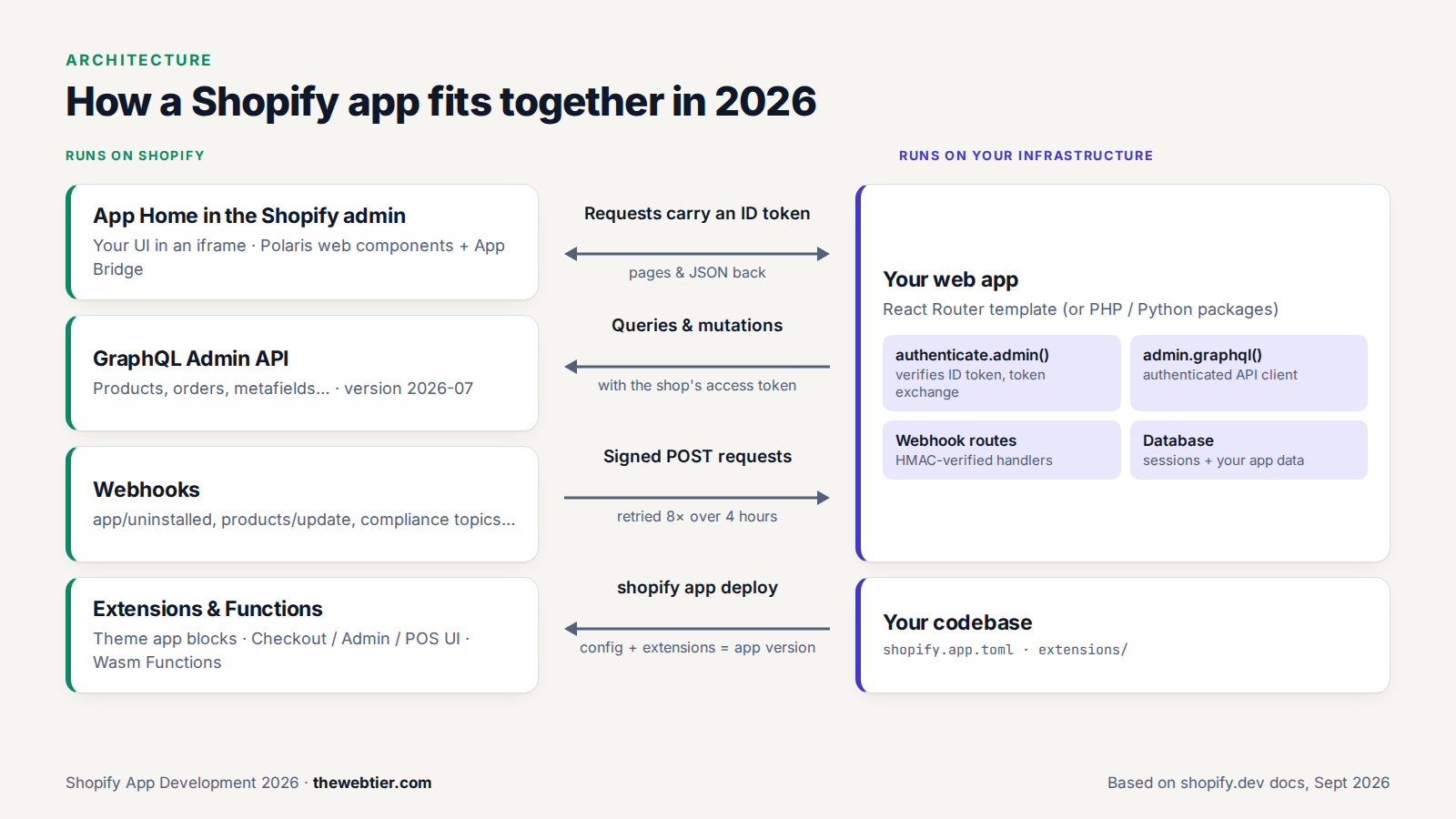 How the parts of a 2026 Shopify app connect.
The types of Shopify apps in 2026
When you create an app, you pick a distribution method, and you can't change it later. So decide early.
Also Read: JavaScript: 13 Most Promising
| Type | Who can install it | Reviewed by Shopify? | Can use Shopify billing? | Good for |
|---|---|---|---|---|
| Public app | Any merchant, through the Shopify App Store | Yes | Yes | SaaS products you want to sell |
| Custom app | One store, or stores in one Shopify Plus organisation | No | No | Agency and client work |
| Extension-only app* | Custom distribution only | No | No | Small tools with no backend, including the new App Home UI extension |
* Strictly speaking, extension-only is an app type rather than a distribution method, but it's limited to custom distribution.
Two changes catch people out:
- Merchants can no longer create "custom apps" from the store admin. Since January 1, 2026, new custom apps are built in the Dev Dashboard. Existing admin-created apps still work but are now called "legacy custom apps" (Shopify changelog).
- Private apps and unpublished apps are long gone. If a tutorial mentions them, close the tab.
This series builds a public app, because that's the path with the most steps. Custom apps skip review and billing but otherwise work the same way. The full comparison is in Shopify's app distribution docs.
The 2026 Shopify app tech stack at a glance
| Layer | What Shopify recommends now | What it replaced |
|---|---|---|
| Tooling | Shopify CLI 4.x (4.8 at the time of writing), Node.js 22.12+ | CLI 3.x |
| App framework | React Router 7 template (shopify-app-template-react-router) | Remix template (deprecated) |
| Admin UI | Polaris web components (<s-page>, <s-button> …) + App Bridge | Polaris React (archived Sept 2026) |
| Auth | Shopify managed installation + token exchange, with expiring offline tokens | OAuth redirects, non-expiring tokens |
| Data API | GraphQL Admin API (latest stable 2026-07; 2026-10 goes stable on Oct 1) | REST Admin API (legacy) |
| UI extensions | Preact + Polaris web components, 64 KB bundle limit | React UI extensions |
| Backend logic in checkout | Shopify Functions (Rust or JavaScript → Wasm) | Shopify Scripts (shut down June 30, 2026) |
| Billing | Shopify App Pricing (hosted plans, trials, usage) | Managed Pricing / Billing API |
| App management | Dev Dashboard at dev.shopify.com | Partner Dashboard (still used for listings and payouts) |
Using PHP or Laravel? You're no longer stuck with community libraries. In August 2026 Shopify released official PHP (shopify/shopify-app-php) and Python app packages (changelog). The CLI template is still JavaScript, and this series uses it, but the concepts carry over.
What changed in 2025 and 2026 (and why old tutorials break)
Here's the short version, newest first:
- Sept 2026: CLI 4.8 can create dev stores from the terminal (
shopify store create dev), with a cap of 250 dev stores per organisation. Polaris React was archived. - Aug 2026: Official PHP and Python packages. Script tags were deprecated: you can't create new ones from October 1, 2026, and they stop running on March 1, 2027.
- June 30, 2026: Shopify Scripts stopped running. Functions replace them.
- June 2026: Spring '26 Edition. The Shopify AI Toolkit became generally available, Sidekick app extensions opened to all developers, and "static apps" arrived.
- May 2026: Shopify CLI 4.0 moved to semantic versioning with auto-upgrades and removed deprecated flags. Shopify App Pricing replaced Managed Pricing as the default billing method.
- April 1, 2026: New public apps must use expiring offline access tokens. Every public app must switch by January 1, 2027.
- Jan 1, 2026: No new custom apps can be created in the store admin.
- Oct 2025: Polaris web components went stable. UI extensions moved to Preact.
- Sept 2025: The Dev Dashboard became generally available and took over app and dev store management from the Partner Dashboard.
- April 1, 2025: New public apps must use the GraphQL Admin API only.
Keep this list in mind when you read older blog posts or Stack Overflow answers.
Also Read: Shopify Ditches React Native for Swift and Kotlin - Programming
The roadmap: 8 steps from idea to App Store
This is the order we'll follow. Each step is its own post.
- Understand the platform (this post)
- Become a Shopify app developer: Partner account, Dev Dashboard, dev stores, fees and revenue share
- Build your first app with Shopify CLI: install CLI 4, scaffold the React Router template, understand every file
- Build real features with the GraphQL Admin API: queries, mutations, metafields, webhooks and Polaris UI
- Extend Shopify with app extensions: theme app extensions, checkout UI, admin blocks and Shopify Functions
- Monetise your app: Shopify App Pricing compared with the Billing API
- Deploy to production: hosting, databases, environment variables, app versions and CI/CD
- Publish to the Shopify App Store: listing SEO, requirements, review and Built for Shopify
What it costs to become a Shopify app developer
Less than most people expect:
- Partner account: free (Shopify Partners)
- Dev stores: free, on any plan including Plus, for testing
- App Store registration: a one-time $19 USD fee, paid only when you're ready to list a public app
- Revenue share: 0% on your first $1M USD of lifetime app revenue (counted from January 1, 2025), then 15%. A 2.9% processing fee applies to all app billing (revenue share docs)
- Hosting: whatever your backend costs. A small app fits comfortably on a free or low tier of Fly.io, Render, Vercel or Google Cloud Run.
We'll cover each of these properly in part 2.
Skills you'll need
- JavaScript/TypeScript and React basics. The template is React Router 7, and UI extensions use Preact, which is nearly identical to React.
- GraphQL basics: queries, mutations and variables. We'll cover the Shopify-specific parts.
- Some Liquid if you build theme app extensions. It's a simple template language.
- Optional: Rust, if you want the fastest Shopify Functions. JavaScript Functions work fine for most apps.
AI coding tools help here too. Shopify's official AI Toolkit and Dev MCP server give Claude Code, Cursor, VS Code and others up-to-date Shopify docs and GraphQL schema validation, so they're far less likely to suggest deprecated APIs.
Also Read: Statamic Custom Fieldtype Tutorial: Vue 3 & Vite (v6)
FAQ
Is Shopify app development still worth it in 2026?
The economics are the best they've been. Shopify keeps 0% of your first $1M in lifetime app revenue, and more than 100,000 partners work in the ecosystem. The catch is competition: the App Store is crowded, so pick a niche problem and do it well.
Can I build a Shopify app without React?
Yes. Polaris web components are plain custom elements, so App Home works with any framework or none. Official PHP and Python packages now exist for the backend. The CLI's official template is React Router, and that's the smoothest path.
Can I still use the REST Admin API?
Existing apps can, but it's been legacy since October 2024. New public apps must use GraphQL only (since April 1, 2025). Learn GraphQL.
What's the difference between the Partner Dashboard and the Dev Dashboard?
The Dev Dashboard (dev.shopify.com) is where you create apps, manage versions, credentials, dev stores, logs and team roles. The Partner Dashboard (partners.shopify.com) still handles App Store listings, pricing, payouts and referrals. Part 2 covers both.
How long does it take to build and publish a Shopify app?
A simple app like our badge demo takes a weekend to build. Plan for App Store review on top of that: Shopify's own staff said in 2026 that review times were longer than usual, and developers reported waits of several weeks to a few months.
Next up
In Part 2: How to Become a Shopify App Developer we'll create a Partner account, find our way around the Dev Dashboard, spin up a dev store from the CLI, and go through the fees and payouts.
Further reading