Our badge app works across the admin, product pages and the storefront (part 5). Now let's charge for it.
Also Read: 5 Vital Marketing Marketing Strategy Strategies for SaaS Companies
Billing changed a lot in 2026. In May 2026, "Managed Pricing" was renamed Shopify App Pricing and became the default for new public apps. The GraphQL Billing API still works, but Shopify now calls it legacy ("Manual Pricing"). Most tutorials online still teach the old way.
Series: Shopify App Development 2026, part 6 of 8
The one rule: use Shopify's billing
If your app is on the Shopify App Store, you must charge merchants through Shopify. Stripe checkouts, PayPal links and "email us for an invoice" all break App Store requirement 1.2.1, and Shopify will reject the app (billing overview). Two related requirements:
- 1.2.2: handle accept, decline and re-approval flows correctly.
- 1.2.3: merchants must be able to upgrade or downgrade without contacting support.
In return, charges appear on the merchant's normal Shopify invoice. That means less friction for them and no card handling for you.
Also Read: Programming Guide
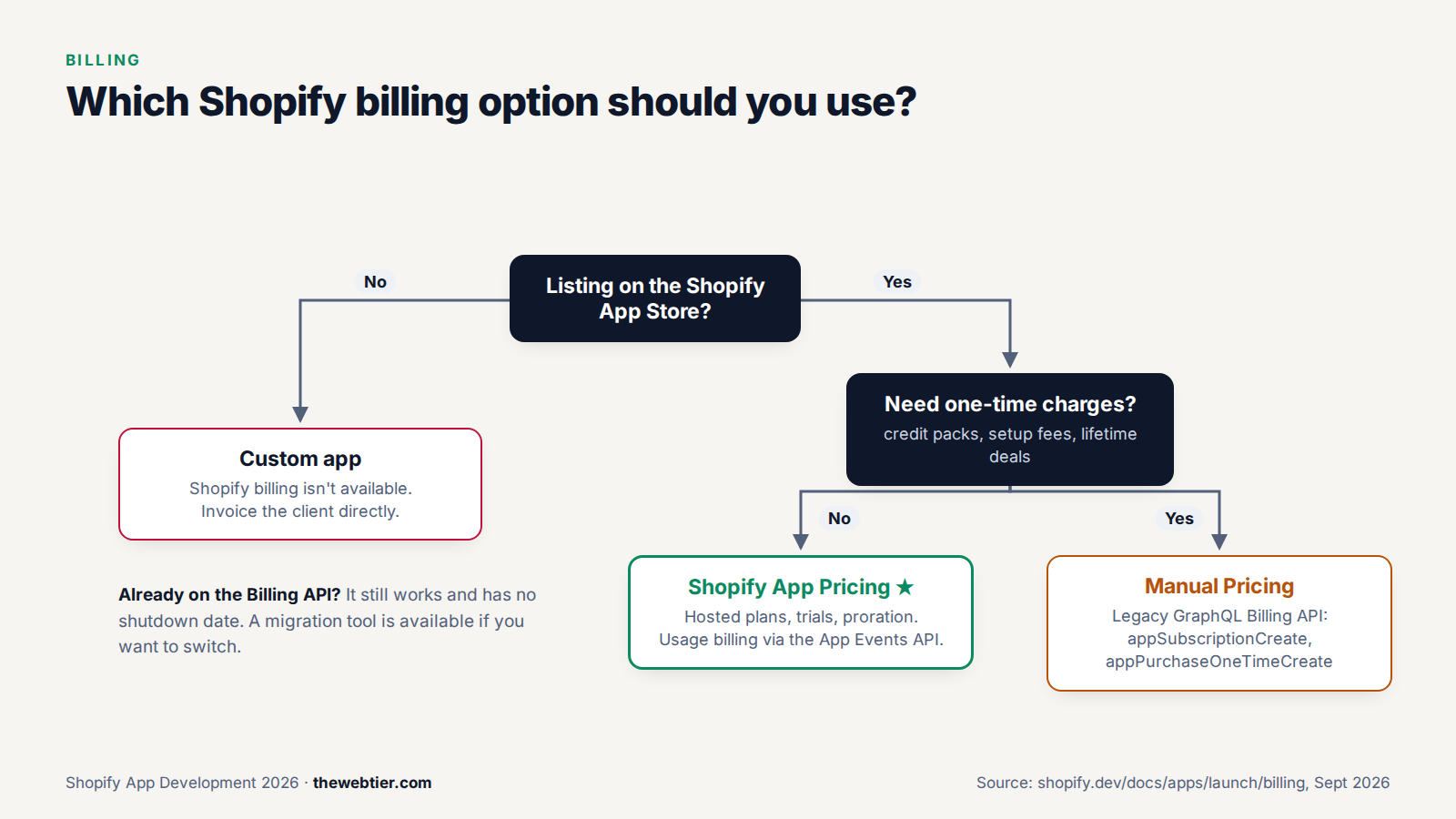
(Custom apps can't use Shopify billing at all. You invoice those clients directly.)
Shopify App Pricing or the Billing API?
| Shopify App Pricing (recommended) | Manual Pricing (legacy Billing API) | |
|---|---|---|
| Recurring plans (monthly or annual) | ✅ | ✅ |
| Usage-based charges | ✅ via the App Events API | ✅ via appUsageRecordCreate |
| One-time charges | ❌ | ✅ appPurchaseOneTimeCreate |
| Hosted pricing page | ✅ Shopify builds and hosts it | ❌ you build it |
| Trials, proration, upgrades and downgrades | ✅ handled for you | You handle them |
| Code needed | A redirect, plus a subscription check | Mutations, return URLs, approval handling |
The short answer: use Shopify App Pricing unless you need one-time charges. There's no deprecation date for the Billing API, so existing apps don't have to migrate (Shopify App Pricing docs).
Also Read: Web Development: How to Publish
Option 1: Shopify App Pricing
With App Pricing you define plans in a dashboard and Shopify hosts everything else: the plan selection page, trials, proration, upgrades, downgrades and cancellations.
What it supports (as of September 2026)
- Fixed plans: monthly or yearly, or monthly with a yearly discount
- Usage-based pricing: fixed, graduated or volume tiers. Up to 5 usage meters per plan and 6 tiers per meter, billed monthly
- Hybrid: a recurring base price plus usage
- Up to 8 public plans (up from 4 in July 2026), and unlimited private plans for specific stores (since September 21, 2026, per the changelog)
- Free trials per plan. Shopify counts trial days over a 180-day window, so merchants can't uninstall and reinstall to get a fresh trial
Step 1: Create your plans
In the Partner Dashboard, go to App distribution → Manage listing → Pricing content → Settings, then set Pricing method to Shopify App Pricing. Add your plans there.
For TWT Product Badges we'll use:
Also Read: Web Development: Shopify GraphQL Admin
| Plan | Price | Includes |
|---|---|---|
| Free | $0 | Badges on up to 10 products |
| Pro | $4.99/month, 7-day trial | Unlimited badges, custom colours |
Once you opt into Shopify App Pricing, you can't create new recurring charges with the Billing API for that app. Choose deliberately.
Step 2: Send merchants to the hosted plan page
Shopify hosts the plan selection page at a predictable URL:
https://admin.shopify.com/store/{store_handle}/charges/{app_handle}/pricing_plans
app_handle is the handle in your shopify.app.toml. Here's a route that sends the merchant there. It type-checks against @shopify/shopify-app-react-router 3.0:
// app/routes/app.plans.tsx
import type { LoaderFunctionArgs } from "react-router";
import { authenticate } from "../shopify.server";

// Sends the merchant to Shopify's hosted plan selection page
// (Shopify App Pricing). `handle` is the handle in shopify.app.toml.
const APP_HANDLE = "twt-product-badges";

export const loader = async ({ request }: LoaderFunctionArgs) => {
  const { session, redirect } = await authenticate.admin(request);
  const storeHandle = session.shop.replace(".myshopify.com", "");

  return redirect(
    `https://admin.shopify.com/store/${storeHandle}/charges/${APP_HANDLE}/pricing_plans`,
    { target: "_top" },
  );
};
target: "_top" matters. The admin page has to navigate the whole browser window, not just your app's iframe. Add an "Upgrade" link to /app/plans in your nav or on a gated feature. After the merchant picks a plan, Shopify redirects back to your app with plan_handle and shop query parameters.
Step 3: Check which plan a shop is on
For Shopify App Pricing, Shopify's docs say to check subscriptions with the Partner API, not the Admin API (activeSubscription):
query ActiveSubscription($appId: ID!, $shopId: ID!) {
  activeSubscription(appId: $appId, shopId: $shopId) {
    billingPeriod
    cancelAtEndOfCycle
    trialEndsAt
    items {
      handle
      price {
        __typename
        ... on FlatRatePrice { amount }
      }
    }
  }
}
- Endpoint:
https://partners.shopify.com/{organization_id}/api/2026-07/graphql.json - Header:
X-Shopify-Access-Tokenwith a Partner API client token that has the Manage apps permission - IDs look like
gid://shopify/App/1234andgid://shopify/Shop/5678 - Rate limit: 4 requests per second per client, so cache the result (for example in your database, keyed by shop) instead of checking on every page load
A simple approach is to store the plan when Shopify redirects back with plan_handle, then re-check with the Partner API on a schedule or before sensitive actions.
Step 4 (optional): Usage-based billing with App Events
To charge per use (per SMS, per AI generation, per order synced), define a meter with an event handle on your plan, then report usage to the App Events API:
curl -X POST "https://api.shopify.com/app/unstable/events" \
  -H "Content-Type: application/json" \
  -H "Authorization: Bearer {access_token}" \
  -d '{
    "shop_id": "gid://shopify/Shop/12345678",
    "event_handle": "sms_sent",
    "timestamp": "2026-01-27T14:30:00Z",
    "idempotency_key": "sms_12345_1706365800",
    "attributes": { "value": 1 }
  }'
event_handlemust match a meter you configured.idempotency_keyis enforced permanently, so retrying is safe and won't double-bill.- The API always returns 202, even when billing validation fails. Check the App Events logs in the Dev Dashboard while you build.
- Since July 2026 you can send negative values (credits) and fractional values.
- The docs example uses the
unstableversion path. Check the setup guide for a stable version before you go live.
Testing App Pricing
On dev stores in the same Partner organisation as your app, you can pick any plan at no charge, and $0 test subscriptions are created. App Store reviewers can also pick plans for free. Don't use the Billing API test flag with App Pricing.
Also Read: Build Your First Shopify App with Shopify CLI (2026) - Web Development
Option 2: Manual Pricing (the legacy Billing API)
Use this if you need one-time purchases (credit packs, setup fees, lifetime deals) or you're maintaining an existing app. The flow:
- Your app calls a billing mutation.
- Shopify returns a
confirmationUrl. - You redirect the merchant there to approve or decline.
- Shopify sends them back to your
returnUrl.
Creating a subscription with GraphQL
mutation AppSubscriptionCreate(
  $name: String!
  $lineItems: [AppSubscriptionLineItemInput!]!
  $returnUrl: URL!
  $trialDays: Int
) {
  appSubscriptionCreate(
    name: $name
    returnUrl: $returnUrl
    lineItems: $lineItems
    trialDays: $trialDays
  ) {
    userErrors { field message }
    appSubscription { id }
    confirmationUrl
  }
}
{
  "name": "Pro",
  "returnUrl": "https://your-app.example.com/app",
  "trialDays": 7,
  "lineItems": [
    {
      "plan": {
        "appRecurringPricingDetails": {
          "price": { "amount": 4.99, "currencyCode": "USD" }
        }
      }
    }
  ]
}
A usage line item uses appUsagePricingDetails with terms and a cappedAmount. You then report usage with appUsageRecordCreate (appSubscriptionCreate docs).
Or let the React Router library do it
The template's library has billing helpers that wrap the Billing API (they don't apply to App Pricing). Define plans in shopify.server.ts:
import { shopifyApp, BillingInterval } from "@shopify/shopify-app-react-router/server";

export const PRO_PLAN = "Pro";

const shopify = shopifyApp({
  // ...existing config
  billing: {
    [PRO_PLAN]: {
      lineItems: [
        { amount: 4.99, currencyCode: "USD", interval: BillingInterval.Every30Days },
      ],
    },
  },
});
Then require the plan in any loader:
export const loader = async ({ request }: LoaderFunctionArgs) => {
  const { billing } = await authenticate.admin(request);

  await billing.require({
    plans: [PRO_PLAN],
    isTest: process.env.NODE_ENV !== "production",
    onFailure: async () => billing.request({ plan: PRO_PLAN }),
  });

  // Merchant has an active Pro subscription
  return null;
};
Use billing.check() when you only want to know the plan without redirecting (for example, to show an upgrade banner). Full reference: React Router billing API.
The classic rejection: submitting your app with
test: trueorisTest: truestill hard-coded. Merchants then use the app without being charged, and Shopify lists this as a common rejection reason. Tie it to the environment as shown above.
Pricing strategy tips
- Start simple. A free plan or a trial plus one or two paid plans beats a complicated pricing grid.
- Put pricing only in the pricing section of your listing, never in screenshots or the app icon (requirement 4.2).
- Gate features, not the whole app. Merchants who can try the core value install more and uninstall less.
- Show usage on your app's home page ("7 of 10 free badges used"). It sells the upgrade for you, and Built for Shopify expects useful reporting on the home page anyway.
What you actually keep
Say 500 merchants pay $4.99/month:
- Gross revenue: $2,495.00/month
- Revenue share: 0% (you're under $1M in lifetime app revenue)
- 2.9% processing fee: −$72.36
- You receive ≈ $2,422.64/month, before your own taxes and hosting
Details are in the revenue share docs. Payouts arrive twice a month through Hyperwallet (part 2).
FAQ
Is Managed Pricing the same as Shopify App Pricing?
Yes. Managed Pricing was renamed Shopify App Pricing on May 12, 2026, and gained usage-based and hybrid pricing through the App Events API.
Also Read: Shopify App Development in 2026: The Complete Roadmap
Is the Shopify Billing API deprecated?
It's labelled legacy but still fully works, and there's no announced shutdown date. It's the only option for one-time charges. Shopify provides a migration guide for moving existing plans to App Pricing.
Can I charge merchants through Stripe instead?
Not for App Store apps. Off-platform billing is banned for public apps. Custom apps (for a single client) can't use Shopify billing, so you invoice those clients directly.
How do free trials work?
You set the trial length per plan. With App Pricing, Shopify tracks trial usage over 180 days, so reinstalling doesn't restart the trial. With the Billing API, you pass trialDays when you create the subscription.
Next up
The app can now make money. Next it needs a real home. In Part 7: How to Deploy a Shopify App to Production we'll choose a host, move from SQLite to Postgres, set environment variables, and ship with shopify app deploy and CI/CD.