Shopify App Extensions Explained: Theme App Extensions, Checkout UI and Shopify Functions
So far our app only exists on its own admin page. Merchants can set badges (part 4), but nobody sees them. App extensions fix that. They let your app appear inside Shopify: on the storefront, in checkout, on admin pages, in customer accounts and on POS.
Also Read: Programming and Development
In this post we'll:
- Build a theme app extension that shows the badge on product pages
- Add an admin block to the product page
- Look at a checkout UI extension
- Understand Shopify Functions, which replace the now-retired Shopify Scripts
- Touch on the newer extension types from 2026
Series: Shopify App Development 2026, part 5 of 8
How extensions work
Extensions are different from your App Home in three ways:
- They run on Shopify's infrastructure, not your server. Shopify hosts them, serves them from its CDN and sandboxes them.
- They live in your app's
extensions/folder and ship withshopify app deploy. Each deploy creates a new app version that contains your config and all your extensions. - UI extensions use Preact and Polaris web components. Since API version
2025-10, checkout, customer account, admin and POS UI extensions are written in Preact with the same<s-*>components you used in App Home. There's a 64 KB compiled bundle limit, and2025-07was the last API version to support React UI extensions (upgrade guide).
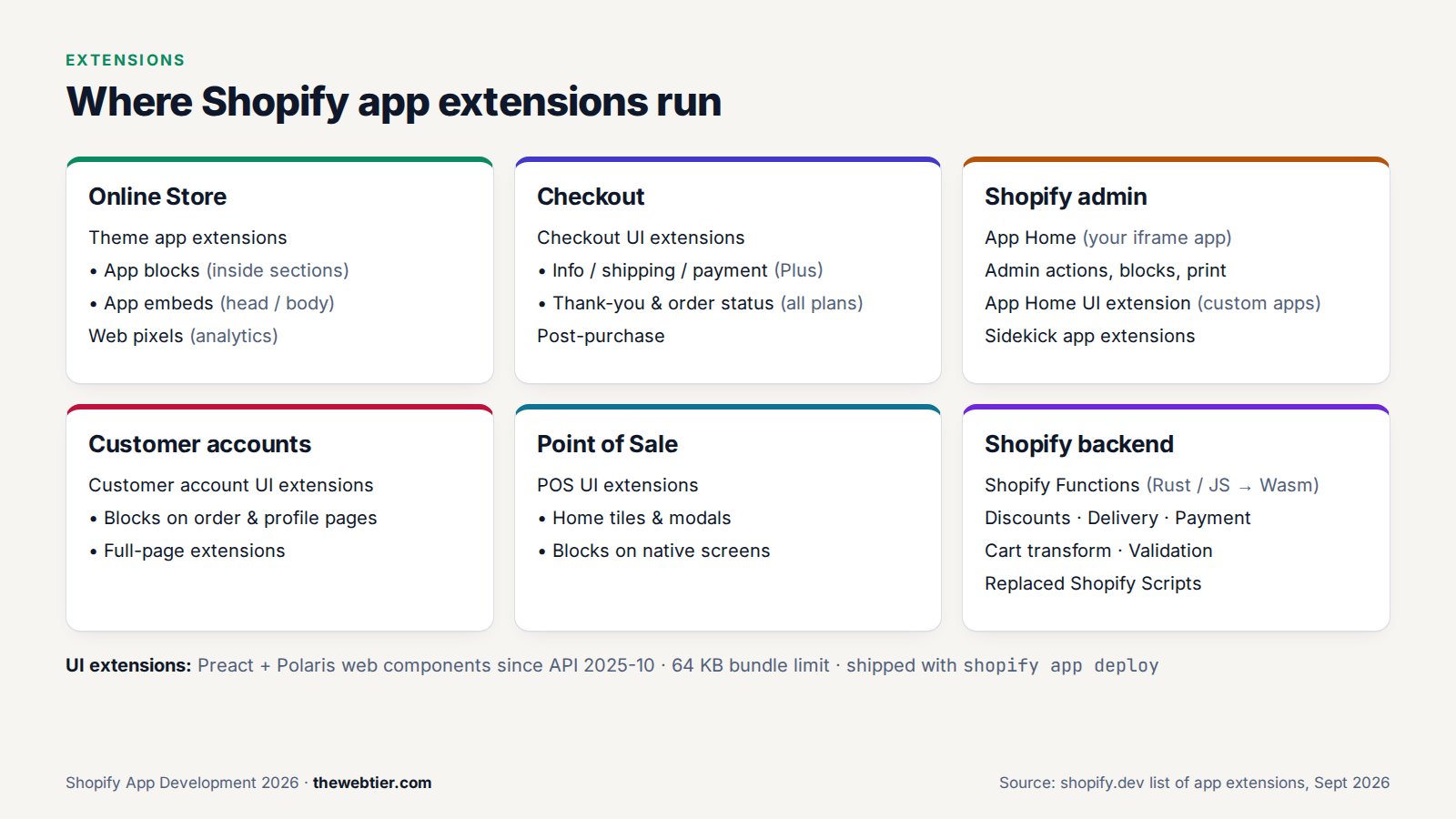
The main extension types
| Extension | Where it shows up | Built with | Notes |
|---|---|---|---|
| Theme app extension | Online Store themes (app blocks and app embeds) | Liquid, CSS, JS | Required for storefront apps on the App Store |
| Checkout UI extension | Checkout, thank-you page, order status | Preact + Polaris | Blocks on the information, shipping and payment steps need Shopify Plus |
| Customer account UI extension | New customer accounts | Preact + Polaris | Blocks and full pages |
| Admin UI extensions | Product, order and customer pages; the More actions menu; print | Preact + Polaris | Action, block, print, selection and configuration types |
| POS UI extension | Shopify POS app | Preact + Polaris | Tiles, modals, blocks |
| Shopify Functions | Shopify's backend (discounts, shipping, payments, cart, validation) | Rust or JS → WebAssembly | Replaced Shopify Scripts |
| App Home UI extension (new in 2026) | Your app's admin page, hosted by Shopify | Preact + Polaris | Custom distribution only |
| Web pixel | Storefront and checkout analytics events | JavaScript | Sandboxed tracking |
| Flow triggers and actions | Shopify Flow | Config | Automations |
Shopify keeps the full list in its list of app extensions.
Also Read: Web Development Guide
Generating an extension
Every extension starts the same way:
shopify app generate extension
Pick a type from the menu, or run it non-interactively with a template identifier:
shopify app generate extension --template theme_app_extension --name product-badge
shopify app generate extension --template admin_block --name product-badge-admin
shopify app generate extension --template checkout_ui --name free-shipping-bar
shopify app generate extension --template discount --name bulk-discount --flavor vanilla-js
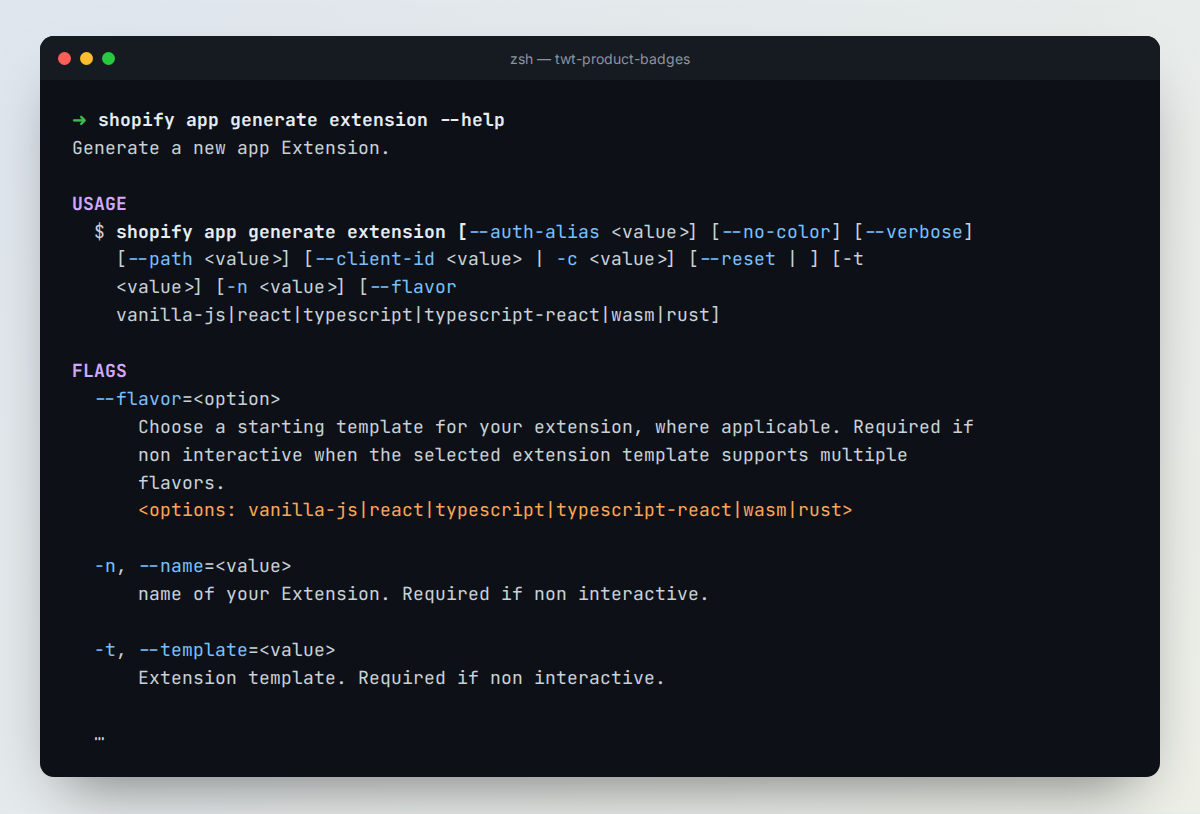 The
The --help output for app generate extension in CLI 4.8.2. The template identifiers above come from Shopify's official extensions-templates repository.
With shopify app dev running, new extensions are picked up and served to your dev store automatically.
1. Theme app extension: show the badge on the storefront
Theme app extensions are how apps add things to Online Store themes. They're required for App Store apps that touch the storefront: requirement 5.1.1 says apps must not edit theme code directly (App Store requirements). Merchants add your blocks in the theme editor and can remove them cleanly when they uninstall.
Also Read: Web Development Guide
There are two kinds:
- App blocks (
"target": "section"): render inside a section, where the merchant places them. They work with Online Store 2.0 themes. - App embed blocks (
"target": "head","body"or"compliance_head"): global scripts or floating UI like chat widgets and popups. They work with every theme.
Folder structure
extensions/product-badge/
├── assets/
│   └── badge.css
├── blocks/
│   └── badge.liquid
├── locales/
│   └── en.default.json
├── snippets/
└── shopify.extension.toml
shopify.extension.toml is just:
name = "Product badge"
type = "theme"
The app block: blocks/badge.liquid
{%- assign badge_product = block.settings.product -%}
{%- assign badge = badge_product.metafields["$app"].badge.value -%}

{%- if badge != blank -%}
 <span


 >
  {{- badge | escape -}}
 </span>
{%- endif -%}

{% schema %}
{
 "name": "Product badge",
 "target": "section",
 "enabled_on": { "templates": ["product"] },
 "stylesheet": "badge.css",
 "settings": [
  { "type": "product", "id": "product", "label": "Product", "autofill": true },
  { "type": "color", "id": "background", "label": "Background", "default": "#111111" },
  { "type": "color", "id": "text_color", "label": "Text colour", "default": "#ffffff" }
 ]
}
{% endschema %}
What's going on:
"autofill": trueon the product setting means the block picks up the current product automatically on product pages.metafields["$app"]reads from your app's reserved namespace, the same$appnamespace we wrote to withmetafieldsSetin part 4. In theme app extensions Shopify resolves$appto your app, so you never hard-code an app ID (reserved prefixes in theme app extensions)."stylesheet": "badge.css"loadsassets/badge.cssonly on pages where the block is used.| escapestops merchants from injecting HTML through the badge text.
And assets/badge.css:
.twt-badge {
  display: inline-block;
  padding: 0.25rem 0.625rem;
  border-radius: 999px;
  background: var(--twt-badge-bg, #111);
  color: var(--twt-badge-fg, #fff);
  font-size: 0.75rem;
  font-weight: 600;
  letter-spacing: 0.04em;
  text-transform: uppercase;
}
We ran this extension through shopify theme check and it came back with no offences.
Try it
With shopify app dev running, open your dev store's Online Store → Themes → Customize, go to a product template, click Add block, and pick Product badge from the Apps tab.
Theme app extension limits
- 10 MB total, and up to 30 blocks per extension
- 100 KB of Liquid across all files
- Recommended: ≤ 100 KB of CSS and ≤ 10 KB of JS (compressed) per block. Storefront speed counts in App Store review, and your app shouldn't lower Lighthouse scores by more than 10 points
- No access to
content_for_header,content_for_indexorcontent_for_layout, and theme app extensions can't render in checkout
2. Admin block: show the badge on the product page
Admin UI extensions put your app on Shopify's own admin pages, so merchants don't have to open your app. This block appears on every product detail page:
# extensions/product-badge-admin/shopify.extension.toml
api_version = "2026-07"

[[extensions]]
name = "Product badge"
handle = "product-badge-admin"
type = "ui_extension"

  [[extensions.targeting]]
  module = "./src/BlockExtension.jsx"
  target = "admin.product-details.block.render"
// extensions/product-badge-admin/src/BlockExtension.jsx
import "@shopify/ui-extensions/preact";
import { render } from "preact";
import { useEffect, useState } from "preact/hooks";

export default async () => {
  render(<Extension />, document.body);
};

function Extension() {
  // The product the merchant is looking at
  const productId = shopify.data.selected[0]?.id;
  const [badge, setBadge] = useState(null);

  useEffect(() => {
    // Admin UI extensions can call the Admin API directly
    fetch("shopify:admin/api/graphql.json", {
      method: "POST",
      body: JSON.stringify({
        query: `query Badge($id: ID!) {
          product(id: $id) {
            badge: metafield(namespace: "$app", key: "badge") { value }
          }
        }`,
        variables: { id: productId },
      }),
    })
      .then((res) => res.json())
      .then(({ data }) => setBadge(data?.product?.badge?.value ?? ""));
  }, [productId]);

  return (
    <s-admin-block heading="Product badge">
      <s-text>{badge === null ? "Loading…" : badge || "No badge set"}</s-text>
    </s-admin-block>
  );
}
Notice there's no backend call and no auth code. Inside admin extensions, fetch("shopify:admin/api/graphql.json") is authenticated automatically. APIs come from the global shopify object (shopify.data, shopify.i18n, shopify.extension), not from props. We type-checked this code against @shopify/ui-extensions 2026.7.0. The full reference is in the Admin UI extensions docs.
Also Read: Build Your First Shopify Development App with Shopify CLI (2026)
3. Checkout UI extension
Checkout UI extensions add custom UI to checkout, the thank-you page and the order status page. Here's a small free-shipping progress banner:
api_version = "2026-07"

[[extensions]]
name = "Free shipping bar"
handle = "free-shipping-bar"
type = "ui_extension"

  [[extensions.targeting]]
  module = "./src/Checkout.jsx"
  target = "purchase.checkout.block.render"
import "@shopify/ui-extensions/preact";
import { render } from "preact";

export default async () => {
  render(<Extension />, document.body);
};

function Extension() {
  const subtotal = shopify.cost.subtotalAmount.value;
  const threshold = 50;
  const remaining = threshold - Number(subtotal.amount);

  if (remaining <= 0) {
    return <s-banner tone="success">You've unlocked free shipping!</s-banner>;
  }

  return (
    <s-banner tone="info">
      Add {remaining.toFixed(2)} {subtotal.currencyCode} more for free shipping.
    </s-banner>
  );
}
Things to know before building for checkout:
- Plan limits: extensions in the information, shipping and payment steps only render on Shopify Plus stores. Thank-you and order status targets work on all plans. Use a Plus dev store for testing.
- Capabilities are opt-in:
api_access(Storefront API),network_access(externalfetch) and metafields each have to be declared inshopify.extension.toml. - It's sandboxed: no DOM access and no arbitrary scripts. You only get the components and APIs Shopify provides, which keeps checkout fast and secure.
Docs: Checkout UI extensions.
4. Shopify Functions: custom backend logic
Shopify Functions let you change how Shopify's backend behaves: how discounts are calculated, which shipping and payment methods appear, how cart lines are bundled, and what's valid at checkout. They compile to WebAssembly and run on Shopify's infrastructure in a few milliseconds.
Shopify Scripts are gone. Editing Scripts stopped on April 15, 2026, and all Scripts stopped running on June 30, 2026. If a merchant asks you to "migrate their Scripts", they need Functions (Shopify changelog).
| Function API | Use it to |
|---|---|
| Discount | Build custom product, order and shipping discounts. One unified API replaces the three older ones |
| Delivery customization | Rename, reorder or hide shipping options |
| Payment customization | Rename, reorder or hide payment methods |
| Cart transform | Bundles: expand or merge cart lines |
| Cart and checkout validation | Block checkout, for example "max 3 per customer" |
| Fulfillment constraints, order routing, pickup options | Advanced fulfilment logic |
A discount Function in JavaScript
Each Function has an input query (GraphQL that picks the data it receives) and a run function that returns operations. From the official discount template:
# src/cart_lines_discounts_generate_run.graphql
query CartInput {
  cart {
    lines {
      id
      cost {
        subtotalAmount {
          amount
        }
      }
    }
  }
  discount {
    discountClasses
  }
}
// src/cart_lines_discounts_generate_run.js (trimmed)
import { DiscountClass, OrderDiscountSelectionStrategy } from '../generated/api';

export function cartLinesDiscountsGenerateRun(input) {
  if (!input.cart.lines.length) {
    return { operations: [] };
  }

  if (!input.discount.discountClasses.includes(DiscountClass.Order)) {
    return { operations: [] };
  }

  return {
    operations: [
      {
        orderDiscountsAdd: {
          candidates: [
            {
              message: '10% OFF ORDER',
              targets: [{ orderSubtotal: { excludedCartLineIds: [] } }],
              value: { percentage: { value: 10 } },
            },
          ],
          selectionStrategy: OrderDiscountSelectionStrategy.First,
        },
      },
    ],
  };
}
The extension's TOML connects each target to its query and export:
api_version = "2026-07"

[[extensions]]
name = "t:name"
handle = "bulk-discount"
type = "function"

  [[extensions.targeting]]
  target = "cart.lines.discounts.generate.run"
  input_query = "src/cart_lines_discounts_generate_run.graphql"
  export = "cart-lines-discounts-generate-run"
Function essentials
- Languages: Rust (Shopify recommends it for performance), or JavaScript/TypeScript compiled to Wasm with Javy. Templates come in
vanilla-js,typescript,rustandwasmflavours. - Limits: 256 kB Wasm binary, 11M instructions, 128 kB input, and an input query of up to 3,000 bytes. Keep them lean.
- Local testing:
shopify app function runruns your Function against sample input.shopify app function replayreplays real executions from your dev store.shopify app function typegenregenerates types after you edit the query. - Plans: public App Store apps with Functions work on any plan. Custom apps that use Functions need Shopify Plus.
Docs: Shopify Functions.
5. Newer extension types worth knowing (2026)
- App Home UI extension (June 2026, generally available in
2026-07): build your whole admin page as a Shopify-hosted Preact extension with no server (targetadmin.app.home.render). The catch is that it only works for custom distribution, so it's great for agency tools but not for App Store apps (changelog). - Sidekick app extensions (announced in Winter '26, open to all developers since June 2026): expose your app's data and actions to Sidekick, Shopify's AI assistant.
- Customer account UI extensions: add blocks or full pages to the new customer accounts, such as loyalty points, subscriptions or returns.
- POS UI extensions: tiles and modals in Shopify POS, built with the same Preact components.
FAQ
Can my app still inject scripts into themes with ScriptTag?
No, don't. Script tags were deprecated in August 2026. From October 1, 2026 you can't create or update them, and on March 1, 2027 Shopify stops injecting them (changelog). Use a theme app extension (usually an app embed block) or a web pixel for analytics.
Also Read: How to Become a Shopify App Developer (2026 Guide) - Web Development
Why won't my checkout extension show up on the payment step?
Checkout UI extensions on the information, shipping and payment steps only render on Shopify Plus stores. Create a dev store on the Plus plan to test them.
Can I still write UI extensions in React?
Not on current API versions. 2025-07 was the last version that supported React UI extensions. From 2025-10 onwards they use Preact with Polaris web components. The JSX looks almost the same, but hooks like useApi() became the global shopify object.
Do extensions need my server to be online?
Theme app extensions, UI extensions and Functions are hosted by Shopify, so they keep working even if your server goes down. Anything that calls your backend (for example with network_access or an app proxy) still depends on your server.
Also Read: Shopify App Development in 2026: The Complete Roadmap
Next up
Our app now runs in the admin, on product pages and on the storefront. Time to charge for it. In Part 6: How to Monetise a Shopify App we'll compare Shopify App Pricing with the legacy Billing API and add a Free/Pro plan.