
The short answer
HTTP is the language browsers and servers use to request and deliver web pages. Its meaning (methods, headers, status codes) has barely changed in decades. What changed is how those messages travel.
Also Read: Why Your Database Needs Connection Pooling - How To's
Quick answer: HTTP/1.1 can only handle one request at a time per connection, so pages with dozens of files got slow. HTTP/2 (2015) fixed that by multiplexing many requests over a single TCP connection. But because TCP delivers bytes strictly in order, one lost packet still stalls every request on that connection. HTTP/3 (2022) fixes that by running over QUIC, a new transport built on UDP where each request travels in its own independent stream, and the connection and encryption setup happen in one step.
Your code barely notices the difference. The same GET /index.html means the same thing in all three versions; only the plumbing underneath changed.
The problems with HTTP/1.1
HTTP/1.1 was standardised in 1997, when a web page was mostly one HTML file and a few images. MDN's history of HTTP traces how it evolved. Today a typical page loads dozens or hundreds of files: scripts, stylesheets, fonts, images, API calls. HTTP/1.1 struggles with that in three ways.
1. One request at a time per connection. On a connection, the browser sends a request and must wait for the complete response before sending the next. A slow response blocks everything queued behind it. This is application-level head-of-line blocking. (HTTP/1.1 defined "pipelining" to send several requests at once, but responses still had to come back in order, and it was so buggy that browsers switched it off.)
2. Too many connections. To get parallelism, browsers open several connections per host, typically six. Each one costs a TCP handshake and a TLS handshake, and each starts slowly while TCP probes the network.
3. Bulky, repetitive headers. Every request resends text headers like User-Agent, Accept and Cookie, often hundreds of bytes, even when they're identical to the last request.
The hacks developers used
Front-end developers spent years working around these limits:
- Domain sharding: splitting assets across
static1.example.com,static2.example.comto trick browsers into opening more connections. - Image sprites: combining many icons into one image and showing slices with CSS.
- Concatenation: bundling all JavaScript or CSS into one giant file.
- Inlining: embedding small images and CSS directly in the HTML.
These reduced request counts but hurt caching: change one icon, and the whole sprite must be downloaded again. HTTP/2 set out to make these hacks unnecessary.
The difference at a glance
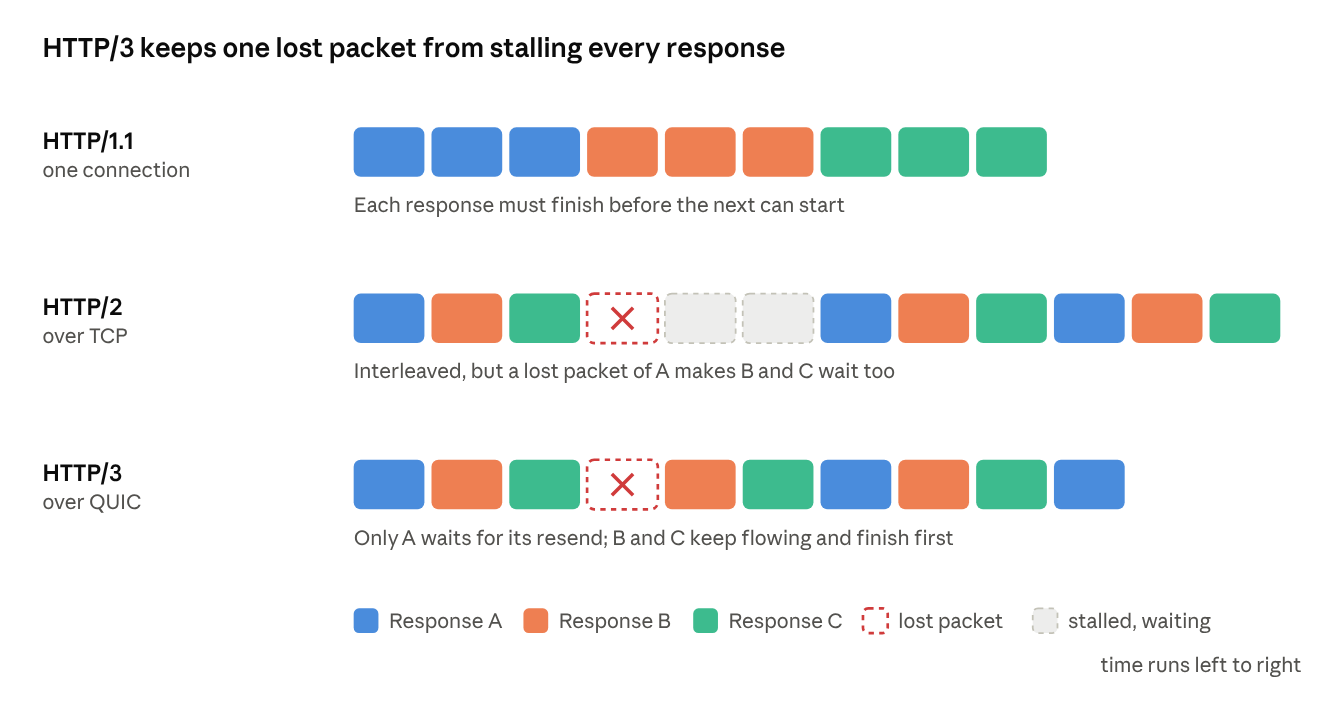
Each version tackles the bottleneck left by the one before. HTTP/2 stops responses from queuing behind each other. HTTP/3 stops a single lost packet from freezing all of them.
How HTTP/2 works
HTTP/2 grew out of Google's experimental SPDY protocol and was standardised in 2015 (the current spec is RFC 9113). It keeps HTTP's meaning but changes the wire format completely.
- Binary framing. Messages are split into small binary frames instead of plain text lines. Frames are faster and less error-prone to parse.
- Streams and multiplexing. Each request/response pair gets a numbered stream. Frames from many streams interleave on a single connection, so a slow response no longer blocks the others. One connection per site replaces six.
- Header compression (HPACK). Both sides keep a table of headers already sent. Repeated headers like
Cookieshrink to a few bytes. - Prioritisation. The browser can hint which resources matter most, like CSS before images.
- Server push. Servers could send resources before being asked. In practice it rarely helped and was hard to get right, so major browsers have dropped support.
103 Early Hintsis the lighter replacement.
In browsers, HTTP/2 is only used over HTTPS. Browser and server agree on it during the TLS handshake through an extension called ALPN, so there's no extra round trip.
With HTTP/2, domain sharding and sprites stopped paying off. Many small, individually cacheable files became fine again.
The problem HTTP/2 couldn't fix
HTTP/2 moved head-of-line blocking down a layer instead of removing it. All those streams still share one TCP connection, and TCP promises to deliver bytes in exact order. If a single packet is lost, TCP holds back every byte behind it, from every stream, until the missing packet is retransmitted.
Also Read: Database Sharding Explained: Scaling Past One Machine
On a clean wired connection that's rare. On mobile networks and busy Wi-Fi, where packet loss is common, HTTP/2 can perform worse than HTTP/1.1 with six connections, because one loss freezes everything instead of one-sixth of it. Fixing that meant replacing TCP itself. The TCP vs UDP article explains why TCP has this behaviour.
How HTTP/3 and QUIC work
Changing TCP is nearly impossible: it lives in operating system kernels and in countless routers and firewalls. So the designers built a new transport, QUIC (RFC 9000), on top of UDP, which every network already passes. HTTP/3 (RFC 9114) is HTTP mapped onto QUIC. Cloudflare's HTTP/3 explainer covers it well.
QUIC brings four big improvements:
- Independent streams. QUIC handles reliability per stream. A lost packet only delays the stream it belongs to; the rest keep flowing. This finally removes transport-level head-of-line blocking.
- Faster setup. QUIC has TLS 1.3 built in, so the connection and encryption handshakes happen together in one round trip, instead of TCP's round trip plus TLS's. Returning visitors can use 0-RTT and send a request immediately.
- Connection migration. A TCP connection is tied to your IP address and port. When your phone switches from Wi-Fi to mobile data, it breaks. QUIC identifies connections by a connection ID, so it survives a network change.
- Always encrypted. Almost all of QUIC's metadata is encrypted, not just the payload. That improves privacy and stops middleboxes from depending on details that would block future upgrades.
Header compression was redesigned as QPACK, because HPACK assumed in-order delivery.
Discovery: how the browser knows to use HTTP/3
A browser can't assume a server speaks QUIC, so the first visit usually uses HTTP/2 over TCP. The server advertises HTTP/3 with an Alt-Svc response header (or a DNS HTTPS record), and the browser switches for later requests. Many sites get HTTP/3 simply by sitting behind a CDN that supports it.
HTTP/1.1 vs HTTP/2 vs HTTP/3
| HTTP/1.1 | HTTP/2 | HTTP/3 | |
|---|---|---|---|
| Standardised | 1997 | 2015 | 2022 |
| Transport | TCP | TCP | QUIC over UDP |
| Format | Text | Binary frames | Binary frames |
| Requests per connection | One at a time | Many, multiplexed | Many, independent streams |
| Head-of-line blocking | Application and TCP | TCP only | None at transport level |
| Header compression | None | HPACK | QPACK |
| Encryption | Optional | Required in browsers | Always, built in |
| New connection setup | TCP + TLS (2 round trips with TLS 1.3) | TCP + TLS (2 round trips) | 1 round trip, or 0-RTT on resumption |
| Survives network change | No | No | Yes |
How to check which version a site uses
- Chrome or Edge DevTools: open the Network tab, right-click a column header, and enable Protocol. You'll see
http/1.1,h2orh3. - Command line:
curl -I --http2 https://example.comshows the version in the first line; builds of curl with HTTP/3 support accept--http3.
HTTP/3 also affects infrastructure. Load balancers and firewalls must handle QUIC over UDP port 443, and connection IDs let them route packets correctly even after a client's address changes.
Frequently asked questions
Is HTTP/3 always faster than HTTP/2?
Not always. The biggest gains show up on high-latency or lossy networks, like mobile data and crowded Wi-Fi, and on first connections. On a fast, clean wired link the difference can be small.
Do I need to change my code to use HTTP/2 or HTTP/3?
Usually not. Methods, headers and status codes are the same. You enable newer versions on your web server, load balancer or CDN. The main code-level change is that old HTTP/1.1 hacks, like domain sharding, can be removed.
Why does HTTP/3 use UDP if UDP is unreliable?
QUIC adds its own reliability on top of UDP. UDP is just the envelope that gets packets through existing networks. Building on it avoided waiting decades for every router and operating system to support a brand-new transport.
Does HTTP/2 require HTTPS?
The standard allows unencrypted HTTP/2, but browsers only use it over HTTPS. HTTP/3 is always encrypted.
Can WebSockets run over HTTP/2 and HTTP/3?
Yes. Extensions let WebSocket connections run as streams inside HTTP/2 and HTTP/3 connections, though support varies across servers. Most WebSockets still start as an HTTP/1.1 upgrade. See how WebSockets work.
What if a network blocks UDP?
Browsers fall back to HTTP/2 over TCP automatically, so the site still works.
Conclusion
HTTP/2 and HTTP/3 exist because the web outgrew a protocol designed for single-document pages. HTTP/2 stopped requests queuing behind each other. HTTP/3 stopped lost packets freezing whole connections, and trimmed a round trip from every new connection. Together they're a big part of why modern pages load quickly even on phones, and why the old front-end tricks are no longer needed. To see where these fit in the full request lifecycle, read what happens when you type a URL and press Enter.
Related articles
- What happens when you type a URL and press Enter
- How DNS turns "google.com" into an IP address
- TCP vs UDP: why the internet needs both
- How HTTPS keeps your data safe (TLS handshake explained)
- How CDNs make websites load faster worldwide
- What is a load balancer?
- How WebSockets enable real-time apps
- Why IPv4 ran out and how NAT kept the internet alive
- How email travels from your outbox to someone's inbox
Sources and further reading
- Evolution of HTTP (MDN)
- What is HTTP/3? (Cloudflare Learning Center)
- RFC 9113: HTTP/2
- RFC 9114: HTTP/3
- RFC 9000: QUIC
