
The short answer
Over plain HTTP, everything you send (passwords, card numbers, messages) crosses the internet as readable text. Any router, Wi-Fi hotspot or ISP along the way could read or change it. HTTPS is HTTP sent through an encrypted tunnel built by TLS (Transport Layer Security).
Quick answer: When you open an HTTPS site, your browser and the server run a TLS handshake. They agree on encryption settings, the server proves its identity with a certificate signed by a trusted certificate authority (CA), and both sides derive the same secret session keys without ever sending them. Everything afterwards is encrypted with those keys. In TLS 1.3, this takes a single round trip.
HTTPS gives you three guarantees:
| Guarantee | Protects against | How |
|---|---|---|
| Confidentiality | Eavesdroppers reading your data | Symmetric encryption with session keys |
| Integrity | Attackers changing data in transit | Authenticated encryption detects any tampering |
| Authentication | Impostors pretending to be the site | Certificates signed by trusted CAs |
You'll still hear the name SSL. SSL was TLS's predecessor and is long obsolete, but "SSL certificate" stuck as a name.
The building blocks
Two kinds of encryption
TLS combines two kinds of cryptography, because each is good at a different job.
Symmetric encryption uses one shared key to both lock and unlock data. Algorithms like AES and ChaCha20 are extremely fast, so they encrypt all the actual page data. The catch: both sides need the same key, and you can't just send it over the wire, because an eavesdropper would copy it.
Asymmetric (public-key) encryption uses a key pair. The public key can be shared with the world; only the matching private key can undo or sign with it. It's much slower, so TLS uses it only during the handshake. Cloudflare's guide to public key cryptography explains the maths intuitively.
TLS 1.3 uses an ephemeral Diffie-Hellman key exchange (usually elliptic-curve, ECDHE). Each side generates a temporary key pair and sends only the public half. Through some clever maths, both sides compute the same shared secret, while an eavesdropper who sees both public halves cannot. The temporary keys are thrown away after the session, which gives forward secrecy: even if the server's long-term private key leaks years later, recorded traffic stays unreadable.
Certificates and certificate authorities
Key exchange alone isn't enough. You could be doing a perfect key exchange with an attacker sitting in the middle. The server needs to prove it really is yourbank.com.
That's the job of a certificate. It contains the domain name, the server's public key, an expiry date, and a signature from a certificate authority. Your browser and operating system ship with a list of trusted root CAs. The check works as a chain:
- The server's certificate is signed by an intermediate CA.
- The intermediate's certificate is signed by a root CA.
- The root is in your device's trust store, so the chain is trusted.
CAs must verify that whoever requests a certificate actually controls the domain. Let's Encrypt made this free and automatic with the ACME protocol: your server proves control by placing a file on the site or a DNS record, and certificates renew themselves. Issued certificates are also published in public Certificate Transparency logs, so mis-issued certificates can be spotted.
The TLS 1.3 handshake, step by step
The handshake happens right after the TCP connection opens, as the fourth stage of what happens when you type a URL. Here is the full exchange in TLS 1.3, defined in RFC 8446:
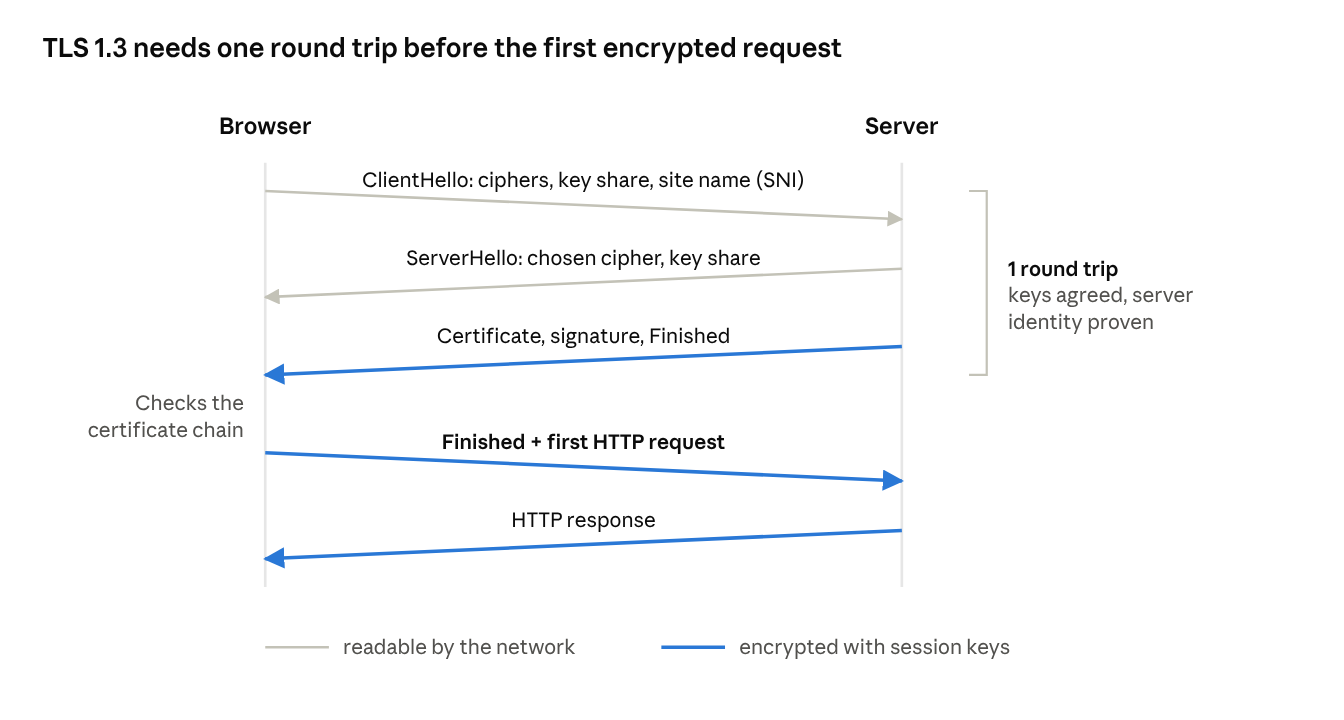
- ClientHello. The browser sends the TLS versions and cipher suites it supports, a random value, and its half of the key exchange (a key share). It also names the site it wants through SNI (Server Name Indication), because one IP address can host thousands of sites.
- ServerHello. The server picks a cipher suite and sends its own key share. At this point both sides can compute the same shared secret, so everything after this message is encrypted.
- Certificate, CertificateVerify, Finished. The server sends its certificate chain, a signature over the handshake so far (proving it holds the private key), and a Finished message that checks nothing was tampered with.
- The browser verifies. Is the certificate for this exact domain? Is it unexpired and not revoked? Does the chain lead to a trusted root? Is the signature valid? If any check fails, you get a full-page warning.
- Finished, plus the first request. The browser sends its own Finished message and can send the HTTP request in the same flight.
From here on, all data is protected with fast symmetric encryption (typically AES-GCM or ChaCha20-Poly1305), which both encrypts and authenticates each record.
Why TLS 1.3 is faster than TLS 1.2
TLS 1.2 needed two round trips before data could flow. TLS 1.3 cut that to one by having the browser guess the key exchange method and send its key share up front. It also removed old, weak options like RSA key exchange and outdated ciphers. Cloudflare's handshake explainer compares both versions.
For repeat visits, TLS 1.3 supports session resumption, and even 0-RTT mode, where the browser sends its request in the very first message using a key from the previous session. 0-RTT data can be replayed by an attacker, so servers only accept it for safe, repeatable requests.
HTTP/3 goes further by merging the transport and TLS handshakes into one inside QUIC.
What HTTPS does not hide or guarantee
HTTPS is essential, but it's easy to overestimate. Here's what it leaves exposed:
- The site you're visiting. Your IP address and the server's IP are visible to the network. The domain name usually is too: DNS lookups are plain text unless you use DNS over HTTPS, and the SNI field in the ClientHello names the site. A newer extension, Encrypted Client Hello (ECH), hides SNI where both sides support it.
- Traffic patterns. Timing and the size of responses can still leak hints about what you're doing.
- Whether the site is honest. The padlock means "your connection to this domain is private," not "this domain is trustworthy." Phishing sites get certificates too.
- What happens after decryption. A CDN or load balancer often terminates TLS, decrypts traffic, and forwards it inside the provider's network. The server can also store your data insecurely. HTTPS only protects data in transit.
Common HTTPS mistakes on your own site
- Mixed content. An HTTPS page that loads scripts or images over HTTP weakens the whole page, and browsers block much of it.
- No redirect or HSTS. Serve a
301redirect from HTTP to HTTPS, then send aStrict-Transport-Securityheader so browsers never try HTTP again. - Expired certificates. Automate renewal with an ACME client instead of calendar reminders.
- Old protocol versions. Disable TLS 1.0 and 1.1; offer TLS 1.2 and 1.3.
Frequently asked questions
What is the difference between HTTP and HTTPS?
HTTPS is HTTP carried inside a TLS-encrypted connection, usually on port 443 instead of 80. The requests and responses are the same; only the transport is protected.
Is SSL the same as TLS?
TLS is the successor to SSL. All SSL versions are deprecated and insecure. People still say "SSL certificate," but modern sites use TLS 1.2 and 1.3.
Does HTTPS make a website slower?
Barely. TLS 1.3 adds one round trip to a new connection, and encryption itself is cheap on modern hardware. HTTPS also unlocks HTTP/2 and HTTP/3 in browsers, which often makes sites faster overall.
What happens when a certificate expires?
Browsers show a full-page security warning and many users leave. On sites with HSTS, users can't click through at all. Automated renewal prevents this.
Can HTTPS traffic be intercepted?
Not without a certificate the browser trusts for that domain. Some corporate networks install their own root certificate on company devices so they can inspect traffic. On a personal device, a certificate warning is a sign something is wrong.
What is forward secrecy?
A property where session keys come from temporary key pairs that are discarded afterwards. Even if the server's private key is stolen later, previously recorded sessions can't be decrypted. TLS 1.3 always provides it.
Conclusion
HTTPS combines two kinds of cryptography: slow public-key maths to agree on secrets and prove identity, then fast symmetric encryption for everything else. Certificates and CAs answer the hardest question, "am I really talking to this site?", and TLS 1.3 does all of it in a single round trip. It's the reason you can type a password into a café Wi-Fi network without handing it to strangers.
Related articles
- What happens when you type a URL and press Enter
- How DNS turns "google.com" into an IP address
- TCP vs UDP: why the internet needs both
- Why HTTP/2 and HTTP/3 exist
- How CDNs make websites load faster worldwide
- What is a load balancer?
- How WebSockets enable real-time apps
- Why IPv4 ran out and how NAT kept the internet alive
- How email travels from your outbox to someone's inbox
Sources and further reading
- RFC 8446: TLS 1.3
- What happens in a TLS handshake? (Cloudflare Learning Center)
- How does public key encryption work? (Cloudflare Learning Center)
- How it works (Let's Encrypt)
- Strict-Transport-Security header (MDN)
