
The short answer
Quick answer: A WebSocket is a long-lived, two-way connection between a browser and a server. It starts life as an ordinary HTTP request asking to upgrade. The server agrees with a 101 Switching Protocols response, and from then on the same TCP connection carries small messages in both directions, whenever either side wants, with no new requests. That's what lets chat messages, live scores, stock prices and multiplayer moves appear instantly.
MDN's WebSocket API guide sums up the benefit: two-way messaging without polling the server for replies.
Why plain HTTP struggles with real-time data
HTTP is a request-response protocol. The client asks, the server answers, and that's it. The server can't speak first. As the URL-to-page walkthrough shows, everything starts with the browser sending a request.
That's perfect for loading pages, and awkward for anything live. If a new chat message arrives on the server, how does it reach your browser? Before WebSockets, developers had three workarounds:
- Short polling. Ask "anything new?" every few seconds. Simple, but wasteful: most answers are "no," and updates arrive up to one interval late.
- Long polling. Ask "anything new?" and have the server hold the request open until there is. Faster, but every message still needs a fresh request with full HTTP headers.
- Server-Sent Events (SSE). One long HTTP response that the server keeps writing events into. Great for one-way updates, but the browser still needs separate requests to send anything back. MDN documents it under server-sent events.
WebSockets, standardised in RFC 6455 in 2011, gave the web a proper two-way channel.
Polling vs WebSockets at a glance
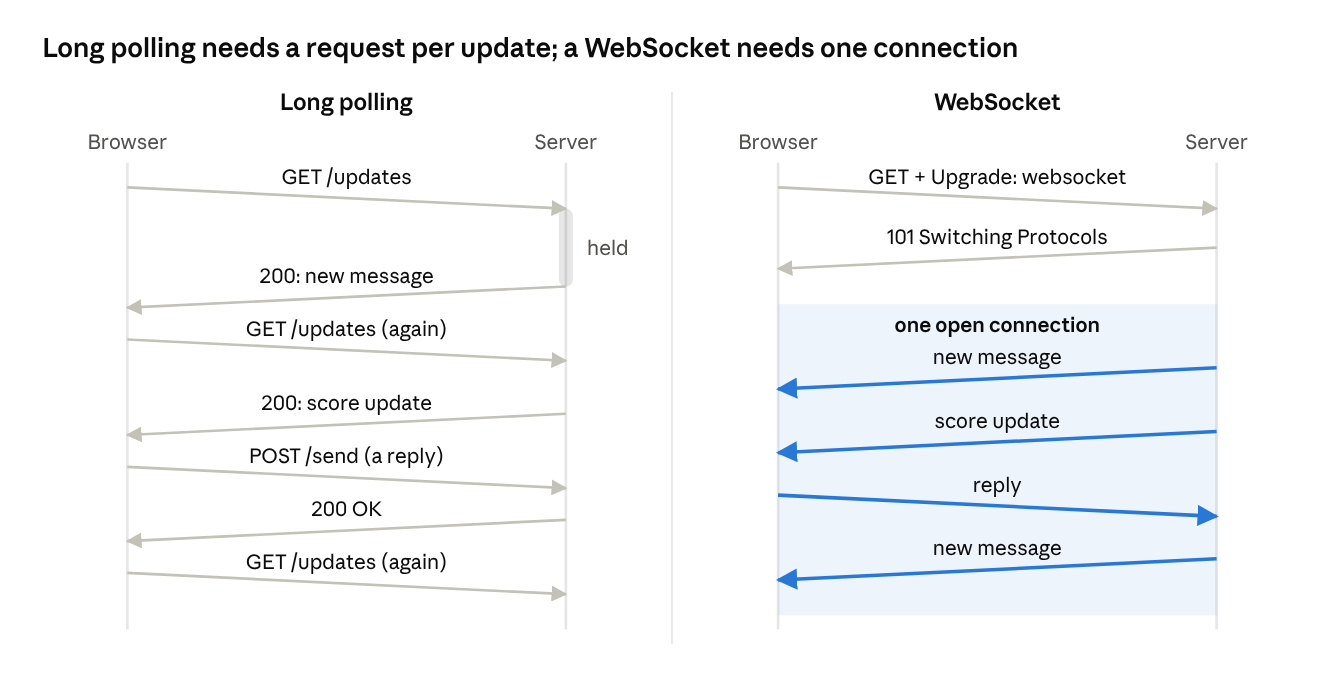
With long polling, every update and every reply costs a full HTTP request with headers. With a WebSocket, you pay for one handshake, then each message is a tiny frame that either side can send at any moment.
How WebSockets work
Step 1: the upgrade handshake
A WebSocket begins as a normal HTTP/1.1 request, which is why it passes through existing proxies, firewalls and load balancers. The browser asks to switch protocols:
GET /chat HTTP/1.1
Host: example.com
Upgrade: websocket
Connection: Upgrade
Sec-WebSocket-Key: dGhlIHNhbXBsZSBub25jZQ==
Sec-WebSocket-Version: 13
Origin: https://example.com
If the server supports WebSockets, it replies:
HTTP/1.1 101 Switching Protocols
Upgrade: websocket
Connection: Upgrade
Sec-WebSocket-Accept: s3pPLMBiTxaQ9kYGzzhZRbK+xOo=
The Sec-WebSocket-Accept value is derived from the client's random key by appending a fixed string and hashing it. It proves the server genuinely understood the WebSocket request rather than being a confused cache replaying an old response. (It is not a security feature; authentication is up to you.)
After the 101, HTTP is done. The underlying connection stays open, and both sides switch to the WebSocket protocol. On secure pages the URL uses wss://, which runs the whole thing inside TLS, exactly like HTTPS.
Step 2: frames
Data now flows as frames, each with a header of just a few bytes instead of hundreds for HTTP. Frame types include:
- Text and binary frames for your messages. Large messages can be split across several frames.
- Ping and pong frames, used as heartbeats to check the connection is still alive.
- Close frames, which end the connection cleanly with a status code.
Frames sent from the browser are masked with a random key. That protects old network proxies from being tricked into caching attacker-controlled data.
A minimal example
In the browser, the built-in WebSocket API is all you need:
const socket = new WebSocket("wss://example.com/chat");

socket.addEventListener("open", () => {
  socket.send(JSON.stringify({ type: "join", room: "general" }));
});

socket.addEventListener("message", (event) => {
  const msg = JSON.parse(event.data);
  console.log("New message:", msg);
});

socket.addEventListener("close", (event) => {
  console.log("Closed with code", event.code);
  // Reconnect here, with a backoff delay
});
On the server, a Node.js example using the popular ws package:
import { WebSocketServer } from "ws";

const wss = new WebSocketServer({ port: 8080 });

wss.on("connection", (ws) => {
  ws.on("message", (data) => {
    // Broadcast to every connected client
    for (const client of wss.clients) {
      if (client.readyState === client.OPEN) client.send(data.toString());
    }
  });
});
That's a working chat server in about ten lines. The hard part is running it for thousands of users.
WebSockets vs polling vs SSE
| Short polling | Long polling | Server-Sent Events | WebSockets | |
|---|---|---|---|---|
| Direction | Client asks | Client asks, server waits | Server to client only | Both ways |
| Latency | Up to one poll interval | Low | Low | Lowest |
| Overhead per message | Full HTTP request | Full HTTP request | Small event in a stream | Tiny frame |
| Protocol | Plain HTTP | Plain HTTP | Plain HTTP, auto-reconnect built in | Upgrade to WebSocket |
| Binary data | Yes | Yes | Text only | Yes |
| Best for | Rare, non-urgent checks | Legacy fallbacks | Feeds, notifications, AI token streaming | Chat, collaboration, games, trading |
If data only flows from server to browser, SSE is often the simpler choice: it's plain HTTP, reconnects automatically, and works well over HTTP/2 and HTTP/3. Choose WebSockets when the client sends frequent messages too.
WebSockets run over TCP, so a lost packet delays everything behind it. For fast-paced games or media, the newer WebTransport API, which MDN notes may replace WebSockets for many uses, runs over QUIC and supports unreliable, unordered delivery. See TCP vs UDP for why that matters.
Running WebSockets in production
WebSockets are stateful: each client holds an open connection to one specific server for minutes or hours. That changes how you scale.
- Many open connections. Each server holds thousands of idle sockets. Use an event-driven server (Node.js, Go, Elixir, or async frameworks) and raise operating system file-descriptor limits.
- Load balancing. Your load balancer must support the upgrade and long timeouts. Least-connections balancing spreads long-lived sockets better than round robin.
- Fan-out across servers. User A is connected to server 1 and user B to server 2. To deliver A's message to B, servers share messages through a pub/sub layer such as Redis, NATS or Kafka.
- Heartbeats. Proxies and mobile networks silently drop idle connections. Send pings every 20 to 30 seconds and close sockets that stop answering.
- Reconnection. Connections will drop. Clients should reconnect with exponential backoff and jitter so a server restart doesn't cause a stampede, then resync any missed messages.
- Deploys. Restarting a server disconnects all its clients. Drain gracefully: stop accepting new sockets, then close old ones gradually.
Security checklist
- Always use
wss://in production. - Check the
Originheader during the handshake. Browsers send cookies with WebSocket requests, so without an origin check, a malicious site could open a socket as your logged-in user (cross-site WebSocket hijacking). - Authenticate during or right after the handshake, and re-check permissions for sensitive actions.
- Validate and size-limit every incoming message, just like an HTTP request body.
- Rate-limit messages per connection.
Some CDNs can proxy WebSockets at the edge, giving you TLS termination and DDoS protection for real-time traffic too.
Frequently asked questions
Are WebSockets the same as HTTP?
No. A WebSocket starts with an HTTP request, then switches to a different protocol on the same connection. After the 101 Switching Protocols response, no more HTTP is spoken on it.
Do WebSockets use TCP or UDP?
TCP. That makes delivery reliable and ordered, but a lost packet delays later messages. WebTransport, built on QUIC over UDP, is the newer option for use cases that need unreliable or unordered delivery.
When should I use Server-Sent Events instead?
When updates only flow from server to client, such as notifications, live feeds or streaming AI responses. SSE is plain HTTP, reconnects automatically, and is simpler to scale.
How many WebSocket connections can a server handle?
It depends on memory, message volume and the server framework, but a well-tuned event-driven server can hold a very large number of mostly idle connections. Message fan-out and CPU per message usually become the limit before raw connection count.
Why does my WebSocket keep disconnecting?
Common causes are proxy or load balancer idle timeouts, mobile networks dropping idle connections, and server deploys. Send regular pings, raise idle timeouts, and build automatic reconnection into the client.
Is socket.io the same as WebSockets?
Socket.IO is a library that uses WebSockets when possible and adds features on top, like rooms, acknowledgements and fallbacks. A plain WebSocket client can't talk to a Socket.IO server without its own protocol.
Conclusion
WebSockets solve a simple problem with a simple trick: borrow an HTTP connection, upgrade it, and keep it open so either side can talk at any time. The protocol is easy; running it at scale is where the work is, from pub/sub fan-out to heartbeats and reconnection. When you need true two-way, low-latency messaging in the browser, it's still the default choice.
Related articles
- What happens when you type a URL and press Enter
- How DNS turns "google.com" into an IP address
- TCP vs UDP: why the internet needs both
- How HTTPS keeps your data safe (TLS handshake explained)
- Why HTTP/2 and HTTP/3 exist
- How CDNs make websites load faster worldwide
- What is a load balancer?
- Why IPv4 ran out and how NAT kept the internet alive
- How email travels from your outbox to someone's inbox
Sources and further reading
