
The short answer
Computers find each other by IP address, but people remember names. The Domain Name System (DNS) translates one into the other.
Quick answer: When you visit google.com, your device asks a recursive resolver for its IP address. If the resolver hasn't cached the answer, it asks a root server which servers handle .com, then asks a .com TLD server which servers handle google.com, then asks Google's authoritative name server for the actual address. The resolver caches the answer and returns it to your device, which can then connect.
That whole chain usually finishes in milliseconds, and most of the time it's skipped entirely because some cache along the way already knows the answer. DNS is the first network step in what happens when you type a URL and press Enter.
Why DNS exists
In the early ARPANET, every computer kept a single file, HOSTS.TXT, that mapped names to addresses. One central office maintained it, and everyone downloaded fresh copies. That worked for a few hundred machines. It did not scale to millions.
In 1983, Paul Mockapetris designed DNS to replace it. The key idea was delegation: no single server knows every name. Instead, responsibility is split into a tree:
- The root knows who runs each top-level domain (
.com,.org,.uk). - Each TLD knows who runs each domain under it (
google.com,bbc.co.uk). - Each domain owner runs (or rents) servers that know its own records.
The core design, published in RFC 1034 and RFC 1035 in 1987, still runs the internet today. Your hosts file even survives: your operating system checks it before asking DNS.
The four servers in every lookup
| Server | What it knows | Who runs it |
|---|---|---|
| Recursive resolver | Nothing permanently; it does the legwork and caches answers | Your ISP, your company, or a public service like 1.1.1.1 or 8.8.8.8 |
| Root name server | Where to find each TLD's servers | 12 organisations operating 13 named root authorities, A through M |
| TLD name server | Where to find each domain's authoritative servers | The registry for that TLD (for example, Verisign for .com) |
| Authoritative name server | The actual records for a domain | The domain owner, or their DNS host |
Thirteen root authorities doesn't mean thirteen machines. Each one is served by many copies around the world sharing the same IP address through anycast routing, so your query reaches a nearby instance. The IANA root servers list shows who operates each one.
A DNS lookup, step by step
Here is what happens on a cache miss, when nobody along the way has the answer yet:
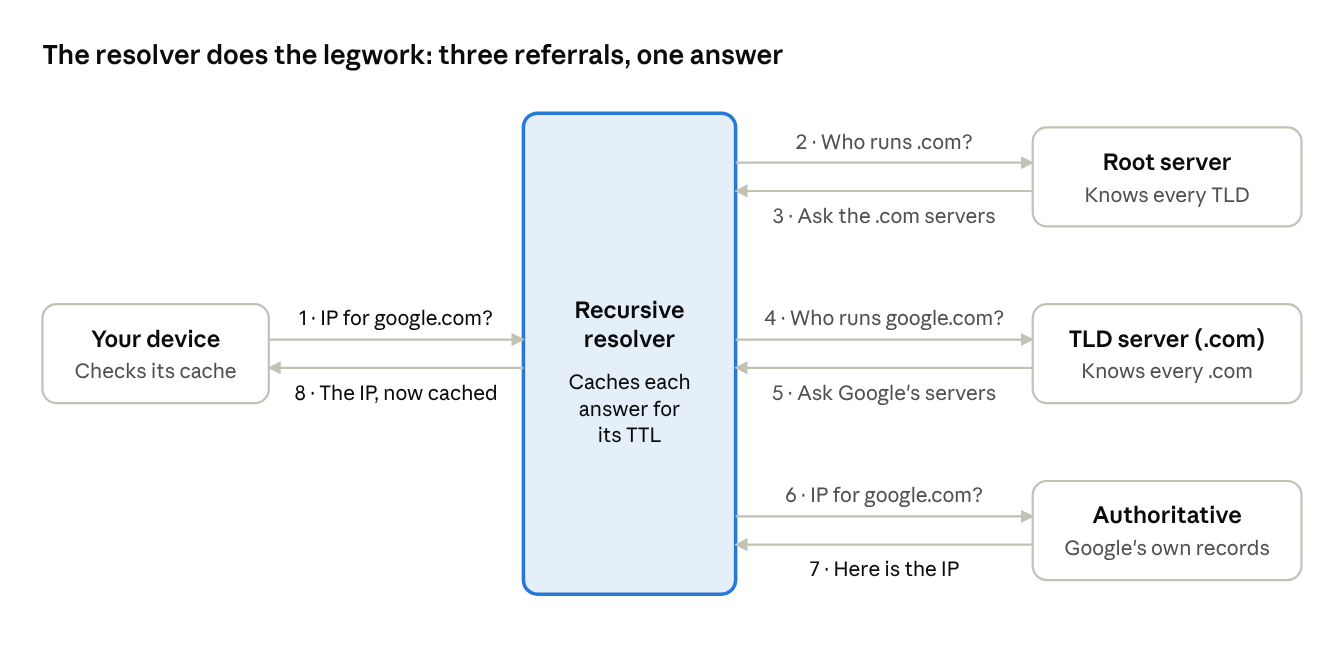
- Your device checks locally. The browser cache, then the operating system cache and
hostsfile. No luck, so it sends a query to its configured resolver. - The resolver asks a root server. The root doesn't know Google's IP, but it knows which servers run
.com, so it returns a referral. - The resolver asks a
.comTLD server. Again a referral: "google.comis handled byns1.google.comand friends." - The resolver asks Google's authoritative server. This server owns the answer and returns the A record (IPv4) or AAAA record (IPv6).
- The resolver caches and replies. Your device gets the IP and can open a connection.
Your device asks one question and gets one answer. The resolver does all the chasing; that's what makes it recursive. The servers it talks to just point it along, which is called iterative resolution. Cloudflare's explainer on recursive DNS covers the difference in more depth.
DNS queries normally travel over UDP port 53, because a question and answer fit in one small packet each and there's no need for TCP's connection setup. Large responses fall back to TCP. If that trade-off is new to you, see TCP vs UDP.
DNS record types you should know
An authoritative server stores records, each with a type. Cloudflare keeps a full reference of DNS record types; these are the ones you'll meet most:
| Record | What it holds | Example use |
|---|---|---|
| A | An IPv4 address | example.com → 203.0.113.10 |
| AAAA | An IPv6 address | example.com → 2001:db8::10 |
| CNAME | An alias to another name | www.example.com → example.com |
| MX | The mail servers for a domain, with priorities | Where to deliver [email protected] |
| TXT | Free-form text | Domain verification, SPF and DMARC email policies |
| NS | The authoritative name servers for a zone | Delegating a domain to your DNS host |
| SOA | Admin details for a zone | Serial number, refresh timers |
| CAA | Which certificate authorities may issue certificates | Blocking rogue HTTPS certificates |
MX and TXT records are the backbone of email delivery and anti-spoofing; see how email works for the full story.
Caching and TTL: why DNS is fast
A full lookup might take four network round trips. It rarely does, because every answer comes with a TTL (time to live) in seconds, telling caches how long they may reuse it.
- A TTL of
300means "cache this for five minutes." - A TTL of
86400means "cache this for a day."
Caches exist at every layer: the browser, the operating system, your router, and the resolver shared by thousands of users. The root and TLD referrals are cached too, so resolvers almost never need to ask a root server.
This explains a classic frustration: DNS propagation. When you change a record, the old answer lives on in caches until its TTL runs out. The fix is to lower the TTL a day or so before a planned change, then raise it again afterwards.
DNS is also used for traffic engineering. CDNs and global load balancers can return different IPs depending on where the resolver is, steering users to a nearby server.
DNS security and privacy
Classic DNS was designed for a friendlier internet. Queries and answers travel in plain text with no proof of who sent them. That opens three problems.
1. Spoofing and cache poisoning. An attacker who can forge a response might trick a resolver into caching a fake IP address. Every user of that resolver is then sent to the attacker's server. A famous 2008 attack technique showed how practical this was, and resolvers now randomise ports and query IDs to make forgery much harder.
2. No authenticity. DNSSEC fixes this by adding cryptographic signatures to records, chained from the root down. A validating resolver can prove an answer really came from the domain's owner. Adoption varies widely by TLD.
3. No privacy. Anyone on the network path can see which names you look up. Two standards encrypt the query itself:
- DNS over TLS (DoT), RFC 7858, uses a dedicated port (853).
- DNS over HTTPS (DoH), RFC 8484, hides DNS inside ordinary HTTPS traffic on port 443. Most major browsers can use it.
Both rely on the same TLS encryption that protects websites. For how that works, read how HTTPS works.
Try it yourself
You can watch DNS in action from any terminal.
# Ask your resolver for google.com's IPv4 address
dig google.com A +short

# Watch the full chain from root to authoritative server
dig google.com +trace

# See where a domain's email goes
dig example.com MX +short

# Ask a specific public resolver instead of your default
dig @1.1.1.1 google.com
On Windows, nslookup google.com does the basic lookup. In dig's full output, the number before IN A is the remaining TTL. Run the same query twice and watch it count down: that's the cache at work.
Frequently asked questions
What is the difference between a DNS resolver and a DNS server?
"DNS server" is a loose term for any of them. A resolver answers questions on behalf of clients by asking other servers. An authoritative server holds the real records for a domain and answers only for that domain.
Why does changing DNS records take time to "propagate"?
Nothing is actively propagating. Resolvers around the world keep serving the cached old answer until its TTL expires. Lower the TTL before making changes to shorten that window.
Does changing my DNS resolver make the internet faster?
Sometimes a little. A faster or closer resolver can shave time off uncached lookups, and some public resolvers add privacy or malware filtering. It won't speed up the download itself once the connection is open.
Is DNS TCP or UDP?
Both. Ordinary queries use UDP port 53 for speed. Large responses and zone transfers use TCP. Encrypted DNS runs over TLS (DoT) or HTTPS (DoH).
How many root servers are there?
There are 13 named root server authorities, labelled A to M and operated by 12 organisations. Each is served by many machines worldwide using anycast, so there are far more than 13 physical servers.
What happens if DNS goes down?
If a domain's authoritative servers fail, cached answers keep working until their TTLs expire, then lookups fail and the site becomes unreachable by name even if its servers are fine. That's why large sites use several DNS providers.
Conclusion
DNS is a distributed, cached, delegated phone book. The root points to TLDs, TLDs point to domains, and authoritative servers hold the answers, while recursive resolvers do the chasing and caches at every layer keep it fast. When a site is "down" but its servers are fine, DNS is often the first place to look.
Related articles
- What happens when you type a URL and press Enter
- TCP vs UDP: why the internet needs both
- How HTTPS keeps your data safe (TLS handshake explained)
- Why HTTP/2 and HTTP/3 exist
- How CDNs make websites load faster worldwide
- What is a load balancer?
- How WebSockets enable real-time apps
- Why IPv4 ran out and how NAT kept the internet alive
- How email travels from your outbox to someone's inbox
Sources and further reading
- What is DNS? (Cloudflare Learning Center)
- What is recursive DNS? (Cloudflare Learning Center)
- DNS records (Cloudflare Learning Center)
- Root name servers (IANA)
- RFC 1034: Domain names, concepts and facilities
- RFC 1035: Domain names, implementation and specification
- RFC 7858: DNS over TLS
- RFC 8484: DNS over HTTPS
