
The short answer
Quick answer: A content delivery network (CDN) is a network of servers spread across many cities. Each edge server keeps copies (a cache) of a website's files. When you request a page, you're routed to the nearest edge. If it has a fresh copy, it answers immediately. If not, it fetches the file once from the site's main origin server, returns it to you, and keeps a copy for the next visitor nearby.
Cloudflare's Learning Center sums it up as a geographically distributed group of servers that cache content close to users.
The problem: distance is slow
Data can't travel faster than light, and in fibre it moves at roughly two-thirds of light speed. A request from London to a server in Sydney covers about 17,000 km each way, so every round trip costs at least around 170 ms before any work is done.
That matters more than it sounds, because loading a page takes many round trips. DNS, the TCP handshake, the TLS handshake, then the request itself, and then more requests for CSS, scripts and images. Multiply 170 ms by all of those and a distant server feels sluggish no matter how fast it is.
There's a second problem: load. If every visitor in the world hits one origin, a traffic spike or an attack can take it down. A CDN absorbs most requests before they ever reach the origin.
How a CDN works
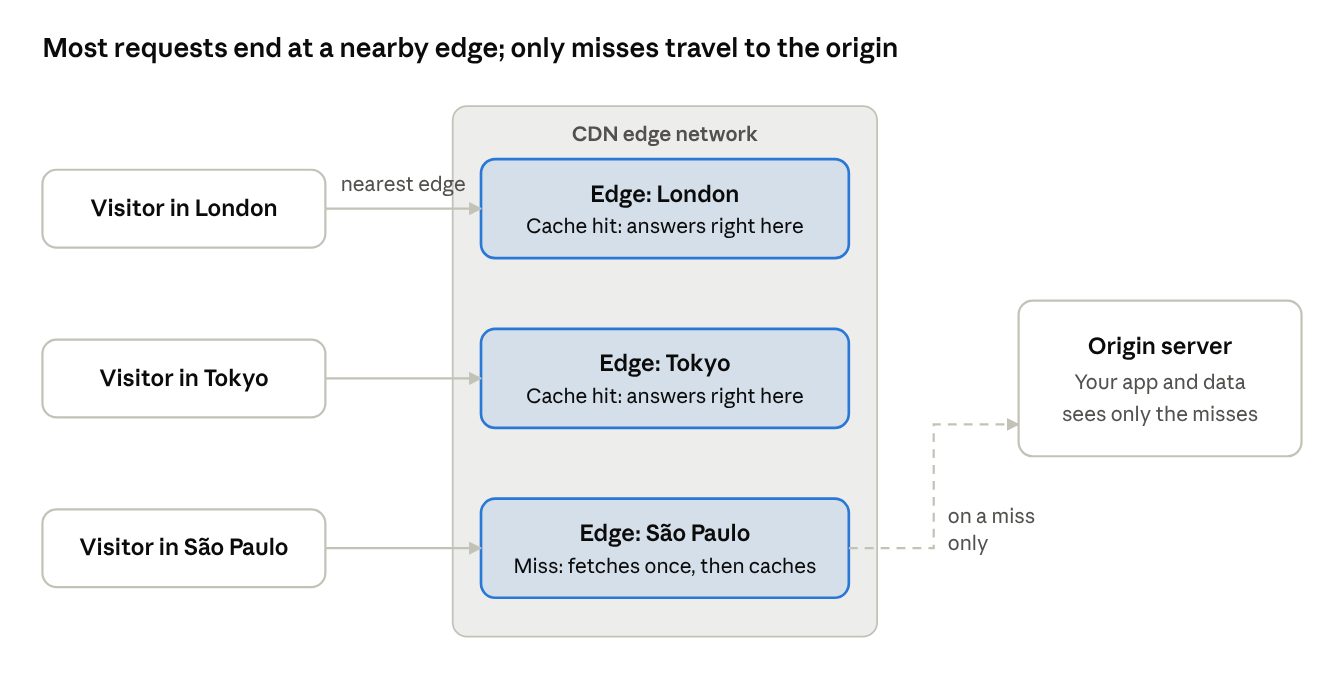
A CDN has three moving parts: routing users to a nearby edge, caching content there, and fetching from the origin when the cache can't help.
1. Routing you to the nearest edge
When you look up www.example.com, the site's DNS usually points to the CDN rather than the origin. CDNs then steer you to a nearby point of presence (PoP) in one of two ways:
- DNS-based routing. The CDN's DNS server looks at where your resolver is and returns the IP of a nearby edge.
- Anycast. Many edges around the world announce the same IP address. Internet routing naturally delivers your packets to the closest one. Cloudflare explains how anycast works, including how it spreads out attack traffic.
Either way, the DNS lookup is where the CDN first takes over.
2. Cache hit: the fast path
The edge checks whether it has a fresh copy of the requested URL. If yes, that's a cache hit: it replies straight away, often within a few milliseconds of you. The origin never hears about the request.
3. Cache miss: fetch once, serve many
If the edge has no copy, or its copy has expired, that's a cache miss. The edge fetches the file from the origin, sends it to you, and stores it. The next visitor in that region gets a hit.
Many CDNs add a middle layer called tiered caching or an origin shield: edges ask a regional cache first, so a popular file is fetched from the origin once per region instead of once per edge.
The key health metric is the cache hit ratio: the share of requests answered from cache. A high ratio means fast pages and a quiet origin.
Controlling what gets cached
A CDN can only be as smart as the instructions you give it. The main lever is the Cache-Control response header, covered in depth by MDN's HTTP caching guide.
| Header | Meaning | Good for |
|---|---|---|
Cache-Control: public, max-age=31536000, immutable | Anyone may cache it for a year and it will never change | Versioned assets like app.3f9a1c.js |
Cache-Control: public, max-age=300 | Cache for 5 minutes | Home pages, listings, news |
Cache-Control: s-maxage=600, max-age=0 | CDNs cache 10 minutes; browsers always revalidate | HTML you want to update quickly |
Cache-Control: private, no-store | Never cache in shared caches | Account pages, anything personalised |
Three more concepts matter in practice:
- Cache keys. The CDN decides whether two requests are "the same" using a cache key, usually the URL. If query strings, cookies or headers vary without changing the response, strip them from the key or your hit ratio collapses.
- Versioned file names. Put a content hash in asset names (
style.8d2e1f.css). Then you can cache them forever, and a new deploy simply references new URLs. - Purging. When content must change before it expires, CDNs let you purge (invalidate) a URL, a tag or everything. Purging by tag is the cleanest way to update, say, every page that shows a product.
The classic mistake is caching something personal. If a response contains one user's data and lacks private, a CDN can serve it to the next visitor. Treat caching headers on logged-in pages as security settings, not just performance ones.
What CDNs do beyond caching
Modern CDNs are less "file cache" and more "programmable front door" for a site:
- TLS termination. The edge completes the TLS handshake close to the user, so the expensive round trips are short. The edge then reuses warm connections to the origin.
- Modern protocols. Many CDNs offer HTTP/2 and HTTP/3 to visitors even when the origin only speaks HTTP/1.1.
- Compression and optimisation. Brotli compression, automatic image resizing and format conversion (like WebP or AVIF).
- Security. DDoS absorption across the whole network, a web application firewall (WAF), bot filtering and rate limiting.
- Load balancing and failover. Spreading requests across several origins and routing around unhealthy ones. See what a load balancer does.
- Edge compute. Running small functions at the edge to handle redirects, A/B tests, authentication checks or even whole API responses.
When do you need a CDN?
You probably want one if:
- Your visitors are spread across countries or continents.
- Your pages include lots of static assets: images, video, scripts, fonts.
- You expect traffic spikes, launches or attacks.
- You want free or cheap TLS, HTTP/3 and DDoS protection without running it yourself.
You might skip it for an internal tool used from one office, or an API whose responses are all personalised and uncacheable. Even then, a CDN's security and TLS features can still be worth it.
Where CDNs fit in the bigger picture: they sit in step 5 of what happens when you type a URL, between the browser and everything else.
Frequently asked questions
Is a CDN the same as web hosting?
No. Hosting stores the original site and runs its code. A CDN sits in front and caches and delivers copies. You still need an origin.
Can a CDN cache dynamic pages?
Often, for short periods. A news home page can be cached for 30 seconds and still feel live. Truly personal pages (like a shopping basket) shouldn't be cached in shared caches, though edge compute can assemble them close to the user.
Why do I still see old content after deploying?
The old version is still cached, either at the CDN or in your browser. Purge the URL at the CDN, and use versioned file names so new deploys never collide with old caches.
Does a CDN help SEO?
Indirectly. Faster pages improve user experience and Core Web Vitals, which search engines consider. A CDN also keeps your site up during traffic spikes, which matters when crawlers visit.
What is a PoP?
A point of presence: a CDN data centre in a particular city. Large CDNs run hundreds of them.
Conclusion
A CDN beats the speed of light by cheating: instead of making the trip shorter, it moves the content closer. Routing sends each visitor to a nearby edge, caching lets that edge answer most requests itself, and the origin only handles what's genuinely new. Get your Cache-Control headers right and a CDN makes your site faster, cheaper to run and much harder to knock over.
Related articles
- What happens when you type a URL and press Enter
- How DNS turns "google.com" into an IP address
- TCP vs UDP: why the internet needs both
- How HTTPS keeps your data safe (TLS handshake explained)
- Why HTTP/2 and HTTP/3 exist
- What is a load balancer?
- How WebSockets enable real-time apps
- Why IPv4 ran out and how NAT kept the internet alive
- How email travels from your outbox to someone's inbox
Sources and further reading
- What is a CDN? (Cloudflare Learning Center)
- What is anycast? (Cloudflare Learning Center)
- HTTP caching (MDN)
- RFC 9111: HTTP Caching
