
The short answer
Email is one of the oldest internet services, and it still works much like it did in the early 1980s: a chain of servers passing a message along, like a postal system.
Quick answer: When you hit Send, your mail app hands the message to your provider's outgoing server using SMTP. That server looks up the recipient's domain in DNS to find its MX record, which names the server that accepts mail for that domain. It connects and relays the message over SMTP. The receiving server checks the message is genuine using SPF, DKIM and DMARC, scores it for spam, and stores it in the recipient's mailbox. The recipient's app then fetches it using IMAP.
Unlike loading a web page, where your browser talks almost directly to one site (see what happens when you type a URL), email is store-and-forward: each server takes full responsibility for the message before passing it on. That's why email still arrives even if the recipient's server was briefly offline.
The cast of characters
| Part | What it does | Examples |
|---|---|---|
| Mail client (MUA) | The app you read and write in | Gmail web app, Outlook, Apple Mail, Thunderbird |
| Submission server (MSA) | Accepts outgoing mail from logged-in users | Your provider's smtp. server |
| Transfer agent (MTA) | Relays mail between domains | Postfix, Exim, or a big provider's in-house servers |
| Delivery agent (MDA) | Filters and stores mail into mailboxes | Spam filters, Sieve rules, the mailbox store |
| DNS (MX, TXT records) | Says where a domain's mail goes, and who may send for it | MX 10 mx1.example.org |
And the protocols that connect them:
| Protocol | Job | Usual port |
|---|---|---|
| SMTP (RFC 5321) | Sending and relaying mail | 587 for submission, 25 between servers, 465 for submission over implicit TLS |
| IMAP (RFC 9051) | Reading mail that stays on the server, synced across devices | 993 (with TLS) |
| POP3 | Downloading mail to one device, usually deleting it from the server | 995 (with TLS) |
All of these run over TCP, because a message must arrive complete.
An email's journey, step by step
Let's follow a message from [email protected] to [email protected].
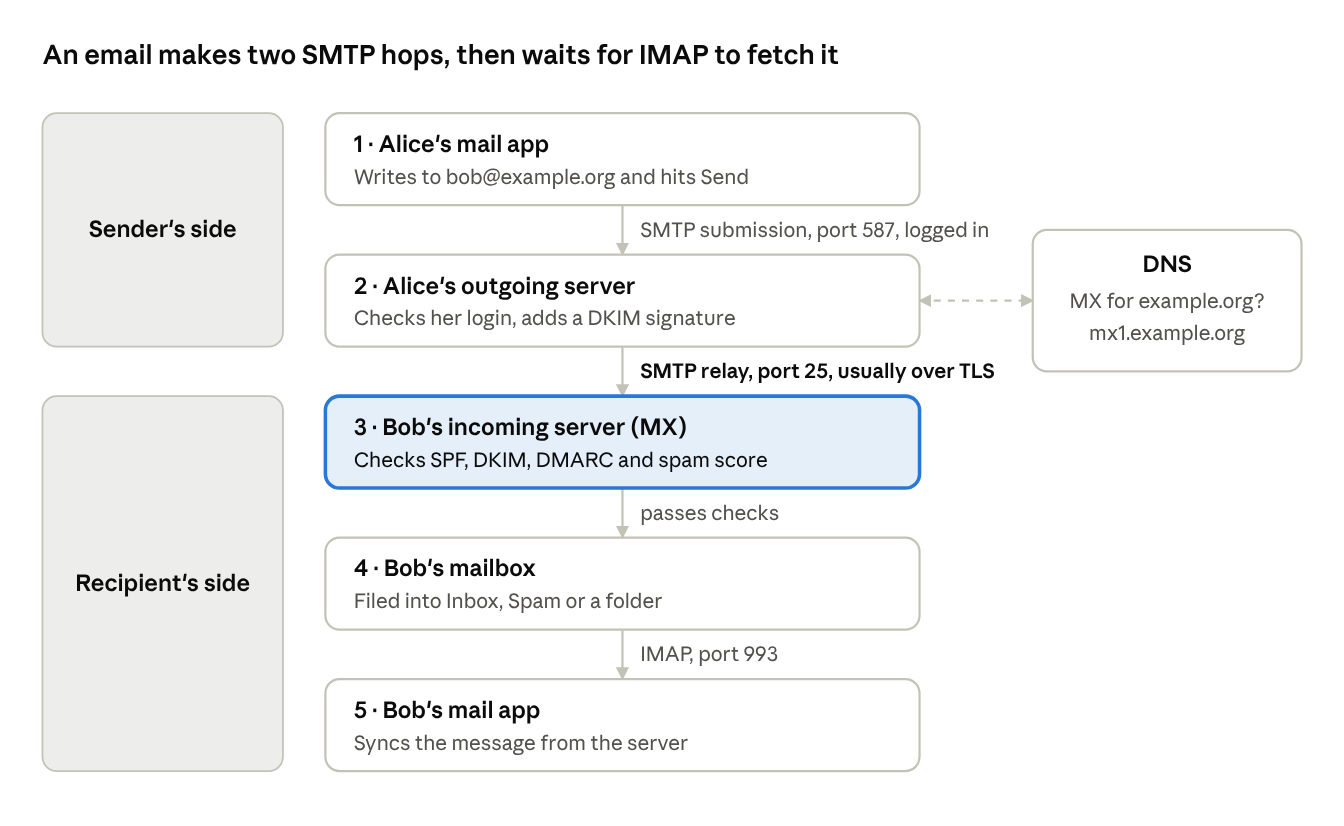
- Alice's app submits the message. It connects to her provider's submission server, usually on port 587, upgrades to an encrypted connection, and logs in. Requiring a login stops strangers from using the server to send spam.
- The outgoing server finds Bob's server. It asks DNS for the MX records of
example.org. Each MX record names a mail server and a priority number; lower numbers are tried first, and the others act as backups. Cloudflare's MX record guide explains the priority system. - Server-to-server relay. Alice's server connects to Bob's MX server on port 25 and hands over the message with SMTP. Most servers upgrade this connection to TLS with a command called STARTTLS. If Bob's server is unreachable, Alice's server keeps the message in a queue and retries for days before giving up with a bounce.
- Bob's server checks and stores it. It verifies the sender's SPF, DKIM and DMARC (next section), runs spam and malware filters, applies Bob's rules, and saves the message in his mailbox.
- Bob reads it. His app uses IMAP to sync with the server, so the same message shows up, read or unread, on his phone and laptop.
What the SMTP conversation looks like
SMTP is a readable text protocol. A simplified relay between two servers looks like this (S: is Bob's server, C: is Alice's):
S: 220 mx1.example.org ESMTP ready
C: EHLO mail.example.com
S: 250-mx1.example.org
S: 250 STARTTLS
C: STARTTLS
   ... connection is now encrypted ...
C: MAIL FROM:<[email protected]>
S: 250 OK
C: RCPT TO:<[email protected]>
S: 250 OK
C: DATA
S: 354 End data with <CR><LF>.<CR><LF>
C: From: Alice <[email protected]>
C: To: Bob <[email protected]>
C: Subject: Lunch?
C:
C: Are you free tomorrow?
C: .
S: 250 OK: queued
C: QUIT
Notice there are two "from" addresses. MAIL FROM is the envelope sender, used for bounces. The From: header inside the message is what your app displays. Nothing in basic SMTP stops those from being different, or from being fake. That's the problem the next section solves.
Proving who sent it: SPF, DKIM and DMARC
SMTP was designed for a small, trusting network. Anyone can connect to a mail server and claim to be [email protected]. Three standards, all published as DNS TXT records, fix that.
| Standard | Question it answers | How |
|---|---|---|
| SPF | Is this server allowed to send for this domain? | The domain lists its approved sending servers in DNS |
| DKIM | Was this message really signed by the domain, and unchanged? | The sender signs the message; the receiver checks with a public key from DNS |
| DMARC | Does the visible From: domain match what SPF or DKIM verified, and what should happen if not? | A published policy: do nothing, quarantine, or reject |
SPF (Sender Policy Framework)
Defined in RFC 7208, SPF is a TXT record listing who may send mail for a domain:
example.com. TXT "v=spf1 include:_spf.mailprovider.com ip4:203.0.113.25 -all"
This says: "Our mail provider's servers and 203.0.113.25 may send for us; reject everything else (-all)." The receiving server compares the connecting server's IP with this list. SPF checks the envelope sender, not the From: header you see, and it breaks when mail is forwarded.
DKIM (DomainKeys Identified Mail)
Defined in RFC 6376, DKIM adds a cryptographic signature to each message's headers. The public key lives in DNS under a selector:
s1._domainkey.example.com. TXT "v=DKIM1; k=rsa; p=MIIBIjANBgkqh..."
The receiver fetches that key and verifies the signature. If anyone altered the signed headers or body in transit, the check fails. Unlike SPF, a DKIM signature survives simple forwarding. It's the same public-key idea that underpins HTTPS.
DMARC
DMARC ties the two together and closes their loophole. It requires alignment: the domain in the visible From: header must match the domain that passed SPF or DKIM. It also tells receivers what to do with failures:
_dmarc.example.com. TXT "v=DMARC1; p=quarantine; rua=mailto:[email protected]"
p=none: deliver as normal, but send me reports (use this while setting up).p=quarantine: send failures to spam.p=reject: refuse failures outright.
The rua address receives daily aggregate reports showing who is sending mail using your domain. Cloudflare's DMARC explainer makes an important point: even domains that never send email should publish a reject policy so spammers can't use them.
Why emails land in spam
Passing authentication proves who sent a message, not that anyone wants it. Receiving servers weigh many signals:
- Missing or failing authentication. No SPF, DKIM or DMARC is now a red flag on its own.
- Sender reputation. The history of your sending IP address and domain. A brand-new domain, or an IP shared with spammers, starts at a disadvantage. Shared addresses are common in the IPv4 world; see how NAT works.
- Recipient engagement. Messages people open and reply to help; messages people delete unread or mark as spam hurt.
- Content and format. Misleading subject lines, broken HTML, link shorteners and attachments from unknown senders all raise the score.
- Infrastructure basics. A mail server IP with no reverse DNS (PTR record), or one listed on public blocklists.
Sender requirements from big providers
The largest mailbox providers now enforce these rules. Google's email sender guidelines, in force since February 2024, require every sender to Gmail to:
- Set up SPF or DKIM for the sending domain.
- Have valid forward and reverse DNS for sending IPs.
- Use TLS when transmitting email.
- Keep spam complaint rates below 0.3%.
Senders of more than 5,000 messages a day to Gmail must also use both SPF and DKIM, publish a DMARC policy, align the From: domain, and offer one-click unsubscribe in marketing mail.
A quick deliverability checklist
- Publish SPF, DKIM and DMARC for every domain you send from.
- Start DMARC at
p=none, read the reports, then move toquarantineorreject. - Send marketing and transactional mail from separate subdomains so one can't damage the other.
- Only email people who opted in, and make unsubscribing easy.
- Warm up new domains and IPs slowly rather than sending thousands of messages on day one.
Frequently asked questions
What is the difference between IMAP and POP3?
IMAP keeps mail on the server and syncs folders and read status across all your devices. POP3 downloads mail to one device and usually deletes it from the server. Almost everyone uses IMAP (or a provider's own sync protocol) today.
Why does email sometimes take minutes to arrive?
Usually because a server along the way is queuing it: the receiving server may be busy, deliberately delaying unknown senders ("greylisting"), or scanning attachments. The sending server retries automatically.
Is email encrypted?
In transit between most major providers, yes, using TLS. But the message is stored readable on each provider's servers. For end-to-end encryption, where only the recipient can read it, you need tools like S/MIME or PGP.
What is an MX record?
A DNS record that says which mail servers accept email for a domain, each with a priority. Without one, other servers don't know where to deliver your mail.
Do I need SPF, DKIM and DMARC for a small business domain?
Yes. Major providers increasingly reject or junk mail without them, and DMARC stops scammers from impersonating your domain to your own customers.
What happens when an email bounces?
If delivery fails permanently (no such user, domain doesn't exist) or keeps failing for days, the sending server returns a bounce message to the envelope sender explaining why.
Conclusion
Every email makes a short relay race: SMTP to your provider, a DNS lookup to find the recipient's MX server, SMTP again between servers, then IMAP to the recipient's app. The original protocols trusted everyone, so modern email layers on TLS for privacy in transit and SPF, DKIM and DMARC to prove who really sent a message. Get those DNS records right and your mail is both safer and far more likely to reach the inbox.
Related articles
This wraps up the "How the Internet Actually Works" series:
- What happens when you type a URL and press Enter
- How DNS turns "google.com" into an IP address
- TCP vs UDP: why the internet needs both
- How HTTPS keeps your data safe (TLS handshake explained)
- Why HTTP/2 and HTTP/3 exist
- How CDNs make websites load faster worldwide
- What is a load balancer?
- How WebSockets enable real-time apps
- Why IPv4 ran out and how NAT kept the internet alive
Sources and further reading
- RFC 5321: Simple Mail Transfer Protocol
- RFC 9051: IMAP4rev2
- RFC 7208: Sender Policy Framework
- RFC 6376: DomainKeys Identified Mail
- What is a DNS MX record? (Cloudflare Learning Center)
- What is a DNS DMARC record? (Cloudflare Learning Center)
- Email sender guidelines (Gmail Help)
