
The short answer
Quick answer: A load balancer sits in front of a group of servers and spreads incoming requests across them. Clients connect to one address, the load balancer's, and never need to know how many servers are behind it. It picks a server for each request or connection using an algorithm (such as round robin or least connections), constantly runs health checks, and stops sending traffic to any server that fails.
Cloudflare describes load balancing as distributing traffic among multiple servers to improve performance and reliability. That's the whole job, but doing it well involves some interesting decisions.
Why you need one
A single server has two hard limits: it can only handle so much traffic, and when it goes down, your site goes down with it. A load balancer fixes both.
- Scale out. Instead of buying one enormous server, you run many ordinary ones and add more as traffic grows. This is horizontal scaling.
- High availability. If one server crashes, the others keep serving. Users never notice.
- Zero-downtime deploys. Take servers out of rotation one at a time, update them, and put them back.
- One front door. TLS certificates, security rules, logging and rate limits can all be handled in one place.
In a typical large website, a request passes through a CDN first, and on a cache miss reaches a load balancer, which picks an application server. That's step 5 of what happens when you type a URL.
How a load balancer handles failure
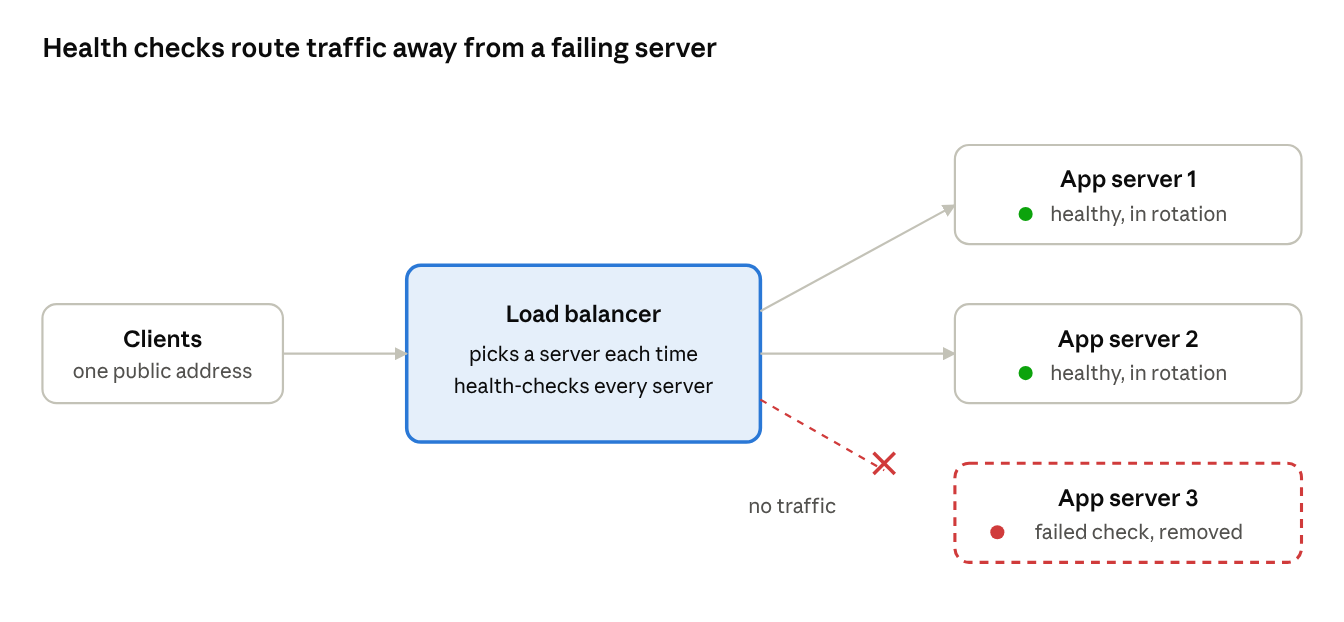
The feature that matters most isn't clever routing; it's noticing when a server is broken. Load balancers do this with health checks:
- Active checks. Every few seconds, the load balancer sends a probe to each server, such as
GET /healthz, and expects a quick200 OK. After a set number of failures in a row, the server is marked unhealthy and removed from rotation. After enough successes, it's added back. - Passive checks. The load balancer also watches real traffic. If a server starts timing out or returning
5xxerrors, it can be taken out without waiting for the next probe.
A good health endpoint checks what the server needs to do its job (can it reach its database?), but stays cheap and fast. A health check that's too strict can take every server out at once when a shared dependency blips; one that's too loose keeps a broken server in rotation.
When servers come back, some load balancers use slow start, ramping traffic up gradually so a freshly restarted server with cold caches isn't flooded. The NGINX load balancing guide shows how health checks, slow start and failover are configured in practice.
How a load balancer decides where traffic goes
Load balancing algorithms
Algorithms fall into two families. Static ones follow a fixed plan; dynamic ones react to how busy each server is right now.
| Algorithm | How it picks | Best when | Watch out for |
|---|---|---|---|
| Round robin | Next server in the list, in turn | Servers are identical and requests are similar | A few slow requests can pile up on one server |
| Weighted round robin | In turn, but bigger servers get more turns | Servers have different capacities | Weights need maintaining |
| Least connections | The server with the fewest open connections | Requests vary a lot in duration, or connections are long-lived | Assumes connections are a good proxy for load |
| Least response time | Fastest recent responses and fewest connections | Latency matters most | Needs good measurements |
| IP hash | A hash of the client's IP picks the server | A client should keep hitting the same server | Uneven if many users share one IP |
| Consistent hashing | A hash of a key (like user ID or URL) on a ring | Caches and sharded data, where moving keys is costly | More complex to set up |
| Random / power of two choices | Pick two servers at random, use the less busy | Many load balancers share one pool | Needs a load signal |
NGINX, for example, offers round robin (its default), least connections, IP hash and generic hash in its open-source version, as its load balancing docs list.
Layer 4 vs Layer 7
Load balancers differ in how much of the traffic they read.
| Layer 4 (transport) | Layer 7 (application) | |
|---|---|---|
| Sees | IP addresses and ports (TCP or UDP) | Full HTTP requests: URL, headers, cookies |
| Routes by | Connection | Request |
| Can do | Very fast forwarding of any protocol | Route /api and /images to different servers, rewrite headers, retry failed requests, terminate TLS |
| Cost | Low overhead | More CPU, must decrypt traffic |
| Examples | Network load balancers, IPVS | NGINX, HAProxy, Envoy, application load balancers |
Most web apps use Layer 7 for its flexibility. Layer 4 is common for raw throughput, non-HTTP protocols, and as a first tier in front of Layer 7 balancers.
A Layer 7 load balancer usually does TLS termination: it completes the TLS handshake and decrypts traffic so it can read the request, then forwards it to servers over a private network (often re-encrypted).
Sticky sessions
If a server keeps a user's login session in its own memory, sending that user's next request elsewhere logs them out. Sticky sessions (session affinity) fix this by pinning a user to one server, usually with a cookie set by the load balancer.
It works, but it fights against load balancing: sticky users stay on a struggling server and are disrupted when it fails. The better long-term design is stateless servers that keep session data in a shared store like Redis or a database, so any server can handle any request.
Long-lived connections complicate this too. A WebSocket connection stays on one server for its whole life, so least-connections balancing and graceful draining matter a lot for real-time apps.
Where load balancers live
Load balancing happens at several layers, often all at once:
- DNS / global load balancing. DNS returns different IP addresses depending on the user's region or data centre health. This spreads traffic across continents.
- CDN and edge. A CDN can balance between multiple origins and fail over between them.
- Regional load balancer. Inside a data centre or cloud region, a Layer 4 or Layer 7 load balancer spreads traffic across app servers.
- Inside the cluster. Service meshes and Kubernetes services balance calls between microservices.
They come in three forms: hardware appliances (older, on-premises), software you run yourself (NGINX, HAProxy, Envoy), and managed cloud services where the provider scales and patches it for you.
Isn't the load balancer a single point of failure?
It would be, so production setups remove that risk:
- Run load balancers in pairs or groups, with a floating IP that moves to a standby if the active one fails.
- Put several load balancers behind DNS or anycast, so the address itself is served from many machines.
- Use a managed service, which runs redundantly across availability zones by design.
Newer protocols bring new wrinkles. HTTP/3 runs over UDP, so load balancers must route QUIC packets by connection ID rather than by IP and port, because a client's address can change mid-connection.
Frequently asked questions
What is the difference between a load balancer and a reverse proxy?
A reverse proxy sits in front of servers and forwards requests to them. A load balancer is a reverse proxy whose main job is spreading traffic across several servers. Tools like NGINX and HAProxy do both.
Which load balancing algorithm should I use?
Start with round robin if your servers are identical and requests are short. Switch to least connections if request times vary widely or connections are long-lived, like WebSockets. Use consistent hashing when the same key should keep hitting the same server, as with caches.
What is the difference between Layer 4 and Layer 7 load balancing?
Layer 4 routes whole connections using IP addresses and ports, without reading the content. Layer 7 reads each HTTP request and can route by URL, header or cookie.
Do I need a load balancer with only one server?
Not for spreading load, but it can still be useful for TLS termination, zero-downtime deploys, and adding a second server later without changing DNS.
What is a health check endpoint?
A small URL, like /healthz, that returns 200 OK when the server can do its job. The load balancer polls it to decide whether the server stays in rotation.
Conclusion
A load balancer turns a fragile single server into a resilient pool. It gives clients one stable address, spreads work with an algorithm suited to your traffic, and, most importantly, notices failures and routes around them before users do. Pair it with stateless app servers and you can scale out, deploy and survive crashes without anyone noticing.
Related articles
- What happens when you type a URL and press Enter
- How DNS turns "google.com" into an IP address
- TCP vs UDP: why the internet needs both
- How HTTPS keeps your data safe (TLS handshake explained)
- Why HTTP/2 and HTTP/3 exist
- How CDNs make websites load faster worldwide
- How WebSockets enable real-time apps
- Why IPv4 ran out and how NAT kept the internet alive
- How email travels from your outbox to someone's inbox
Sources and further reading
- What is load balancing? (Cloudflare Learning Center)
- HTTP load balancing (NGINX documentation)
